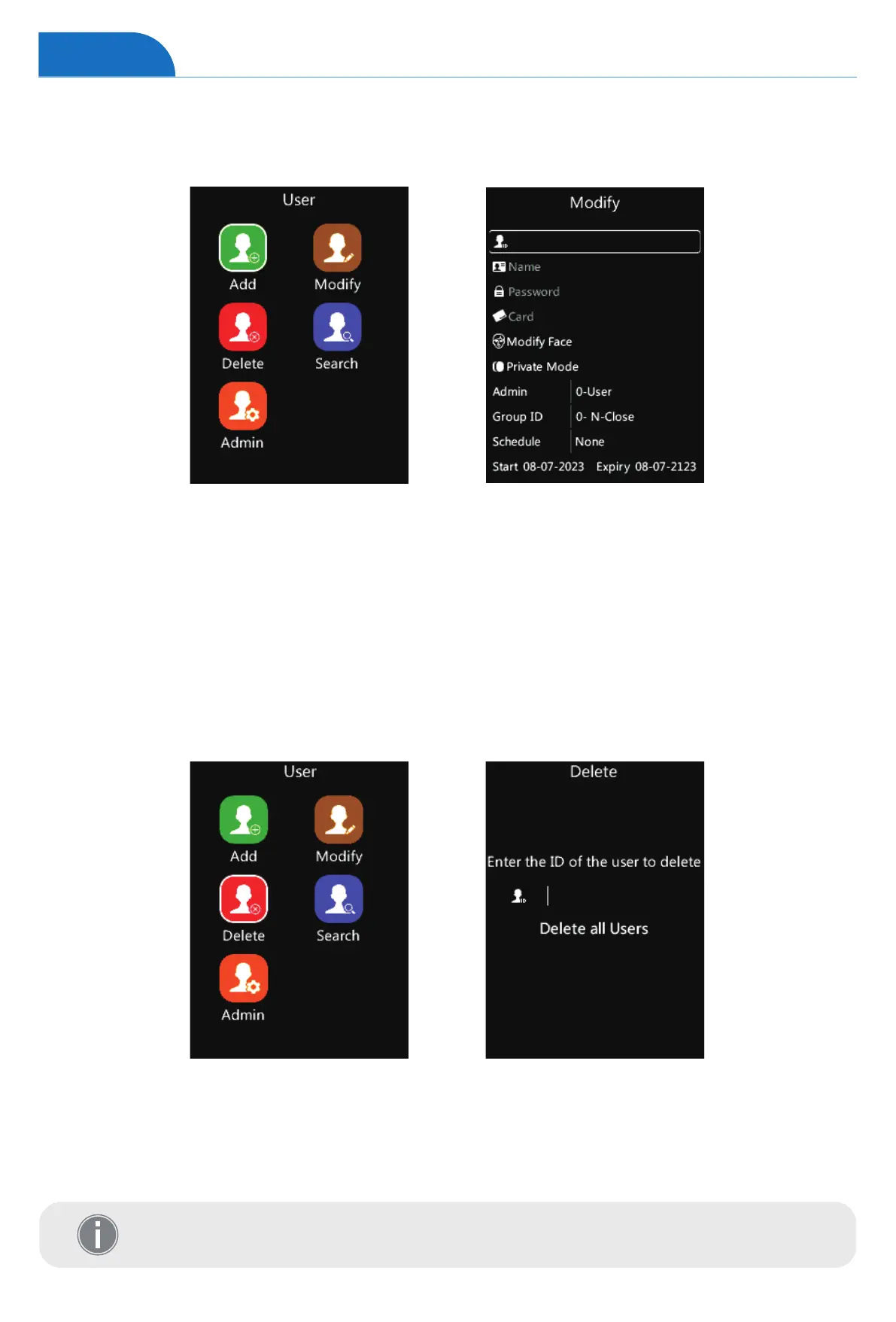
Delete User
Administrator can delete user.
1 On the User page, tap number “4” to access the delete interface.
2 Input the User ID you want to delete and tap “OK” on the keypad to confirm the operation.
3 Tap “OK” to jump to “Delete all Users” option, and tap “OK” to delete all users.
4 Tap “M” to reture to the previous page.
1 On the User page, tap number “2” to access the modify interface.
2 Input the registered user ID to modify the user information.
(Including the face template, mode, Admin, Group ID, schedule, and the Start & Expiry date.)
3 Select the desired item, and then change the settings by tapping “↑/IN” or “↓/OUT”.
4 Tap “OK” to save the configuration, and jump to the next row.
5 Tap “M” to reture to the previous page.
Modify User
Administrator can modify the registered user information.
Tap “OK” to delete all Users, the device will ask for confirmation.
Input the super admin password to confirm the operation, default: “12345”.
User


 To Next Page