90
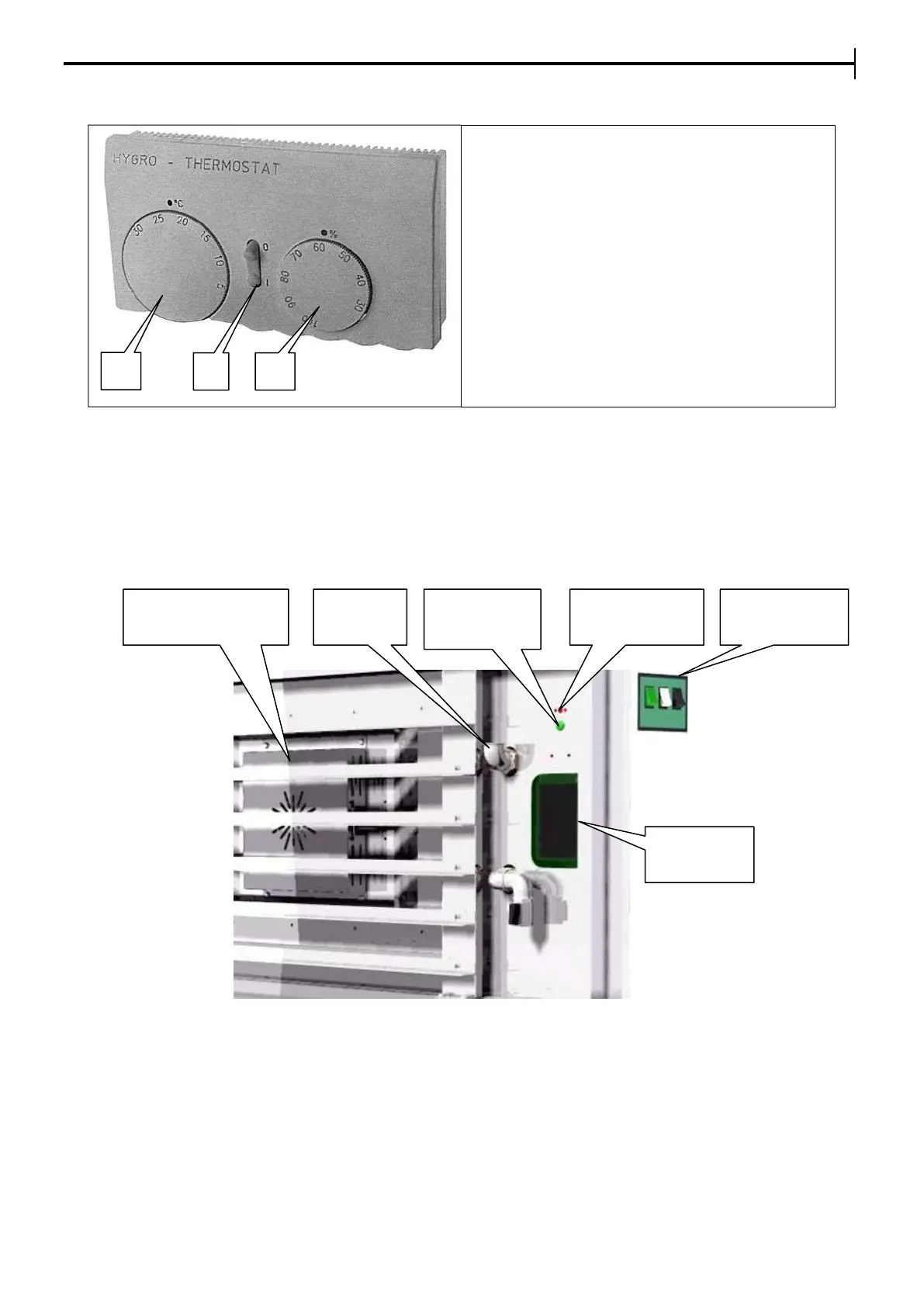
ANALOGIC HYGRO – THERMOSTAT (left hand side inside the prover)
USE OF THE LEAVENING PROVER WITH HUMIDIFIER (optional)
On the prover’s control panel there is a backlit selector to turn steam production in the prover on and off.
The load of water in the steam generator is automatic and the Relative Humidity Percentage (RH%) is
controlled by means of the hygro-thermostat on the inside of the prover.
NB):The green pilot light (inside the prover next to the safety thermostat) is on during normal functioning, it
goes off when the safety thermostat cuts in, to be reset manually (Red button) and indicates the presence of
chalk inside the steam generator.
INSIDE WALL OF THE CELL
12.2.2. START UP AND RUNNING-IN CYCLES OF THE OVEN
During the running-in cycle, no particular cautions need to be taken with the oven. It is sufficient to check that
the temperature in the baking chamber and all the working cycles function as indicated.
A) Temperature adjustment
B) Not used
C) Adjustment of the humidity
percentage


 To Next Page