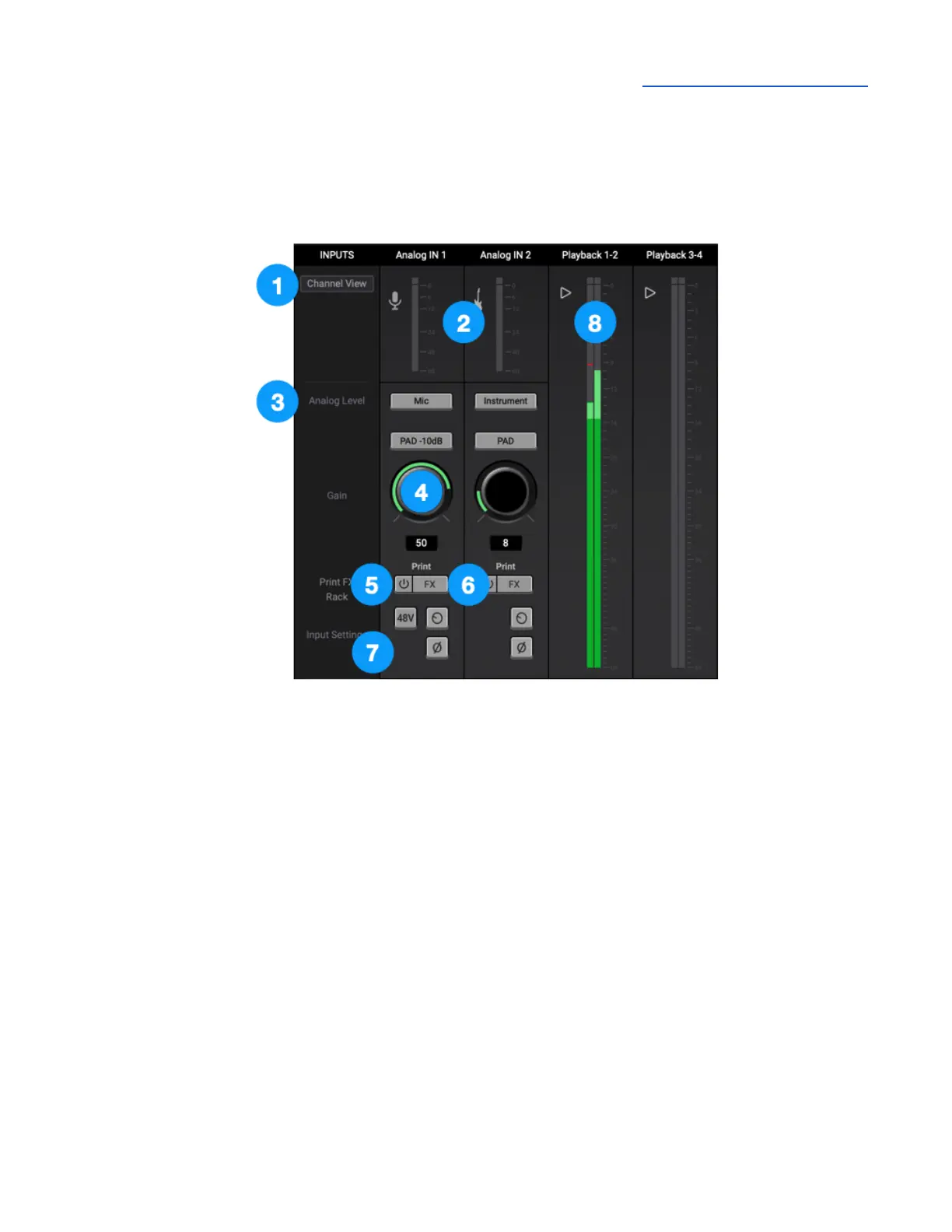
Channel Section
This portion of the Primary window displays channels for Analog and Playback inputs.
General Settings
1. Channel View Button - click to show/hide Analog In and Playback channels.
2. Input Channel Level Meter - displays the digital signal level of the channel. The Analog IN channel
levels are post A/D conversion.
Analog IN Channels 1-2
Analog IN channels represent inputs from microphones, instruments and other analog sound sources.
● Analog inputs are routed to software (DAW) inputs 1-2 and simultaneously to Mixer inputs.
3. Analog Level - choose the analog reference level for Analog inputs 1-2.
● Choose Mic (Analog IN 1 only) when connecting microphones or direct boxes to the Combi
XLR input.
● Choose Instrument when connecting a guitar,bass, keyboard or other instrument to the 1/4”
inputs.
● Choose +4dBu when connecting “pro” gear with a nominal +4 dBu output level (such as an
external mic pre, compressor, or EQ) to the XLR input.



 To Next Page