Chapter 2 Getting to Know Remote Desktop 35
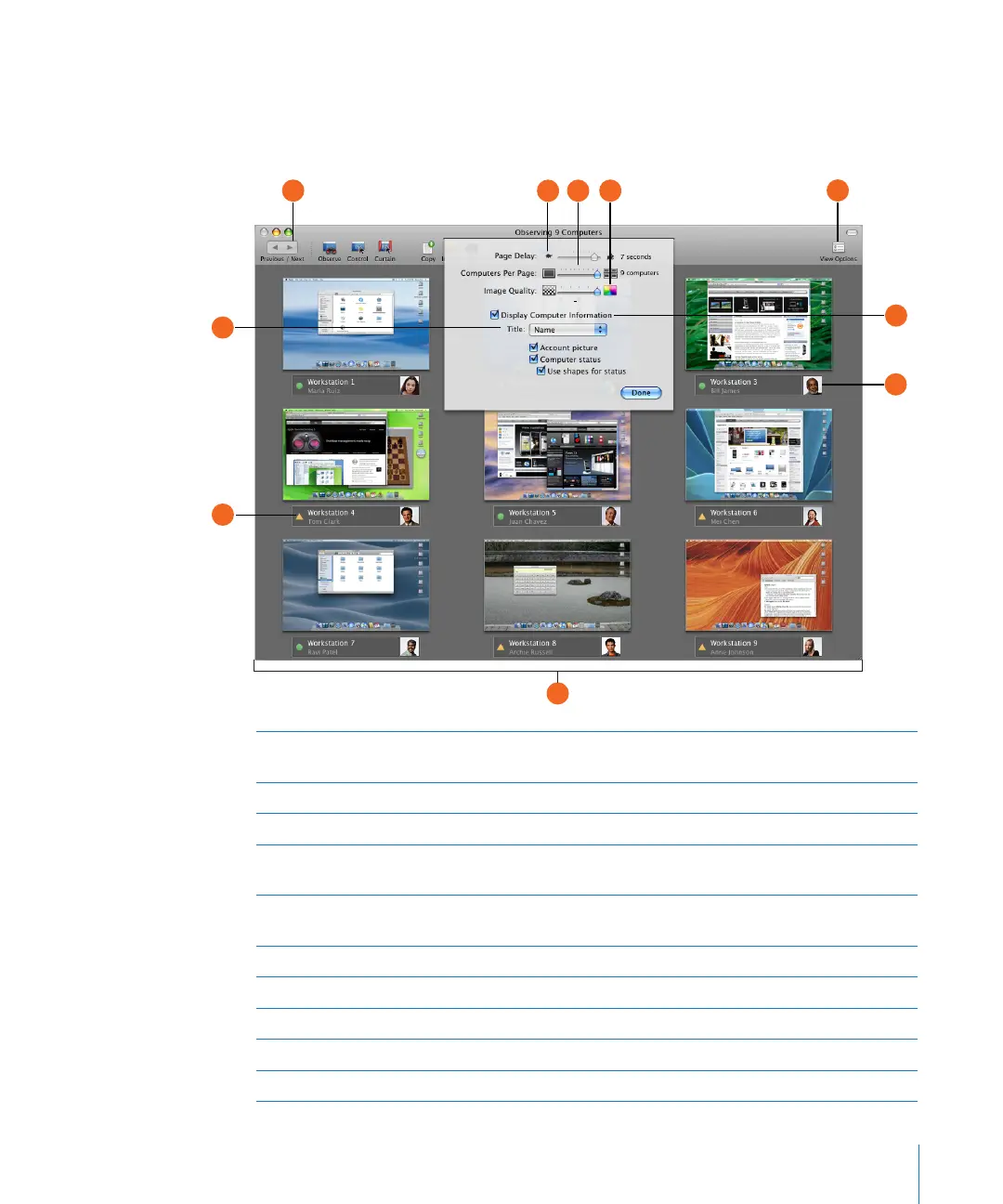
Multiple-Client Observe Window
When you observe many clients at the same time, they all appear in the same
window. If you have more computers than can t in the window, they’re divided
across several pages.
Page Delay: Adjusts the number of seconds before automatically advancing to the next
page of screens.
Computers Per Page: Adjusts the number of client screens visible on each page.
Image Quality: Adjusts the screen color depth from black and white to millions of colors.
Display Computer Information: Shows the computer information area, which contains
desktop titles, account pictures, and status icons.
Computer title selector: Changes the titles displayed underneath the client screens (you can
choose the computer name, IP address, or hostname).
Account picture: Shows the login icon of the currently logged in user.
Computer status: Shows basic computer status beneath each client screen.
Cycle through pages: Manually advances to the next page of screens.
View Options: Reveals the view option controls.
Observed computers: Contains the scaled desktops of the observed client computers.



 To Next Page