MANUAL
V3.0
GEN 5
CONNECTING TO A WIFI NETWORK > P. 46
formation manually in the network’s conguration screen, as shown in the following
sections.
Note that your device will remember the network connection information that
you enter, in order to re-use it and connect automatically to the network when
it is in range.
OPEN NETWORKS
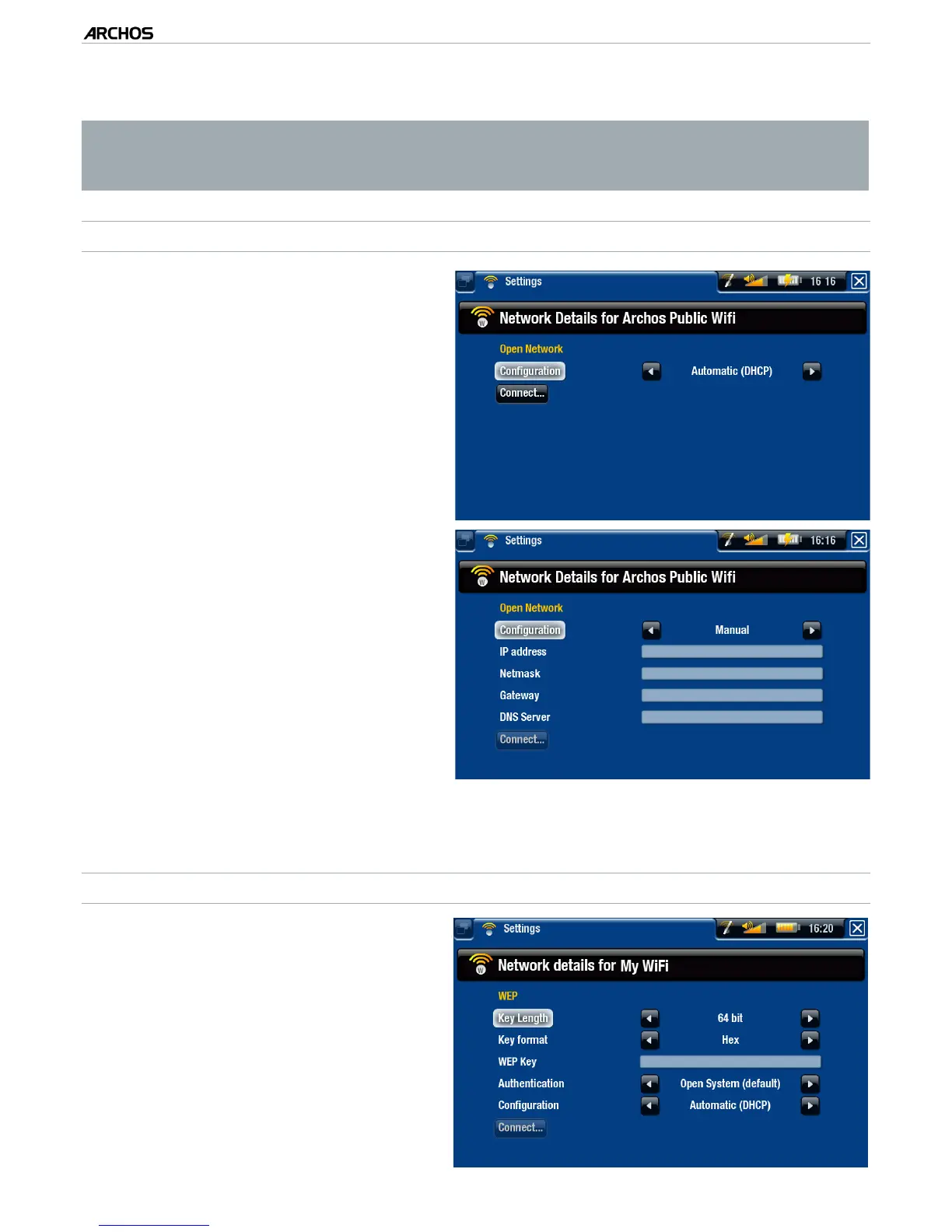
Open networks do not require an
authentication key.
If the network has automatic con-
guration turned on (DHCP), sim-
ply tap on the “Connect” button,
and your ARCHOS will connect to
this network, provided the signal is
strong enough.
•
•
If the network needs to be cong-
ured manually, use the left/right ar-
rows to select the “Manual” setting
on the “Conguration” parameter.
Other parameters will appear: the
required information can be ob-
tained from the person who man-
ages the network.
•
•
When you have nished entering all the information, tap on the “Connect” button,
and your ARCHOS will connect to this network, provided the signal is strong enough.
PROTECTED NETWORKS
(
WEP, WPA OR WPA2 KEY
)
Protected networks require an en-
cryption key to connect.
The type of key (WEP, WPA or
WPA2) will be detected automati-
cally by your device.
The rest of the required information
can be obtained from the person
who manages the network.
•
•
•



 To Next Page