MANUAL
V3.0
GEN 5
PLAYING VIDEO > P. 14
VIDEO BROWSER MENU ITEMS
“Info”
displays a message box with information about the highlighted video le.-
“File Management”
“Rename”: allows you to change the name of the highlighted video le using
the virtual keyboard. See:
Using the Virtual Keyboard
.
“Delete”: allows you to delete the highlighted video le. A conrmation
screen will pop up.
-
-
“Bookmark”
“Resume”: will resume playing the highlighted video from the bookmark.
“Clear”: will remove the bookmark from the highlighted video le.
-
-
“Bookmark” only appears in the menu when a bookmarked video le is high-
lighted.
“Settings”
you can choose to display the Video Player settings screen (see:
Video Player
Settings
) or the “Sound” settings screen (see:
“Sound” Settings
).
-
1.2 VIDEO PLAYBACK
To play a video, highlight the le and open it. The menu overlay will disappear auto-
matically after a few seconds.
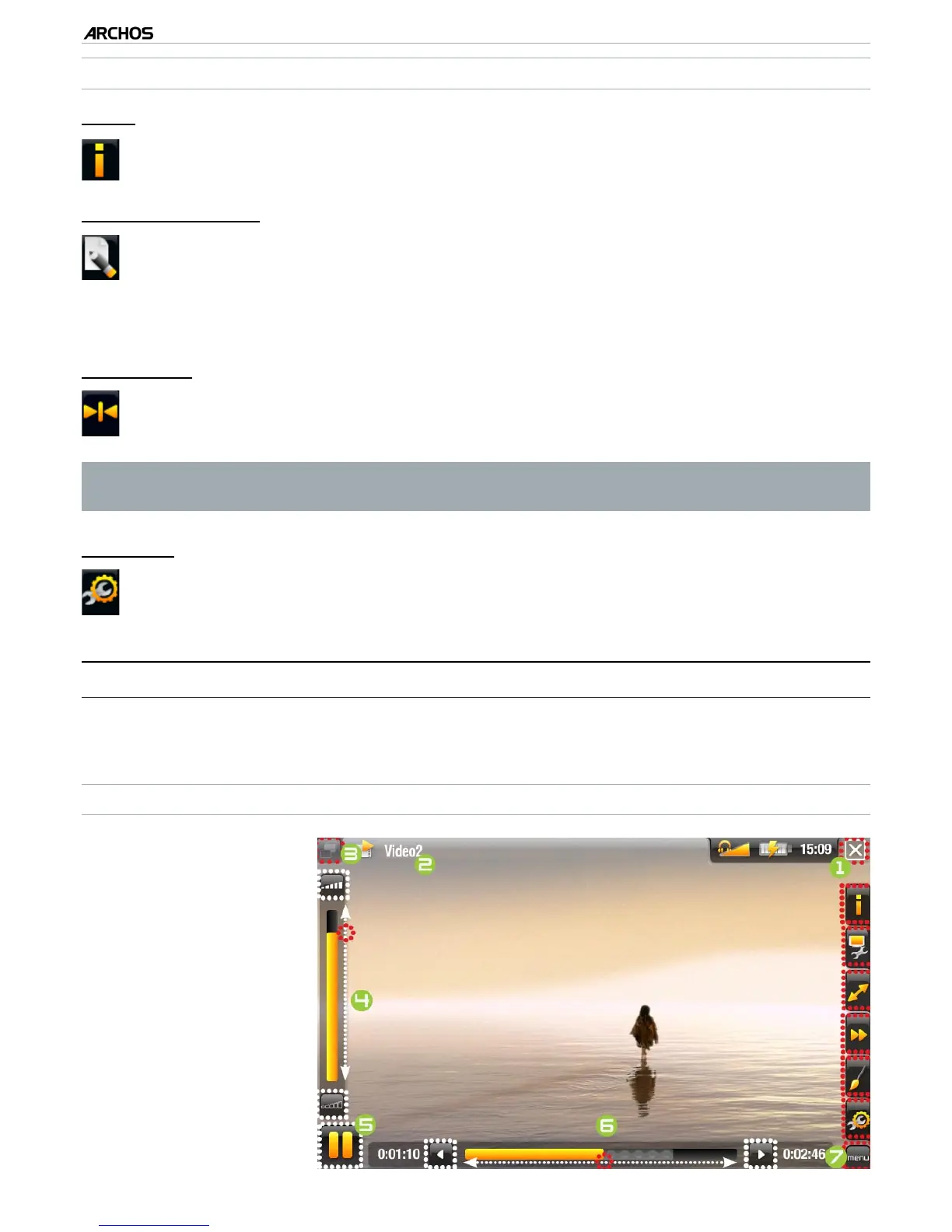
VIDEO PLAYBACK SCREEN
1.
Exit icon
2.
video le name
3.
Tab icon
4.
volume level
5.
play / pause icon
6.
video progression bar
7.
menu items



 To Next Page