MANUAL
V3.0
GEN 5
CONNECTING TO A WIFI NETWORK > P. 45
THE LIST OF AVAILABLE NETWORKS
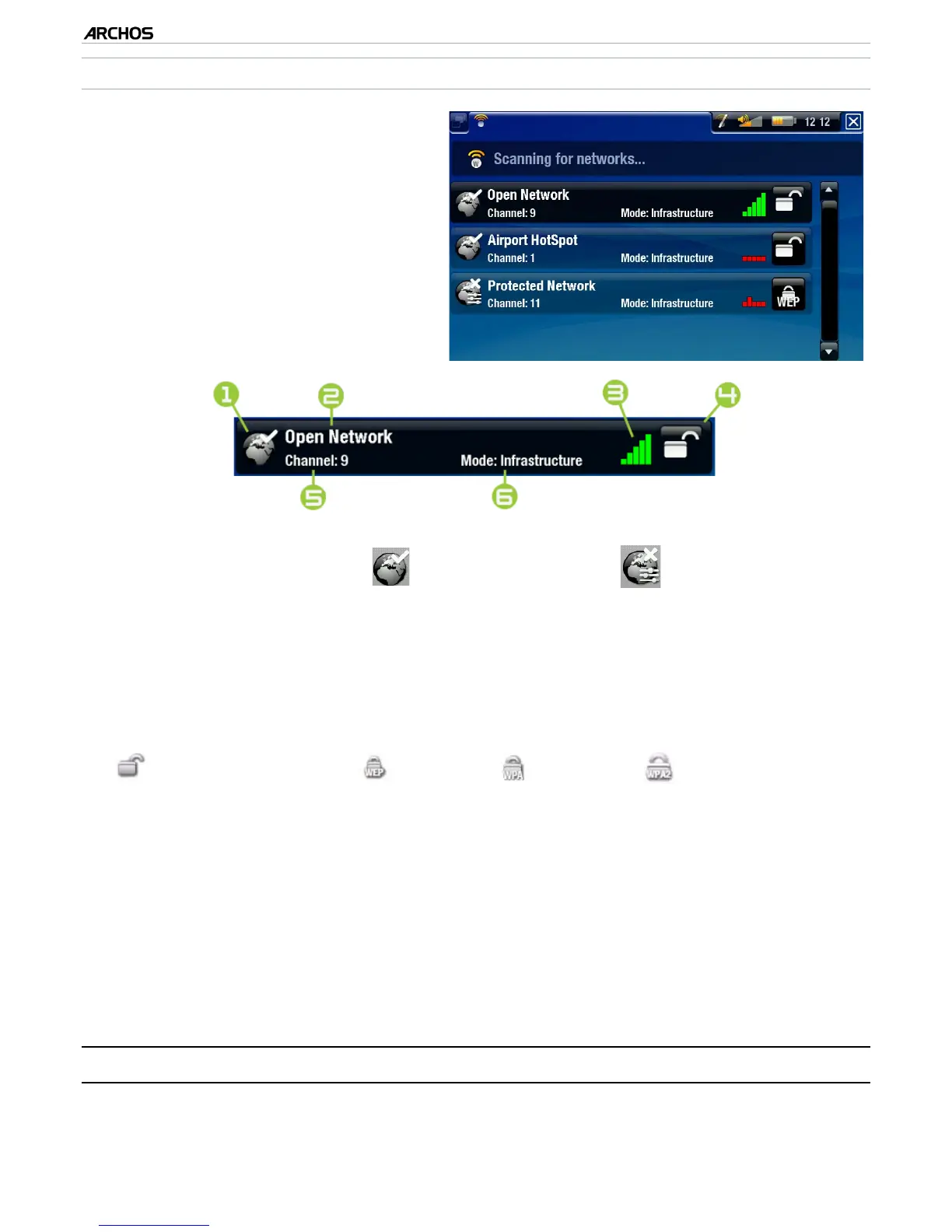
The list of available networks shows
all the wireless networks in range of
your device.
The list is constantly refreshed au-
tomatically.
In the list of available networks, for
each network you will see the fol-
lowing information:
•
•
•
1.
Conguration status:
congured network
uncongured network
2.
The name of the network (SSID), if it is broadcasted
(if the SSID is not broad-
casted, you will be prompted to enter it in the next conguration screen).
3.
The strength of the signal.
4.
The type of encryption key that is required:
Open network (no key) WEP key WPA key WPA2 key
5.
The channel used by the network.
6.
The type of network (Infrastructure or Ad-Hoc).
Ad-Hoc networks are not sup-
ported at this time.
Select the network that you want to connect to (your home wireless network or
a free hotspot).
You will be taken to the conguration screen for this network, where you will
have to enter some information to set up your access to this network.
5.2 WIFI NETWORK CONFIGURATION
In order to connect to a wireless network, the ARCHOS will need some specic in-
formation about the network. Your device will automatically pick up certain pieces
of information that it needs from the WiFi hot spot. You can enter the rest of the in-
•
•



 To Next Page