MANUAL
V3.0
GEN 5
MAIN SETTINGS > P. 58
8. MAIN SETTINGS
In the Home screen, select the “Settings” menu item and choose a setting.
605
705
USING THE TOUCHSCREEN
Tap on the “Settings” menu item, and choose a setting to open its corre-
sponding screen.
Once you are in a settings screen:
tap on a parameter to highlight it.
tap on the left/right arrows to select a different setting.
when you have nished adjusting your settings, tap on to save them and
go back to the Home screen.
When it is possible, tap on the up/down arrows to scroll the screen up and
down.
405
605
USING THE BUTTONS
To open a settings screen, press the menu button, use the navigation pad to
highlight the “Settings” menu item, and press OK.
Once you are in a settings screen:
use the up/down navigation buttons to highlight a parameter.
use the left/right navigation buttons to select a different setting.
when you have nished adjusting your settings, press the Exit button to
save them and go back to the Home screen.
When it is possible, use the up/down navigation buttons to scroll the screen
up and down.
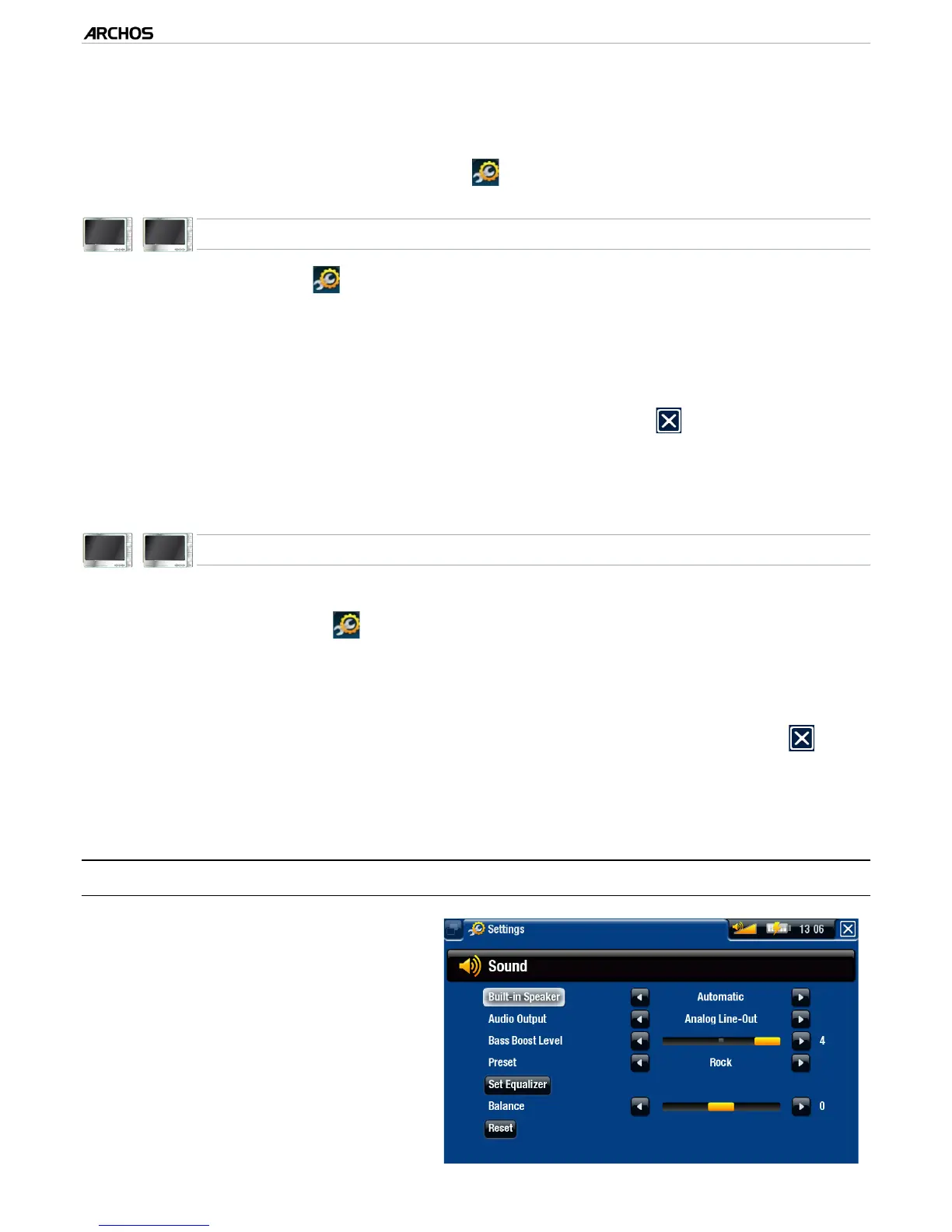
8.1 “SOUND” SETTINGS
This screen allows you to adjust the
sound settings of your ARCHOS to
your personal taste.
•
•
-
-
-
-
•
•
-
-
-
-



 To Next Page