27
10.3 Frame Routing - di2
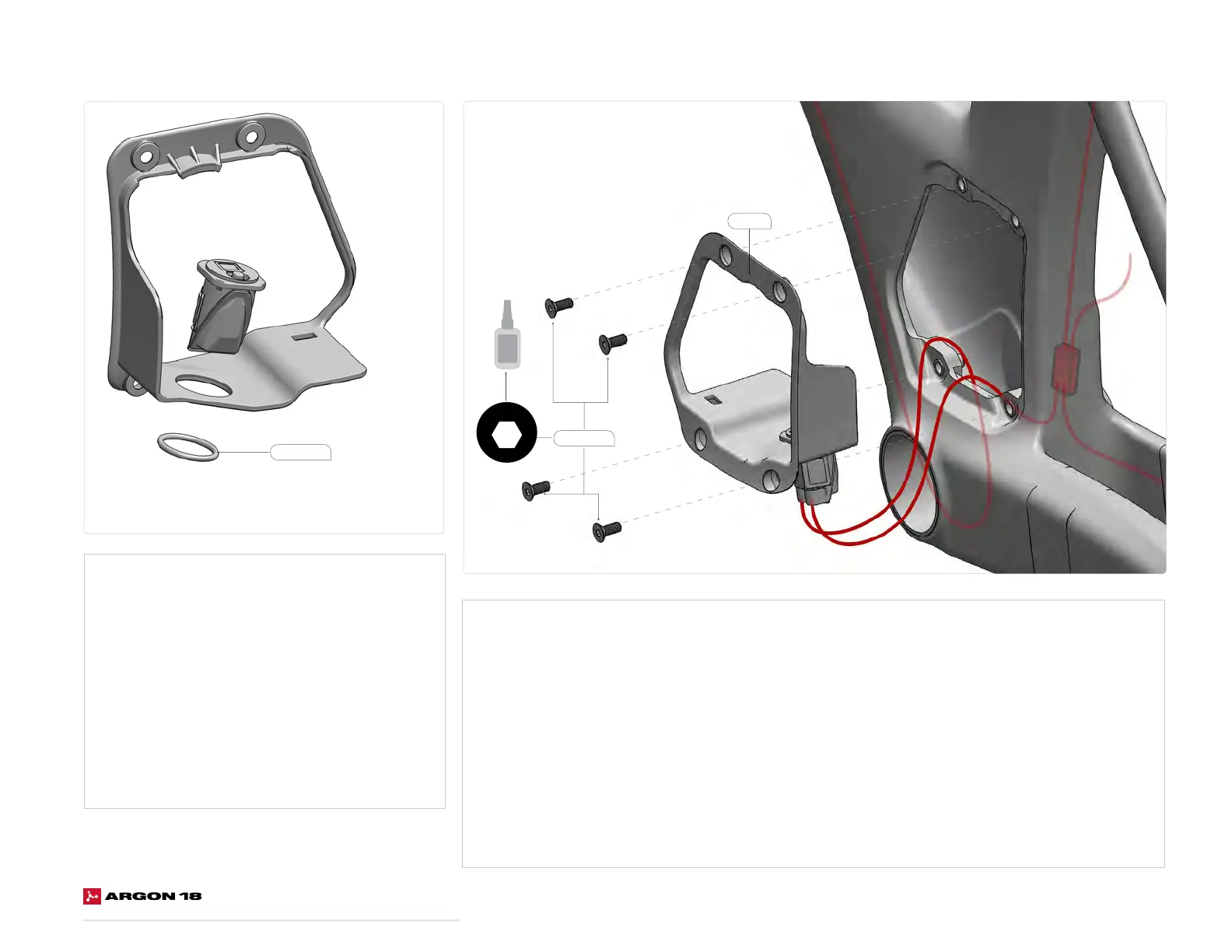
Assembling the EW-RS910 junction box:
1. Insert the EW-RS910 junction box from the top of
the door frame receptacle (SKU: 81507).
2. Make sure the charging port is facing the outside of
the frame, so that it is accessible once assembled.
3. Place a cable tie around the junction box.
4. Tighten the cable tie with the head in line with the
the junction box cavity.
5. Cut the excess of the cable tie using a flush cut plier.
M4 x 10mm
Assembling the door frame receptacle:
1. Connect the Di2 wire coming from the front end (Routed behind the BB sleeve) to the EW-RS910.
2. Connect the Di2 wire from the battery, the FD and RD to the SM-JC41 junction box.
3. Connect a short Di2 cable to both junction boxes.
4. Place the SM-JC41 junction box behind the BB sleeve.
5. Press the door frame receptacle (SKU: 81507) into place.
6. Apply threadlocker (no. 242) to the threads of the four M4 x 10 mm flat head screws.
7. Hand-tighten the four screws.
4
6Nm
2.5
1Nm
4
5.5Nm
4
7Nm
2
HT-1/4
5
12Nm
2
2Nm
3
3Nm
4
3Nm
8
35Nm
2.5
HT
3
HT
40Nm
4Nm
T25
T25
4
3Nm
10
HT
2.5
5
9Nm
2.5
HT-2
2.5
HT-5
2.5
2Nm
3
2.5
HT
HT
3
4Nm
3
2Nm
6
10Nm
2.5
HT
4Nm6Nm
8
81507
Cable Tie















 To Next Page