EN - 20
2. Torque hardware to 61 N*m (45 lb-ft).
3. Return unit to operating position and
reconnect spark plug wire.
Install Blades
Model 911614
NOTICE: Some dual blade machines feature
an additional spacer. Configure per machine
specifications.
1. Position blades against blade adapter
and secure with original hardware. See
Figure 28.
OR
Position blades, washer, and spacer
against blade adapter. See Figure 29.
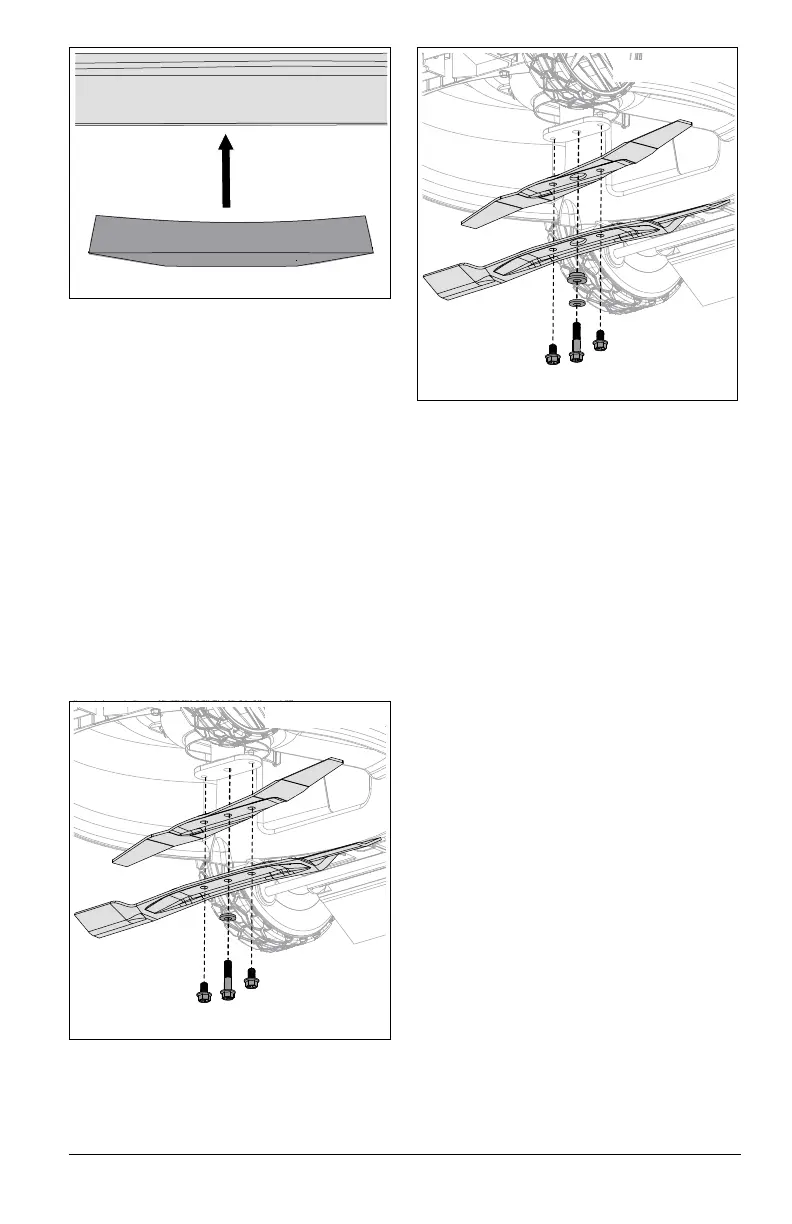
NOTICE: Washer must be positioned
concave side towards blade and blades
MUST be installed with cutting edges
positioned upward. See Figure 27.
2. Torque center bolt to 61 N*m (45 lb-ft),
torque outer two bolts to 40.7 N•m (30 lb-
ft).
3. Return unit to operating position and
reconnect spark plug wire.
CHECK DRIVE BELT
Models 911609, 911614, 911608
Check drive belt and replace if worn or
damaged. See Replace Drive Belt on
page 23.
CHECK FASTENERS
Check for loose or missing hardware. Give
special attention to blade hardware and all
guards, shields and safety devices.
LUBRICATE UNIT
1. Apply oil to all pivot points and pin
connections.
Lubricate Ground Drive System
Models 911609, 911614, 911608
See Figure 30.
IMPORTANT: Lubricate both sides of ground
drive system.
1. Place a support, such as a wood block,
under deck rear.
2. Models 911609, 911614: Place rear of
unit in highest height of cut position.
Remove locking nuts from behind wheel
plates. Remove shoulder bolts retaining
rear wheels and remove wheels.
Figure 27
Figure 28
Model 911614
Figure 29
Model 911614




 To Next Page