EN - 23
7. Check the adjustment:
a. Start the engine. See Start the Engine
on page 14.
b. Model 911608 only: Slowly pull wheel
drive control lever against handlebar.
Unit should move forward smoothly
and increase in speed as lever is
pulled closer to handlebar.
Models 911609, 911614 only: Slowly
push down on REFLEX drive
handle.The unit should move forward
smoothly and increase in speed as
handle is pushed down to match
operator’s pace.
c. Release wheel drive control lever or
handle. Unit should stop immediately
and not creep forward.
d. Pull back on handlebar and ensure
wheels are not locked in place. If
wheels are locked stop the engine
and slightly decrease cable tension.
Recheck adjustment.
ADJUST OPERATOR PRESENCE
CONTROL (OPC) LEVER
The OPC lever is non-adjustable. If engine
and / or blade does not stop within 3 seconds
of releasing the OPC lever, see your Ariens
dealer.
REPLACE DRIVE BELT
Models 911609, 911614, 911608
Remove Drive Belt
All Models:
1. Disconnect spark plug wire.
2. Remove hardware securing blade(s) to
blade adapter and remove blade(s). See
Remove Blade on page 18 or Remove
Blades on page 18.
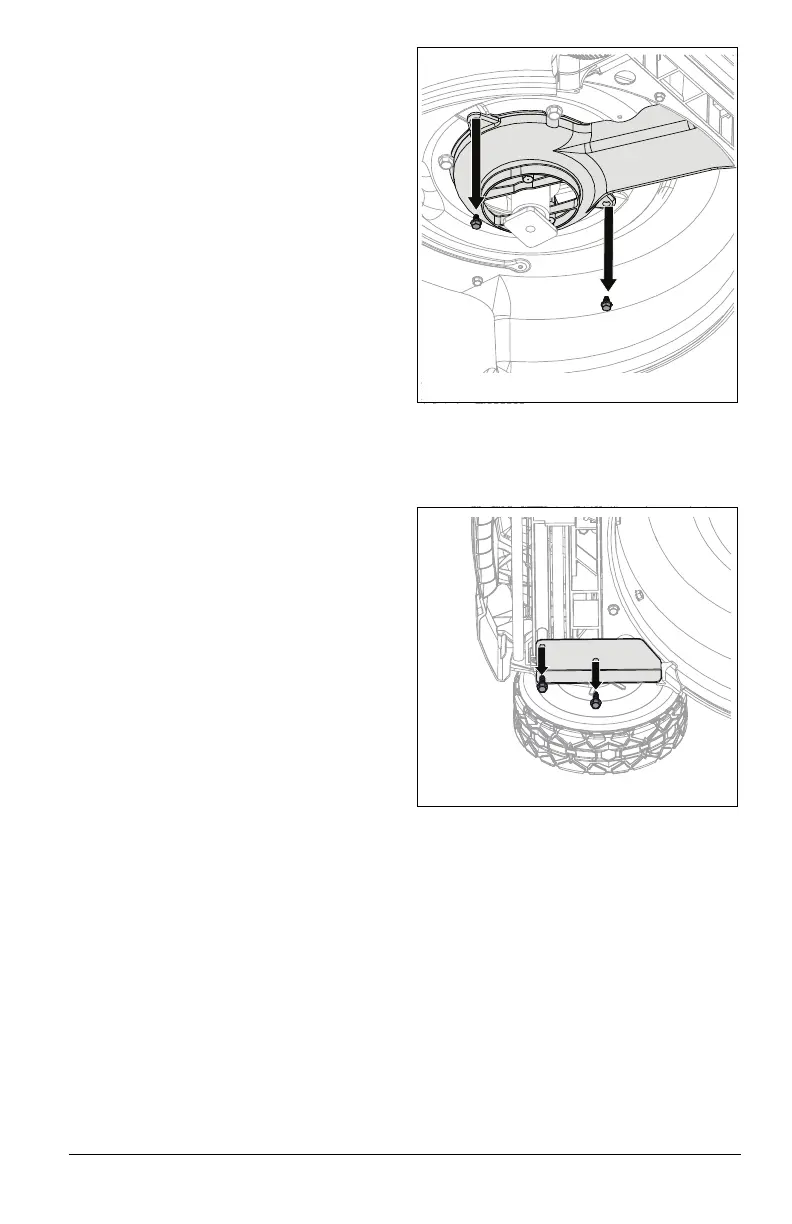
3. Remove two hex screws retaining spindle
pulley cover and remove cover. See
Figure 36.
Model 911608 only:
1. Remove and retain flange bracket
hardware and remove bracket. See
Figure 37.
See Figure 38.
2. Disconnect extension spring from cable
anchor.
3. Remove and retain six hex screws
securing front cover and remove cover.
Figure 36
Figure 37




 To Next Page