The provided document is a user guide for the Aritech CS-175-275-575 Series LCD keypad, which is part of a security system. The manual details the keypad's functions, how to operate the security system, and various maintenance and configuration features.
Function Description:
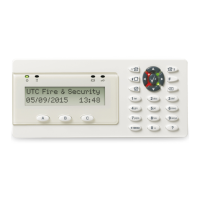
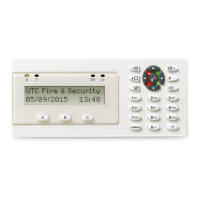
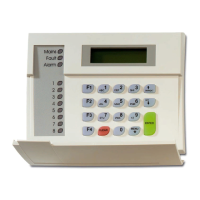
The Aritech CS-175-275-575 Series LCD keypad serves as the primary interface for controlling and monitoring a security system. It features an LCD display for messages and status information, along with a numerical keypad and dedicated function keys. The system is designed to provide comprehensive security, including perimeter protection, full system arming, fire detection, medical alerts, and personal attack alerts. It can be configured to operate in different modes, such as "Stay" mode for arming perimeter protection while occupants are on the premises, and "Away" mode for full system arming when leaving. The keypad also allows for bypassing (excluding) specific zones, managing user codes, and reviewing system events and alarms.
Important Technical Specifications:
While the manual does not explicitly list detailed technical specifications like power consumption, dimensions, or communication protocols, it does provide insights into the system's operational characteristics:
- Power: The keypad indicates power status with a green LED. When lit, the system is connected to mains power. A flashing green LED signifies a low battery or disconnected battery, while an unlit LED indicates a mains power cut.
- Ready Status: A green "Ready" LED indicates the system is ready to be armed. A flashing "Ready" LED suggests the system is ready for "force arming," meaning some zones might be open but can still be armed.
- Fire Status: A red "Fire" LED illuminates when a fire zone is activated. A rapidly flashing red LED indicates a problem with the fire zone.
- Display: The keypad features an LCD (Liquid Crystal Display) for displaying messages, zone information, event logs, and other system data. The viewing angle and brightness of the LCD are adjustable.
- User Codes: The system supports four or six-digit user codes for arming and disarming. A "Master user code" is available for programming certain system parts.
- Zones: The system is organized into "zones," which are protected areas monitored by one or more detection devices. Zones can be bypassed (excluded) if needed.
- Partitions: The system can be divided into multiple "partitions," allowing different users to control specific areas independently.
- Central Station Communication: The system can report alarm data and events to a "Central station" for monitoring.
Usage Features:
The Aritech CS-175-275-575 Series LCD keypad offers a range of user-friendly features for managing the security system:
- Arming and Disarming: The system can be armed using dedicated function keys (Stay or Away) or by entering a user code. Disarming is done by entering a user code.
- Bypassing Zones: Users can exclude one or more zones from the armed system, useful if a zone is faulty or intentionally left open. This is achieved by navigating through zone status and pressing the bypass key.
- Life Safety Functions: The keypad provides quick access to critical life safety functions by pressing and holding specific key combinations for two seconds:
- FIRE (1+3): Initiates a fire alarm and sends a message to the central station.
- MEDICAL (4+6): Sends a medical alert to the central station.
- PERSONAL ATTACK (7+9): Sends a personal attack alert to the central station and can activate sirens if programmed.
- Viewing System Status: Users can view the status of individual zones (e.g., "Okay," "Fault," "Bypass") and review the alarm memory to see the last activated zones.
- Event Log: The system maintains an "Event Log" that records alarms, faults, and other events, which can be reviewed on the LCD display.
- Keypad Tone Adjustment: The tone of the keypad can be adjusted to suit user preference.
- System Clock Setting: The date and time of the system clock can be set and adjusted.
- LCD Display Adjustment: The viewing angle and brightness of the LCD display are adjustable for optimal readability.
- Service Messages: The keypad displays service messages to alert users to issues requiring attention, such as "Service Required," "Expansion box tamper," "Control Over-current," "Siren trouble," "Loss of time," "Box tamper," "Power trouble," "Phone trouble," "Low Battery," "Fail to comm.," "Expansion over-current," "Aux. comm. fail," "Siren trouble," "Zone Tamper," "Zone Low Batt," "Zone Lost," and "Zone Trouble." These messages help in diagnosing and addressing system problems.
Maintenance Features:
The manual outlines several features related to system maintenance and troubleshooting:
- Resetting Fire Detectors: After a fire alarm, fire detectors must be explicitly reset to become operational again. The system cannot be armed until all fire detectors are reset. This process involves entering a user code and then pressing specific keys (*7) to initiate the reset.
- User Code Management: Users with master privileges can change or delete existing user codes, allowing for flexible access control.
- Troubleshooting via Service Messages: The detailed service messages displayed on the LCD keypad are crucial for identifying and understanding system issues. For example, a "Service Required" message prompts the user to contact the installer and provides a way to view the specific problem (*2). Messages like "Low Battery," "Power trouble," and various "trouble" or "tamper" alerts help pinpoint hardware or connection issues.
- Tamper Detection: The system detects "tamper" events if the security system or its components are interfered with, prompting the user to contact the installer.
Overall, the Aritech CS-175-275-575 Series LCD keypad provides a comprehensive and user-friendly interface for managing a robust security system, offering both everyday operational features and diagnostic tools for maintenance.

 Need help?


 To Next Page
 General