During the shaft learning, it is not important where the
car is at that time. The car will be moved to the bottom
floor with the half of the high speed. Then, it will learn
the shaft by moving to the top floor, then stops the
learning operation.
After starting the shaft learning operation, if you want to
cancel and stop this shaft learning process because of any
reason, you can press the emergency stop button or take
the system in inspection mode.
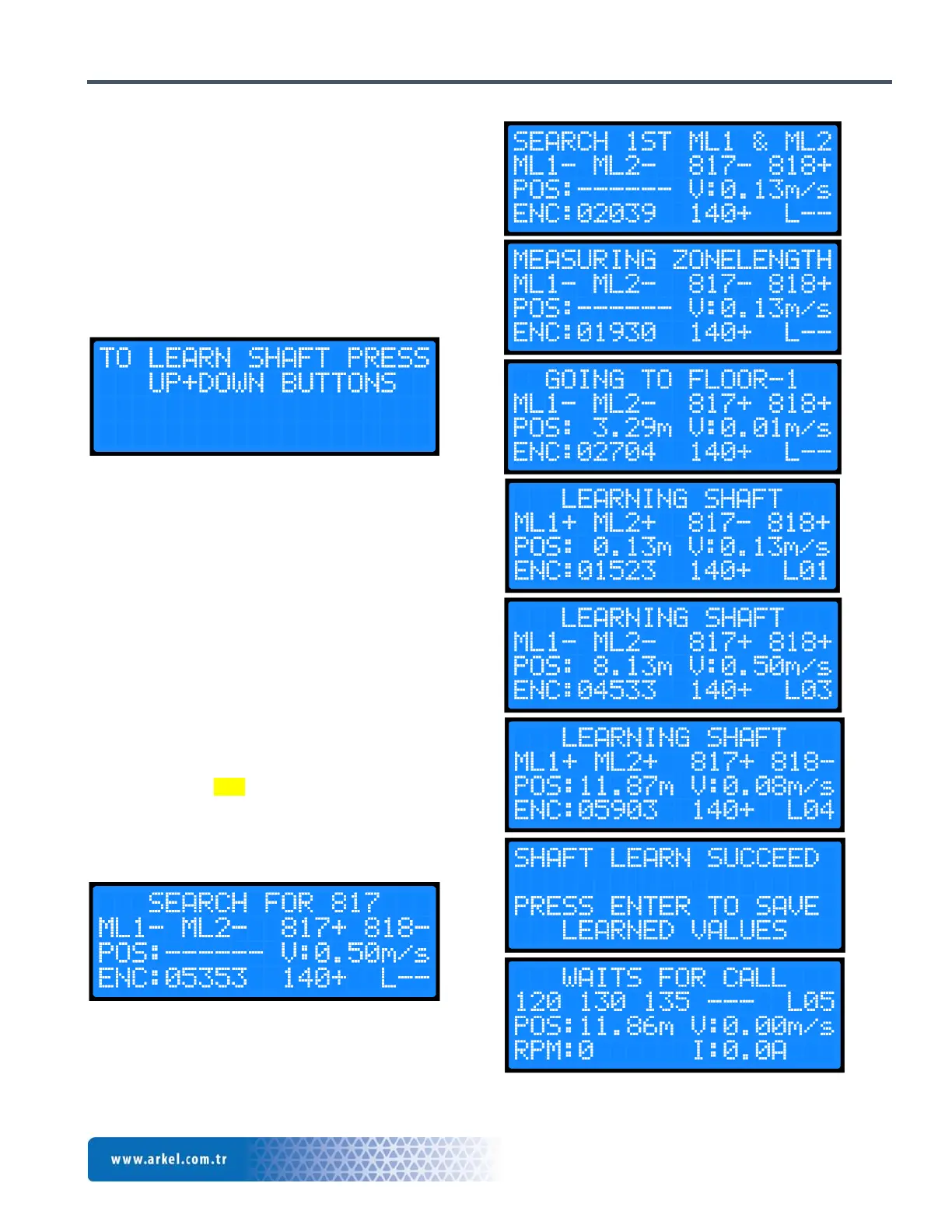
Figure 10 Shaft learning screen
While waiting in the main menu, press “RIGHT” button
until you see the screen shown in Figure-10. Then, start
shaft learning operation by pressing together “UP” and
“DOWN” buttons.
This operation may take some time depending of the
floor number of the elevator. ARCUBE screen shows in
detailed in which process the shaft learning operation is.
After ending of the shaft learning, the operation will be
ended with the “SHAFT LEARN SUCCEED” message.
It is enough to perform shaft learning operation 1 time for
each elevator shaft. Exit from the menu after this is
completed. Press “ENT” button to save the values
while exiting from the screen. Otherwise, the shaft
learning will not be valid, and it will be necessary to re-
perform this operation. The processes while doing shaft
learning are shown with the following figures.


 To Next Page