7.2 Landing Calls
ARCUBE has features to work serial (CANBus) or
parallel installation in the landing calls. If the landing
calls are used to be in parallel, it is necessary to use MSP-
16_Exp board.
7.2.1 Serial installation
If the landing calls are used to be in serial installation, the
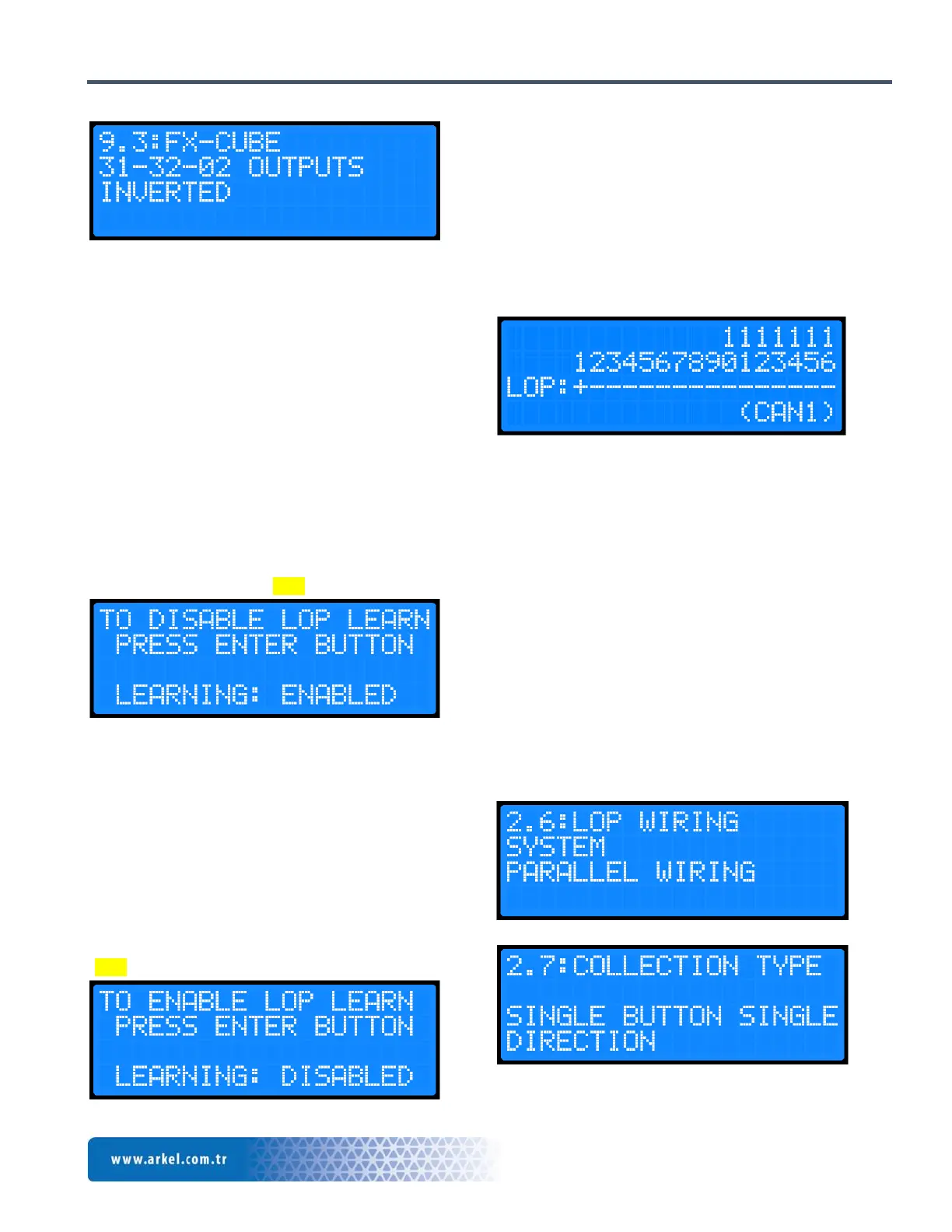
“2.6: LOP WIRING SYSTEM” parameter under “2:
BASIC SETTINGS” needs to be chosen as “SERIAL
WIRING” inside the menu. “2.7: COLLECTION
TYPE” parameter needs to be chosen according to your
system. Then, it is necessary to recognize the landing call
buttons to ARCUBE. Press “LEFT” button until you see
LOP learning screen. When you reach this screen, make
it “ENABLED” by pressing “ENT” button.
Figure 12 LOP learning enabled
Move the car to the bottom floor by giving car call to
perform LOP learning and keep pressed the landing call
button 5 seconds. When the LOP of that floor is learned,
the landing button led will be flashing with 1 second.
Move the car to the 2nd floor by giving car call and keep
pressed landing call button 5 seconds. In this way, after
making them learned for all floors, press again “LEFT”
button until you see LOP learning screen. When you
reach this screen, make it “DISABLED” by pressing
“ENT” button.
Figure 13 LOP learning disabled
In order to observe the learned floors from the menu, for
example, if 1st floor LOP is recognized to the system
correctly, LOP monitoring screen inside menu will show
“+” sign under “1” floor number. Otherwise, it means
that LOP learning operation is not successful. Press
“LEFT” button until you see the screen shown in Figure
14 while waiting in the main menu.
Figure 14 Learned LOP screen
If the LOP board is used only as an indicator in the
landing (Not used as a call button), it is not necessary to
perform this learning operation.
7.2.2 Parallel installation
MSP-16_Exp board is used when the landing call buttons
are connected directly in parallel. The calls are collected
up to 16 floors for single button in the landing, and up to
9 floors for double buttons in the landing. “2.6: LOP
WIRING SYSTEM” parameter under “2: BASIC
SETTINGS” parameter should be chosen as
“PARALLEL WIRING”. “2.7: COLLECTION
TYPE” parameter should be adjusted according to your
system.
After landing button installation parameter is selected as
parallel installation, the display outputs of MSP-16_Exp


 To Next Page