80Arlo Rechargeable Battery
Pro 5S 2K Spotlight Camera
User Manual
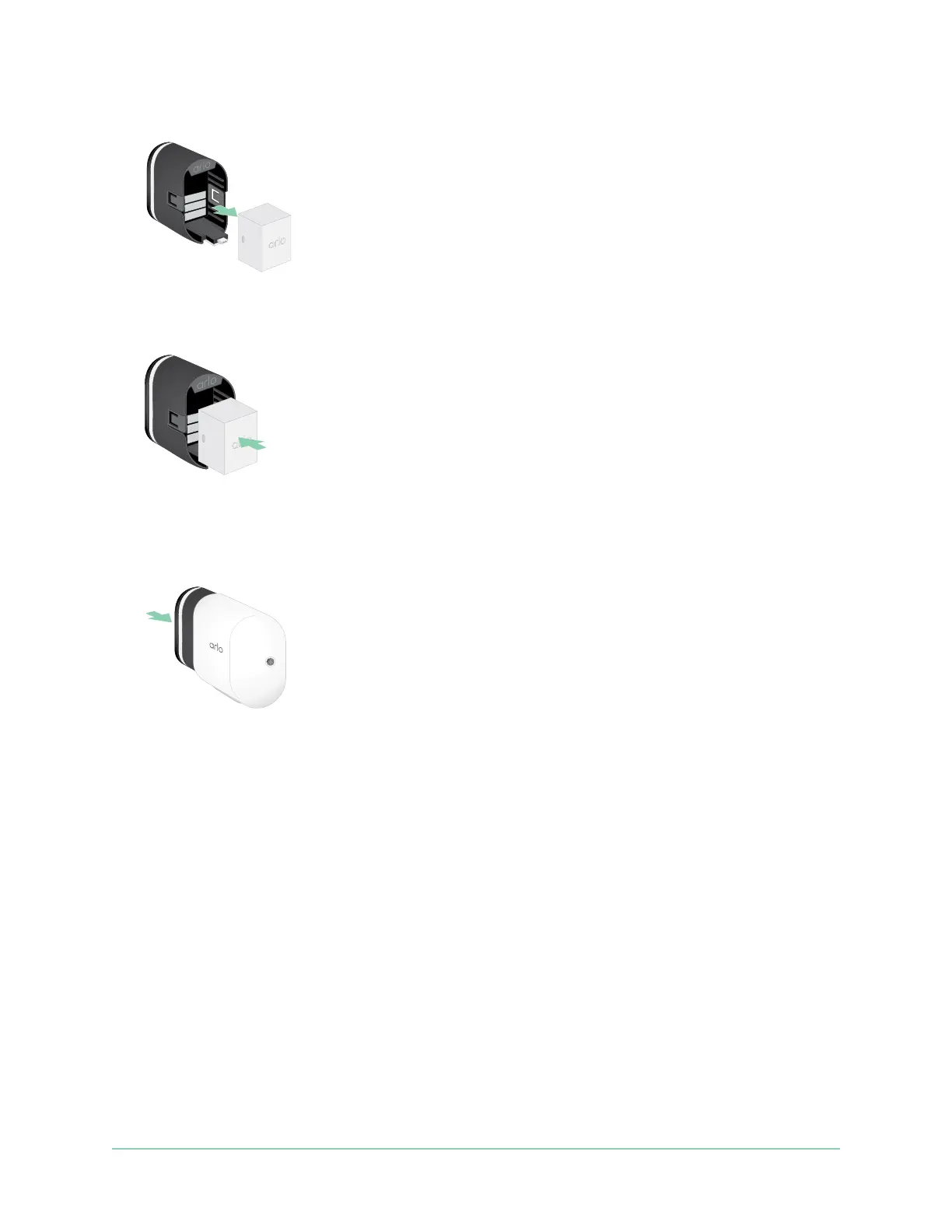
3. Remove the battery by pulling on it until it slides out of the camera.
4. Align the battery and insert it into the battery compartment.
The battery only inserts one way.
The LED on the camera blinks blue.
5. Insert the camera into the camera housing by pushing down on both the le and right
sides of the camera until it clicks into place.
Battery life
Your camera’s battery lifespan varies depending on the number of motion triggers that occur
and how oen the camera activates.
Note: Cold temperatures can aect any battery’s capacity because of their chemistry. This
means that if you install your camera outside in cold temperatures, you might notice a shorter
battery duration, or a faster than expected drop in the displayed battery capacity.
To optimize the lifespan of your battery:
• Select a location for your camera with a strong Wi-Fi signal.
A strong Wi-Fi signal typically requires less battery power than a weak Wi-Fi signal. You
can check the strength of the Wi-Fi signal from the Arlo Secure App.



 To Next Page