5.2.2 General Use
The Armstrong EmechCong interface consists of several tabs containing a variety of controls. The most important
for conguration of the actuator is the Device Manager tab. This section provides access to information about the
actuator, and allows the user to modify some of the permanent settings.
The available parameters, called Properties, are displayed in a tree format in the Emech Devices window. This
display is operated much like a Windows Explorer display and each item display with a ‘+’ can be expanded to show
its child Properties. Each top-level item in the list represents a category of conguration. Expanding these will display
a list of available properties.
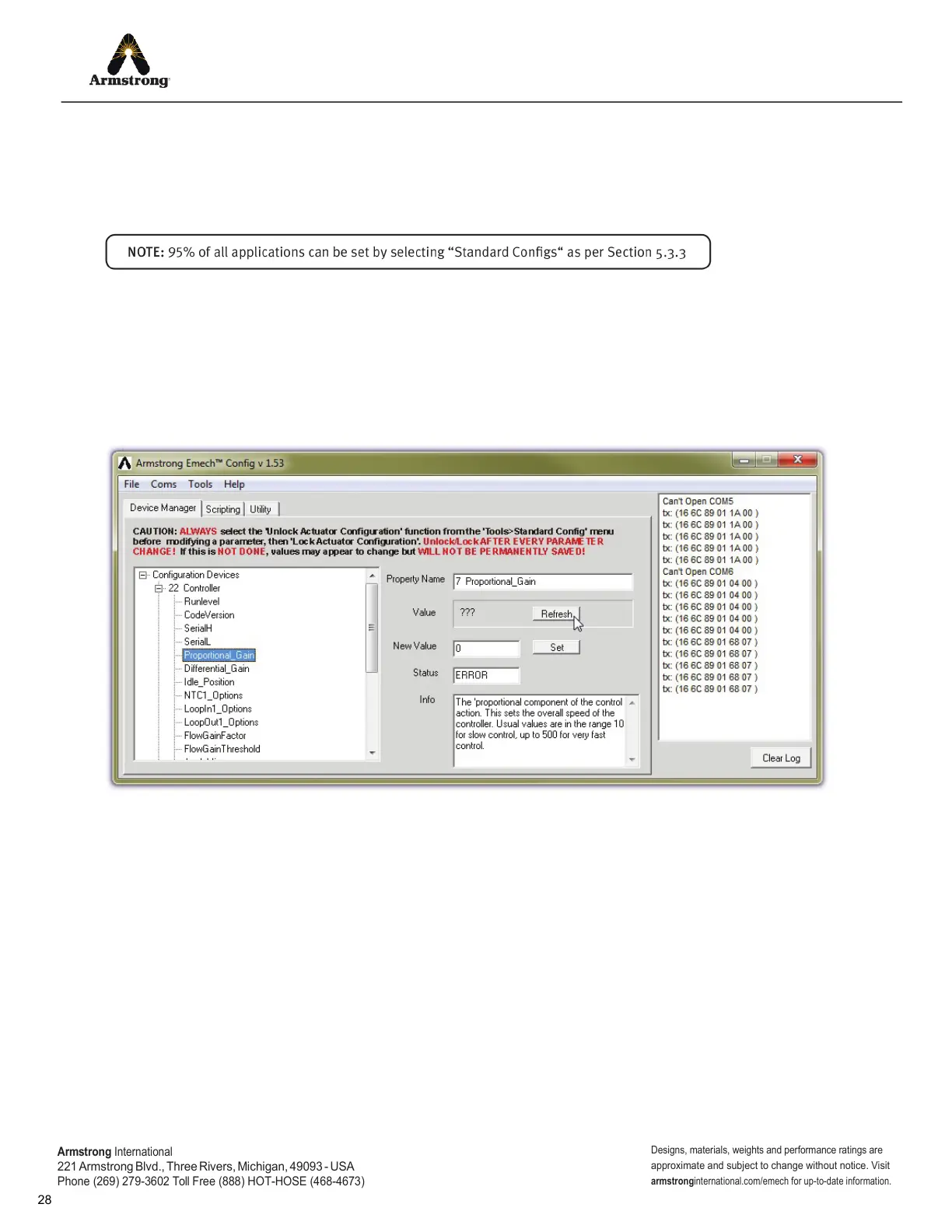
Clicking on a Property will cause EmechCong to attempt to read the value of the Property from the actuator’
s
memory. If the read is successful, the value will be displayed in the ‘Value’ box. If the read fails, then ‘???’ will be
displayed indicating that the value is not known. To retry
, just click on the Property name again, or click on the
‘Refresh’ button.
Figure 5.3: Refreshing a Property Value.
Armstrong
International
221
Armstrong Blvd., Three Rivers, Michigan, 49093 - USA
Phone (269) 279-3602 Toll Free (888) HOT-HOSE (468-4673)
Designs, materials, weights and performance ratings are
approximate and subject to change without notice. Visit
armstrong
international.com/emech for up-to-date information.


 To Next Page