5.2.3 Changing Values
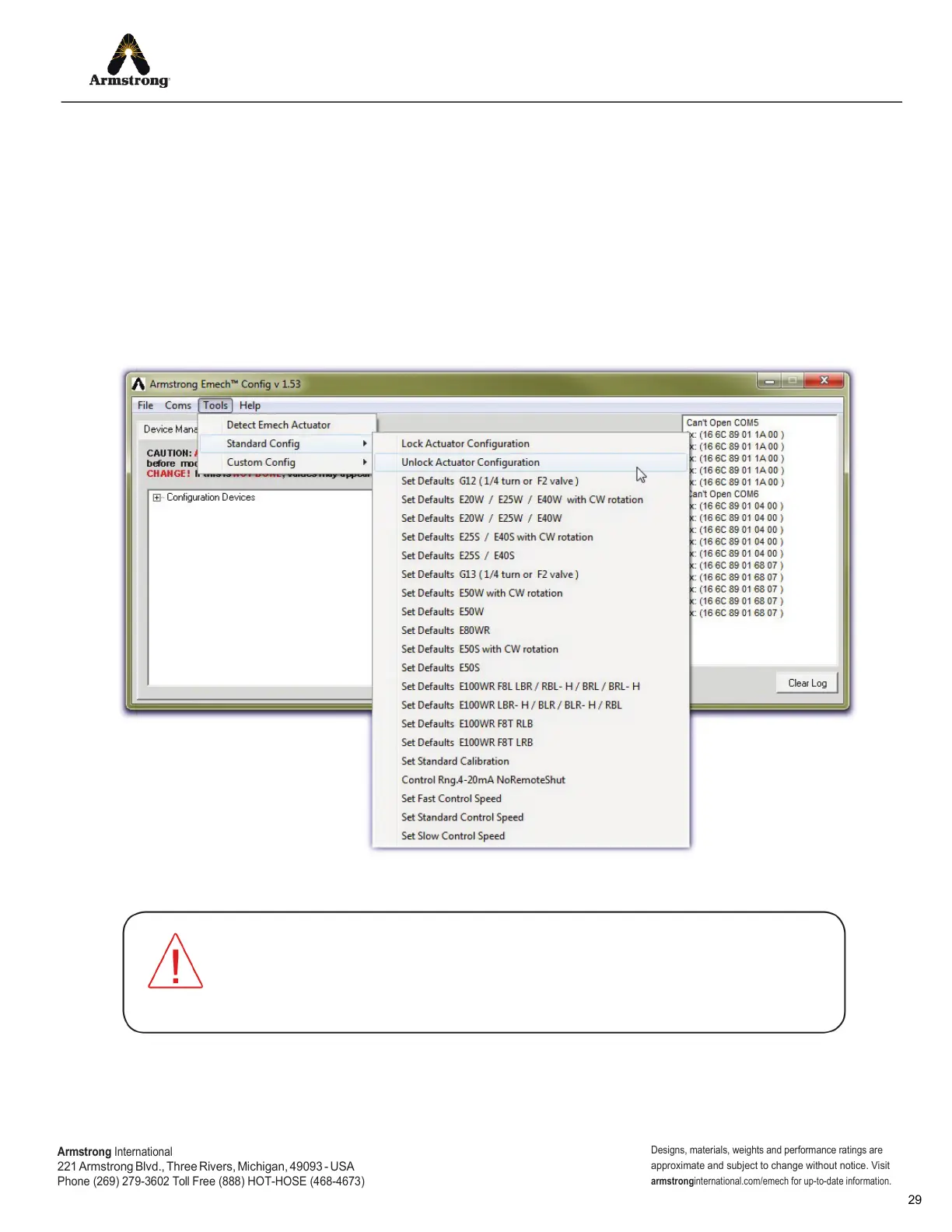
The actuator must rst be unlocked before any Property values can be changed. Select the ‘Unlock Actuator
Conguration’ function from the ‘Tools→StandardConfig’ menu as indicated in Figure 5.4.
To alter a Property value, enter a new value in the ‘New Value’
text box and click the ‘Set’ button. If successful, the
number in the ‘Value’ box will change to reflect that the update has occurred. Some Properties are not user
configurable. When these Properties are displayed, the ‘Set’ button will be dimmed out.
NOTE: the ‘Info’ text box displays a description of the Property, guidance for correct use and default values.
After changing a Property value it is important to lock the actuator, otherwise values may appear to change but will not
be permanently saved. Select the ‘Lock Actuator Configuration’ function from the ‘Tools→StandardConfig’ menu.
ALWAYS select the ‘Unlock Actuator Configuration’ function from the ‘Tools>StandardConfig’
menu before modifying a parameter, then ‘Lock Actuator Configuration’.
Unlock/Lock AFTER EVERY PARAMETER CHANGE! If this is NOT DONE, values may appear
to change but WILL NOT BE PERMANENTLY SAVED!
Figure 5.4: Unlock the actuator before attempting to alter any Property values.
Armstrong
International
221
Armstrong Blvd., Three Rivers, Michigan, 49093 - USA
Phone (269) 279-3602 Toll Free (888) HOT-HOSE (468-4673)
Designs, materials, weights and performance ratings are
approximate and subject to change without notice. Visit
armstrong
international.com/emech for up-to-date information.


 To Next Page