5.0 EmechConfig Configuration Software
5.0 EmechConfig Configuration Softwa
The Armstrong Emech Configuration software provides access to configuration of many parameters within the Emech G1.T
EmechConfig software can be downloaded from the Armstrong Website at www.armstronginternational/emech.
The software is designed to run on any Win32 system (Windows 95/98/ME/NT/2000/2003/XP). It connects to the Emech actuator
through a standard RS232 serial port using the cable supplied by Armstrong (part #CPEL0091).
5.1 Installation
After removing any previous version of the software, run the latest installation software by downloading the executable setup from the
Armstrong Website , www.amrstronginternational/emech. Follow the on screen instructions, selecting an install path for the software.
The installation will require around 3.7 MB of local hard disk space.
5.2 Operation
5.2.1 Getting Started
Connect the serial cable between the Emech actuator and the PC. Make sure that the Emech actuator is powered and the push button
is pressed for 2 seconds to turn the unit ON. Load the “EmechConfig Software” onto the PC which can be downloaded from ww .
armstronginternational/emech.
To start Armstrong EmechConfig, select it from the Start menu, or from the desktop shortcut. To establish a connection with the
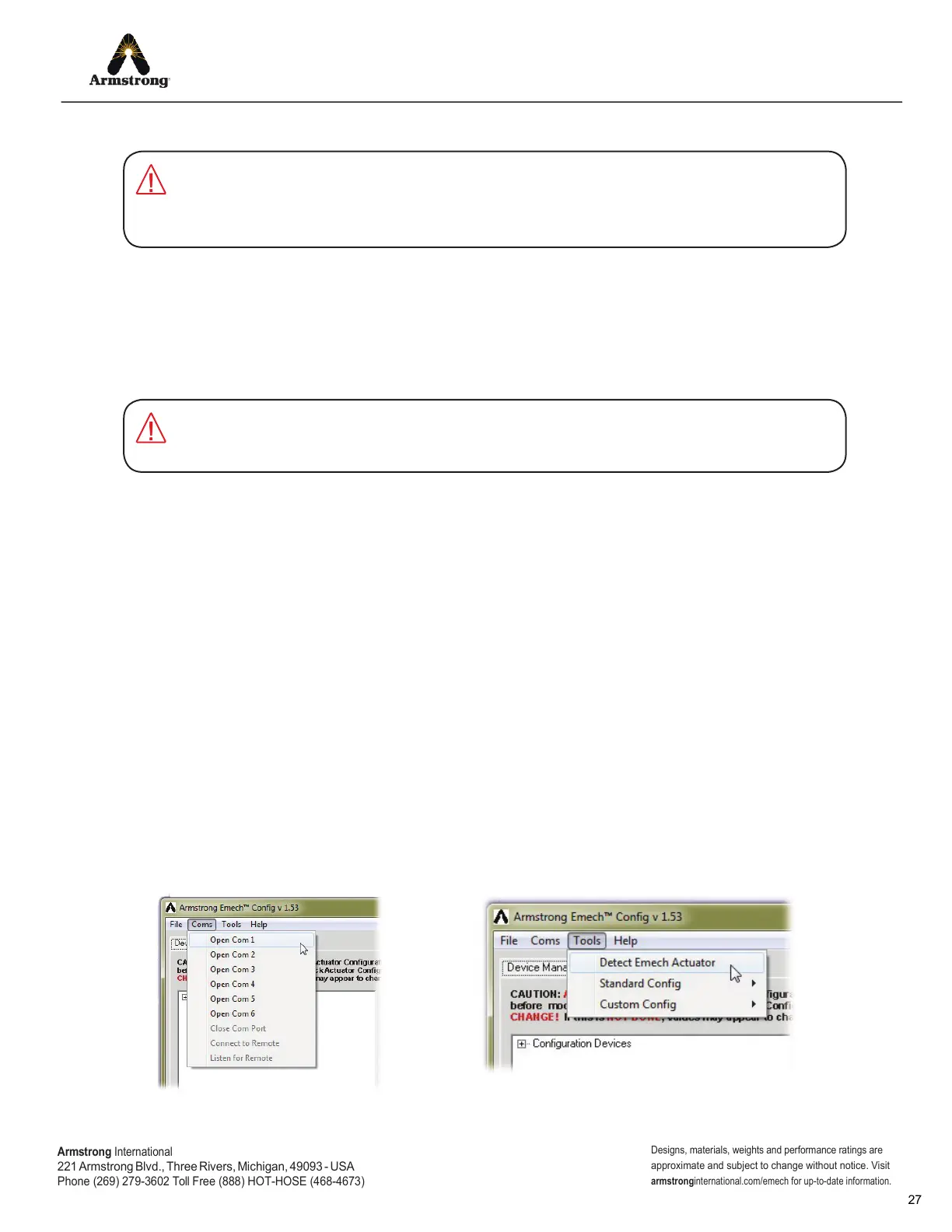
actuator, it is necessary to tell EmechConfig which COM port to use. This is selected from the COMS menu (shown in Figure 5.1).
NOTE: if you are unsure of the COM port being used you can use the ‘Detect Actuator’ function from the ‘Tools’ menu. This will try each
available COM port and test for the presence of an Emech actuator (see Figure 5.2).
If the COM port is successfully opened the message ‘Opening COM x’ will appear in the COMS log in window to the right of the screen.
If the COM port is unavailable, the message ‘Can’t Open COMx’ will be displayed. This could be due to another application using the
COM port, or that the selected port is not recognized by Windows. In this case, try another COM port or close the application currently
using it.
Once the connection is active, a stream of data should begin to appearin the COMS log at the right of the screen. If no activity is
observed, check the cable connection and make sure that the correct COM port is selected.
Emech G1 actuators are shipped as a default standard. Emech actuators are configured to the
valve type when purchased as a system Model Code ,eg ExxW or ExxS. Advise the factory of
any custom or non standard configuration settings on the purchase order at the time of order
placement.
IMPORTANT:
Uninstall any earlier versions of the EmechConfig software before installtng the latest version.
To uninstall, select “Programs>EmechConfig?Unisntall Emech Config” from t
Windows Start menu.
IMPORTANT:
Figure 5.1: Selecting a COM Port.
Figure 5.2: Detecting an Emech actuator if unsure of
which COM port to use.
Armstrong
International
221
Armstrong Blvd., Three Rivers, Michigan, 49093 - USA
Phone (269) 279-3602 Toll Free (888) HOT-HOSE (468-4673)
Designs, materials, weights and performance ratings are
approximate and subject to change without notice. Visit
armstrong
international.com/emech for up-to-date information.


 To Next Page