Chapter 6: Monitoring Your Cable Modem and Connected Network
PN 365-095-28610 x.3 SURFboard SB6190 Cable Modem User Guide
Copyright 2016 ARRIS Enterprises, LLC. All rights reserved. 25
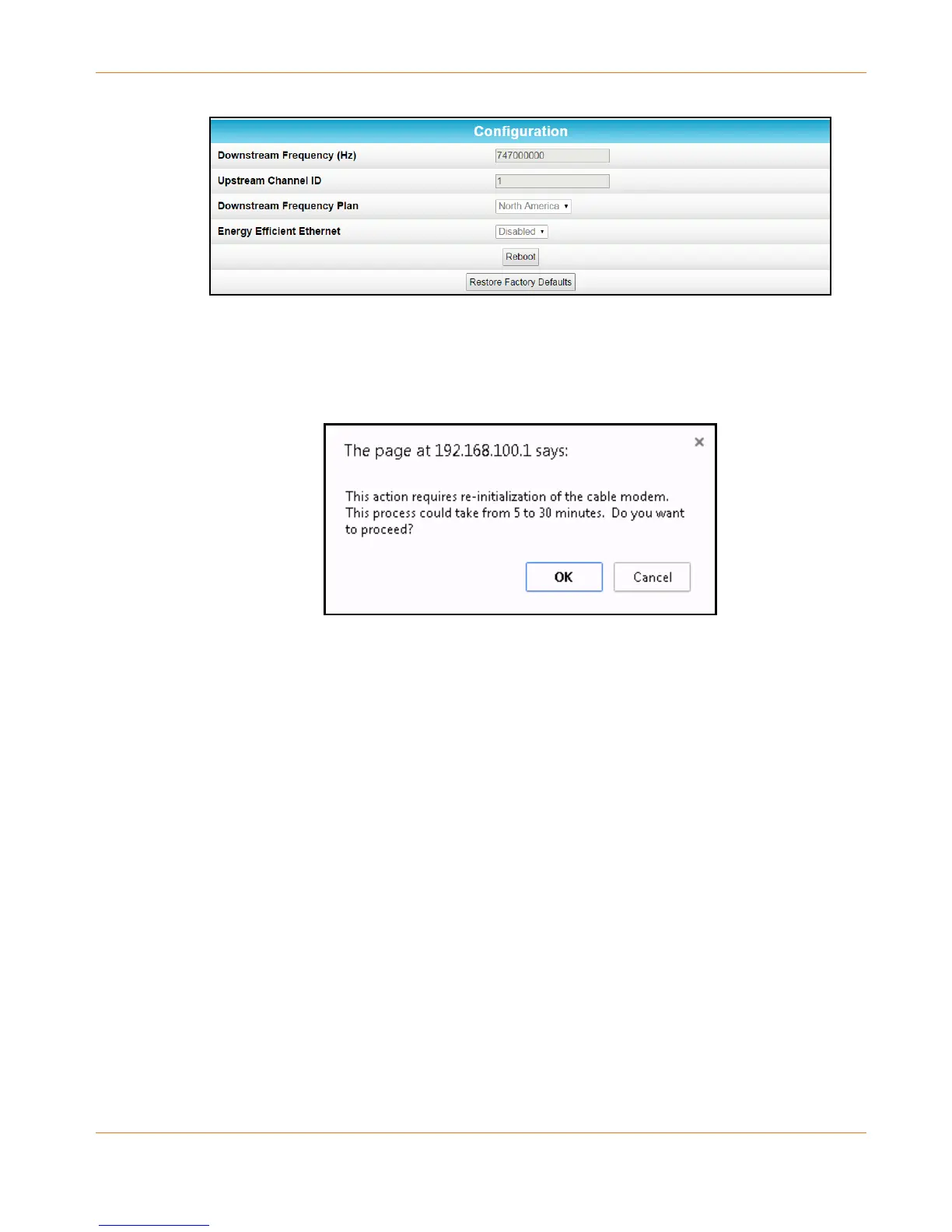
Figure 13: SB6190 Restore Factory Defaults Configuration Screen
3. Click Restore Factory Defaults.
The following message displays:
Figure 14: Restore Factory Defaults Dialog Box
4. Click OK to continue.
The SB6190 Web Manager will automatically open when the Restore Factory Defaults
process is finished.
Restart the SB6190
To reboot the SB6190:
1. Open the SB6190 Web Manager (see Start the SB6190 Web Manager).
2. Click the Configuration menu button or link on the SB6190 Web Manager Menu.
The Configuration screen displays.










 To Next Page