Key Features
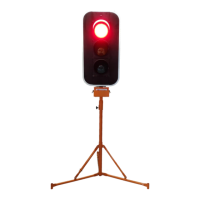
The eSTOP™ is the first Electronic Single Traffic Operator Portable system of its kind. Designed to remove
the Traffic Controllers from the hazard zone, the key features of the eSTOP™ system are:
• Traffic Controllers operate from a safe distance (up to 400m with option to increase distance)
• The eSTOPs works only in the Manual mode. The eSTOPs are controlled only through the HRC. No
automatic operation or vehicle actuated operation or any other buttons or switches on the lanterns
to control the operation of the eSTOPs.
• Can be implemented anywhere a stop/slow baton would normally be used
• HRC can control 1 or 2 eSTOP™ units at a time. (If 2 units are paired to the HRC, the system works
in the shuttle flow mode only)
• Environmentally robust, light weight, three-piece assembly, adjustable height
• Small and rugged Hand Remote Control (IP65)
• Hand Remote Control indicates the traffic lantern states in real time visually.
• Wind load up to 100km/hr when used as per manufacturer’s guidance
• There is a bright Yellow LED at the back of the Lantern units (not visible for the motorists on the
front) which glows only when the Lantern is in Red. This acts as an indication for the workers to
know the status of the lanterns at any time.
• When in operation, the eSTOP Lanterns are very clearly visible for the motorist from long distance.
• The Batteries are of Lithium phosphate which is very safe and will not cause any explosion.
Safety Features
The eSTOP is incorporated with several safety features as listed below.
• If the Lantern rotates more than 20 degrees; the fault is reported on the HRC both visually and the
beeping sound.
• If the Lantern tilts more than 20 degrees or falls over; the fault is reported on the HRC both visually
and the beeping sound.
• If any of the LEDs fail during the operation; the fault is reported on the HRC both visually and the
beeping sound.
• If the communication between the HRC and any of the paired Lantern units fail, all the Lantern
units will go Yellow for 4 seconds and then goes to RED. The fault is reported on the HRC both
visually and the beeping sound.
• If the Operator tries to set 2 lantern units to go Green simultaneously, the software interlocking
feature ensures that both the Lanterns will not go Green. (The HRC beeps indicating invalid
command. The second lantern which the operator is trying to set Green will not go Green)


 To Next Page