Handheld Remote Controller – HRC
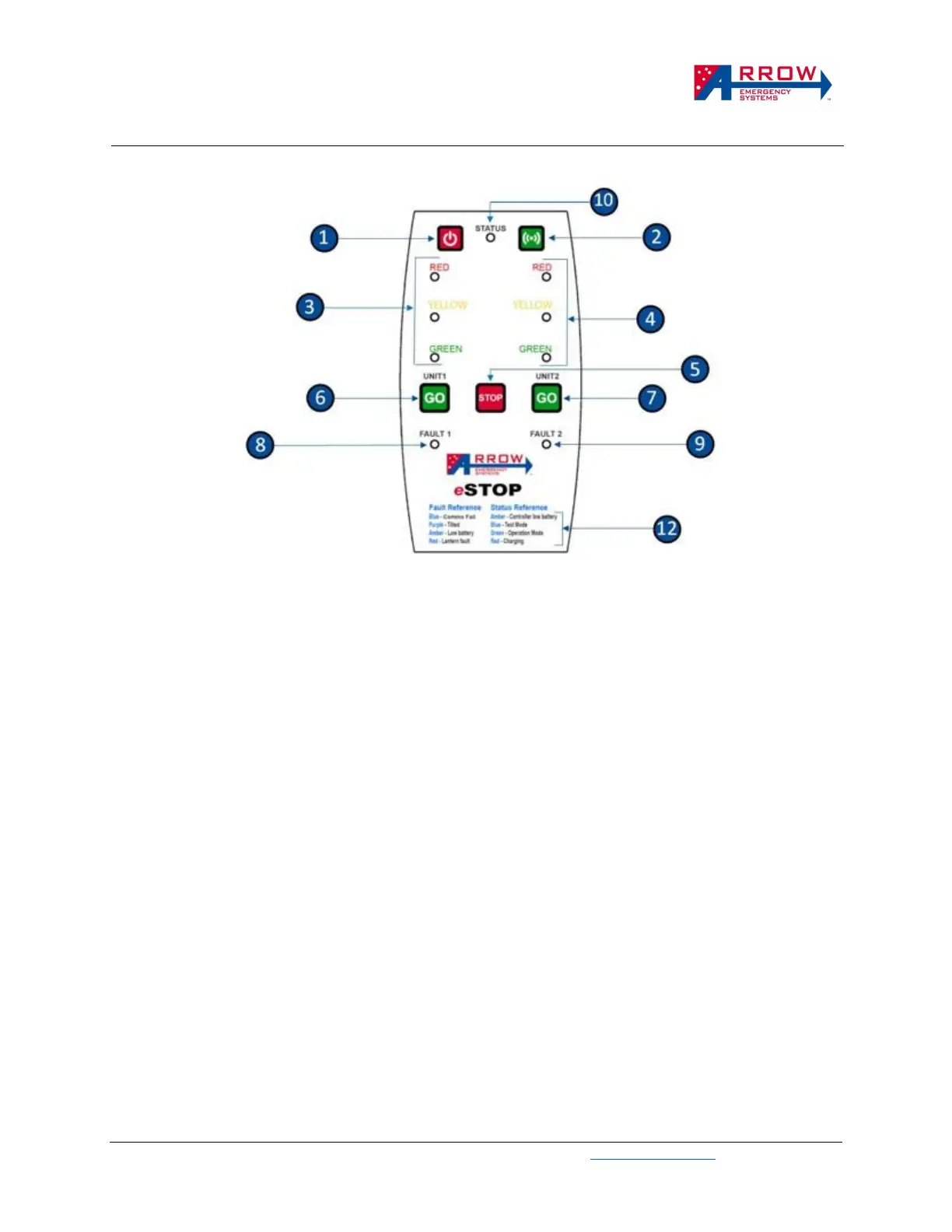
LED indicators – There is 3 type of LED indicators – Lantern, Status, Fault.
▪ Lantern indicators ❸❹ reflects the signal status of the paired lantern units.
▪ Status indicator ❿ represents the states and faults of the over system and indicates the following
colours:
o Red – when the HRC is off, Red indicates the HRC is charging. When the HRC is on, Red indicates
invalid press or failed pairing.
o Blue – once the HRC is powered on, the status indicator is Blue, which represents Test Mode.
o Green – when the HRC is off, Green indicates the HRC is fully charged and stopped charging. When
the HRC is on, Green indicates valid press, or the system is in Operational Mode.
o Yellow/Amber – the Status will flash Yellow/Amber when the HRC batteries is low.
o Blank/no colour – the HRC is powered off, if Pressing the buttons does not sound a beep then the
HRC is faulty or battery is completely dead
▪ Fault indicators ❽❾ represents the states and faults of the respected paired unit.
o Blue – HRC is paired to a lantern unit but communication fail (no connection, may need to re-pair).
o Purple – The paired lantern is tilted and/or rotated from its starting position after Activation.
o Green – The paired lantern is communicating and operating normal.
o Yellow/Amber – The paired lantern battery is low.
o Red – The Paired lantern has a lantern fault in one of the LED.
Modes of Operations – The system runs in 2 modes, Test Mode and Operation Mode
▪ Test Mode (Status LED blue) - When the HRC first power up it is in Test Mode, during this mode you
can pair/un-pair any Lantern units (refer to pairing section). Once it is paired to a Lantern unit (and
Fault light is green), you can do a LED test and check the battery of the Lantern unit (refer Lantern
Battery section).
▪ Operation Mode (Status LED green) - Once the HRC is paired, LED test is performed and the Fault
LED is green, the system is be activated into Operation Mode. During this Mode, the operations of a


 To Next Page