To avoid personal injury or product damage, review the Installation precautions on page 4
before beginning the installation.
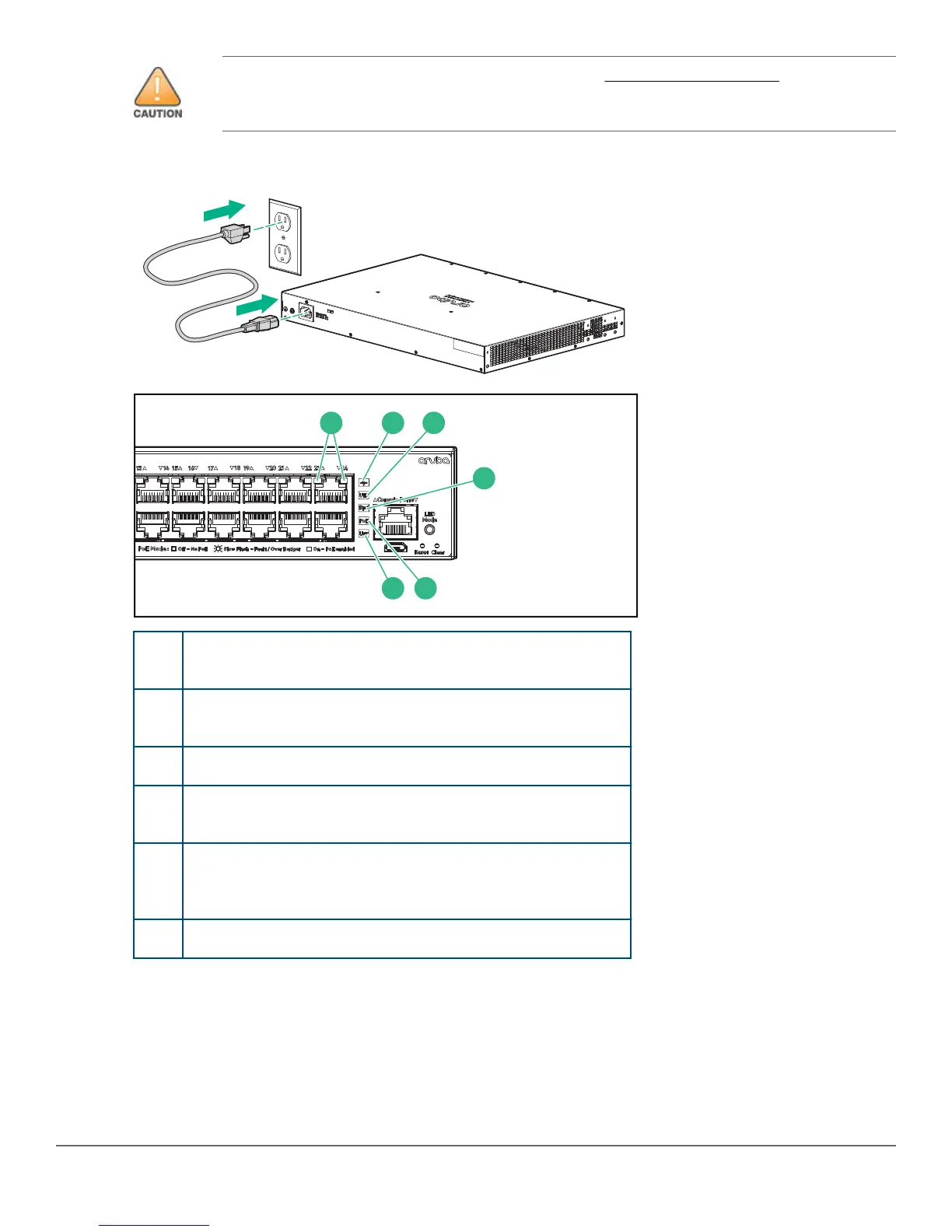
3. Power on and verify that self-test completes normally. An Aruba 2540 24G or 48G switch does not contain a
power on/off switch. It is turned on by connecting the AC power cord to the switch and to an AC power source.
1 Port LEDs: Off after self-test unless a network cable is
connected and the port is receiving link beat.
2 Global Status LED: Green after self-test in default
configuration.
3 Locator/Unit-Identification LED: Off after self-test.
4 Speed Mode Selected LED: Off after self-test in default
configuration.
5 PoE Mode Selected LED (Only on Aruba 2540 models that
support PoE+ operation): Off after self-test in default
configuration.
6 User Mode Selected: Off after self-test in default configuration.
4. Remove the power cord from the switch and the power source.
Mounting Aruba 2540 24-Port and 48-Port switches
Supported mounting options for the Aruba 2540 24-Port and 48-Port switches include:
6 Aruba 2540 24G/48G Switch Quick Setup Guide and Safety/Regulatory Information














 To Next Page