• Rack mount
• Tabletop or desktop mount
Wall-mounting or under-table mounting Aruba 2540 24G and 48G switches is not supported.
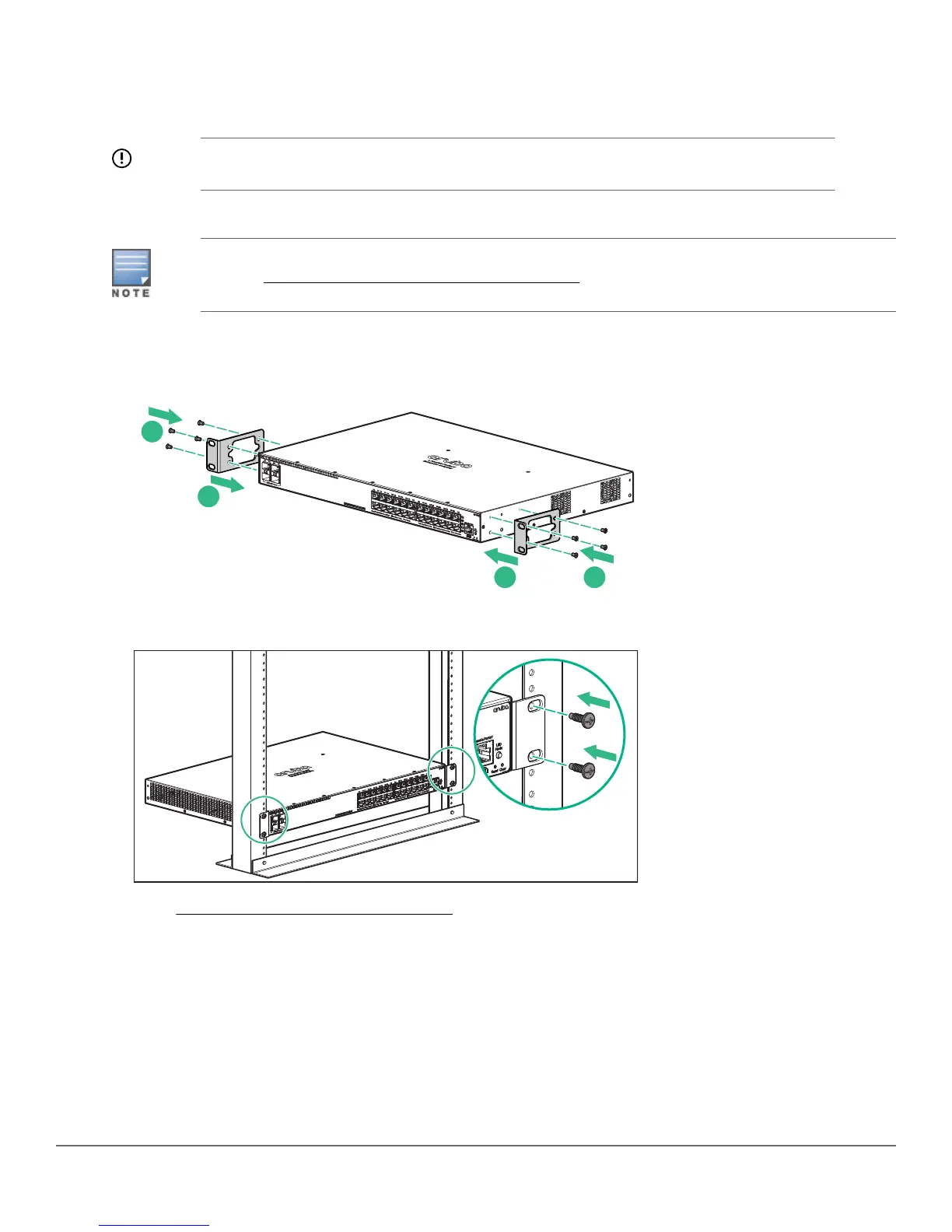
Two-post rack mounting option:
For the four-post rack-mount option, see the Aruba 2540 Switches Installation and Getting Started
Guide at www.hpe.com/networking/ResourceCenter.
1. Use a #1 Phillips (cross-head) screwdriver to attach the accessory kit brackets to the switch using the eight 8–
mm M4 screws.
2. Use the four number 12–24 screws to secure the brackets to the rack.
3. Go to Connecting the switch to the network on page 8.
Tabletop or desktop mounting option
Procedure
1. Attach the four self-adhesive pads (included in the accessory kit) to the bottom corners of the switch, and
place the switch on a secure horizontal surface.
Chapter 1 Aruba 2540 24G/48G Switch Quick Setup Guide and Safety/Regulatory Information 7














 To Next Page