13
8.2.2 Connection via LAN
8.2.3 Bluethooth
Plug in the wired cable to the RJ45 Ethernet, the device will show on the app in about 10 seconds.
(Note: The mobile phone and the device must be in the same network)
H50 has 2 different Bluetooth Mode: TX (Transmitter) and RX (Receiver).
Bluetooth TX:
TX mode is used to connect to Bluetooth speaker or Bluetooth Headphone or other Bluetooth receiver device and
stream music to these devices. You can connect upto 2 device at the same time.
To start connection, first enter any input mode other than Bluetooth mode, then press the Reset button or press the
TX Pair button on the remote controller. This will turn on BT TX pairing and the device will auto connect to Bluetooth
receiver near by.
If you want to connect second Bluetooth receiver, you can repeat the procedure.
* Some Bluetooth receiver might need to press a button to trigger connection, please refer to the Bluetooth receiver user manual.
Bluetooth RX:
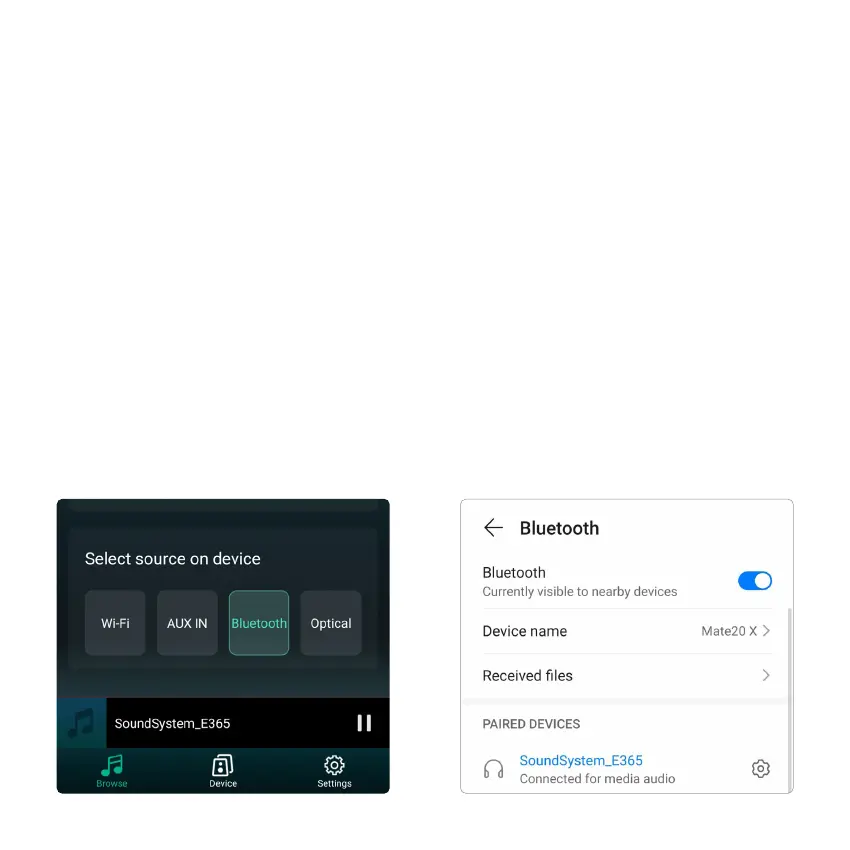
To use Bluetooth RX, please swtich to bluetooth via app or by remote controller, then find bluetooth device
SoundSystem_ XXXX from your phone bluetooth setting and pair it.
You can connect up to 2 mobile devices at the same time, but only one device can play music, the other device needs
to wait till the playing device stop/pause playback.



 To Next Page