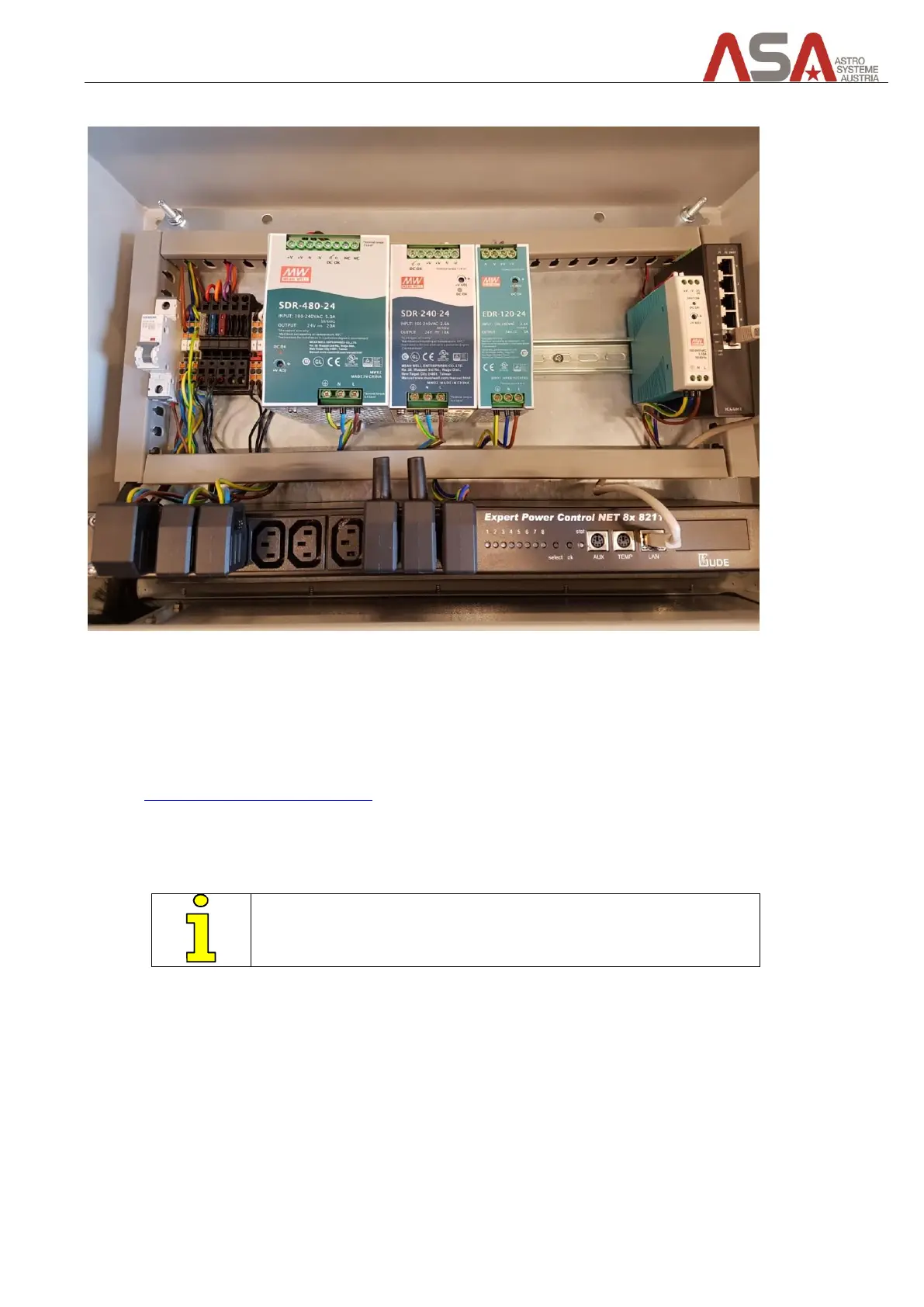
9.2.1 Components inside the cabinet
Figure 35 – cabinet internals
• Power supply unit for main drives 24VDC/20A
• Power supply unit for ancillary drives (focuser, tertiary mirror drive, covers,..) 24VDC/10A
• Power supply unit for internal computer 24VDC/5A
• IP-Remote power switch
Gude Expert Power Control 8211
The remote power switch provides 8 110/230VAC ports that can be switched on and off by using a web
interface. 3 ports are used for powering the main drives controller, ancillary drives controller and
telescope control unit (TCU).
The remaining available ports can be used for powering camera or
other devices, considering the technical specs of the device.
• Ethernet Switch
8 port Gigabit switch
Connects devices such as Telescope and IP-remote power switch to your local network.
Use one of the available ports to connect the Ethernet switch inside the cabinet to your local network.
Use the AC cable to connect the cabinet to your 110/220VAC power socket (UPS).


 To Next Page