EasyManua.ls Logo

ASA Electronics AZ800 - 12 Optics collimation

ASA Electronics AZ800
68 pages
Print Icon
To Next Page IconTo Next Page
To Previous Page IconTo Previous Page
Loading...
AZ800 user manual - hardware
Created by: MPuchner 07.2019
version: 9600021A
Original user manual
page 49 of 68
printed: 04.03.2020
12 Optics collimation
All ASA telescopes are pre-collimated in the factory. So normally you only have to fine-tune
the collimation when installing the telescope.
Nevertheless the whole collimation procedure is described in this chapter.
Fix the elevation axis at an angle, so that the tertiary mirror is easily accessible for you.
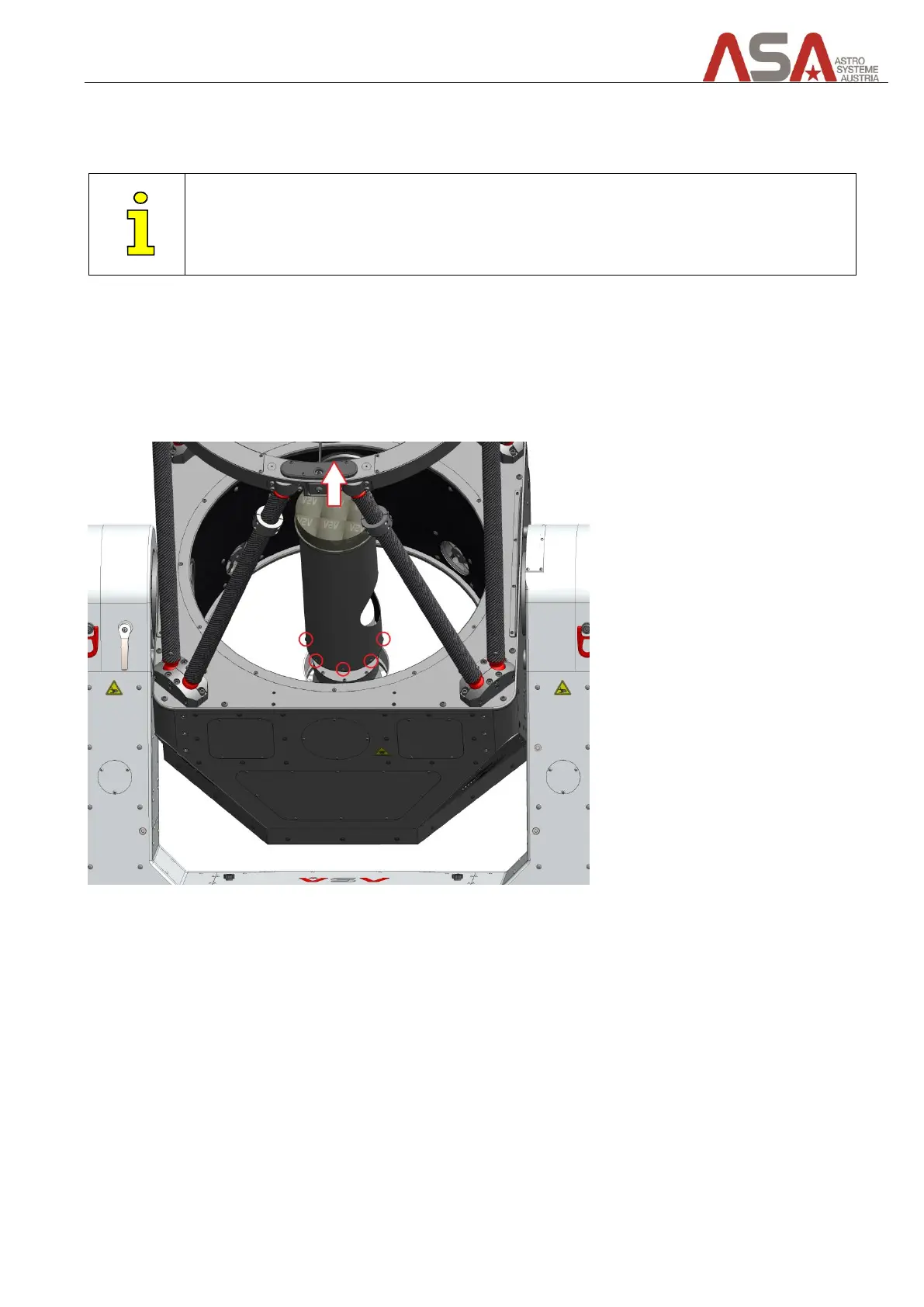
To gain access to the tertiary mirror you need to remove the baffle first. Therefor remove the 8 screws of the
baffle and pull it up.
Be careful not to touch the tertiary mirror!
Figure 44 - how to remove baffle

Table of Contents