Maintenance and Service Manual Version 2.14 Page 27
13. Instruction for the transfer of a new PLC program
With the aid of a memory card a new PLC program can be imported to the PLC.
• position the lift to a station
• remove the front plastic cover
(see chapter 3)
• switch off the lift (red main switch)
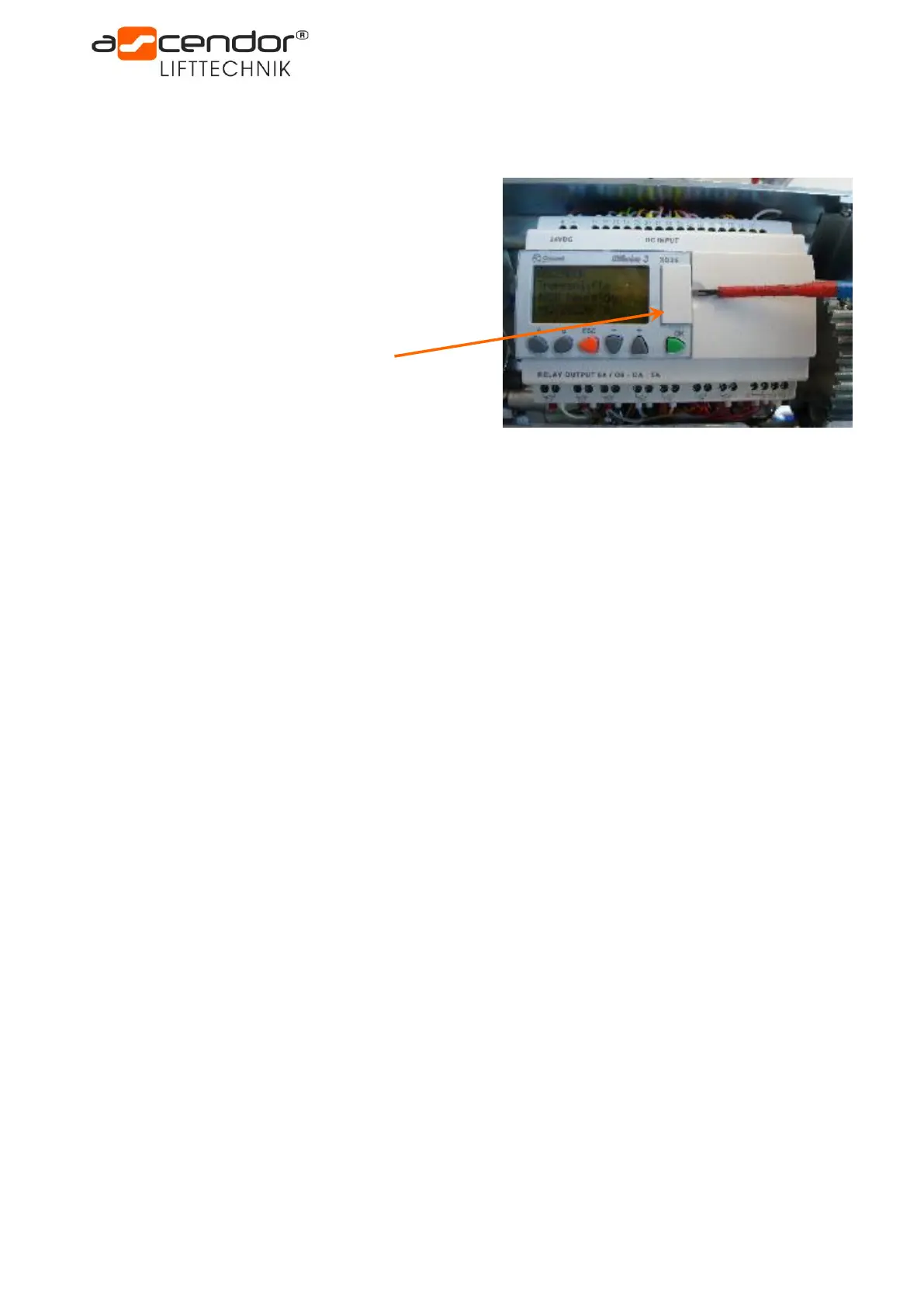
• remove the PLC memory card cover
• insert the new memory card
• switch on the lift
• enter the PLC menu by pressing ESC and OK button for 2 seconds
• in the menu you will see STOP (flashing), press the OK button twice to stop the program
• press – button (down arrow) so long until Memory Card appears
• confirm Memory Card with OK button
• press – button
• restore and OK
• press OK button again
• confirm Run with OK button twice
• programming completed!
• switch off the lift!
• remove the memory card
• put on the PLC memory card cover
• switch on the lift!
• bring both safety bars with „fold platform“ button first into lower and then into upright position
• attach the front plastic cover
• the lift must now undergo a complete operation test
(fold / unfold platform, drive UP / DOWN, emergency stop, stop function access ramps, …)
The lift is now fully operational!



 To Next Page