ASG, Division of Jergens, Inc.
15700 S. Waterloo Road | Cleveland, OH 44110-3898 | Phone: (888) 486-6163 | Fax: (216) 481-4519 | Email: asginfo@asg-jergens.com | www.asg-jergens.com
Page 19 of 23
Software
Torque Link 2.4
Menu Bar
DTT Series Digital Torque Testers
User Manual
This program is designed to enhance the functionality of DTT. The program will retrieve memory from the DTT meter and analyze it
as well as display and analyze readings in real time.
• New: Open a new data sheet
• Open: Open saved “*.tl” data les to the table
• Save: For data storage in the form of torque le “* .tl”
• Print: Command to print directly to the printer
• Export to Excel: Save and export the data to Excel spreadsheet
• Click To Connect: Connect to DTT meter
• Download: For downloading the data in the memory of DTT
• Delete Last: To delete data at the end of the table
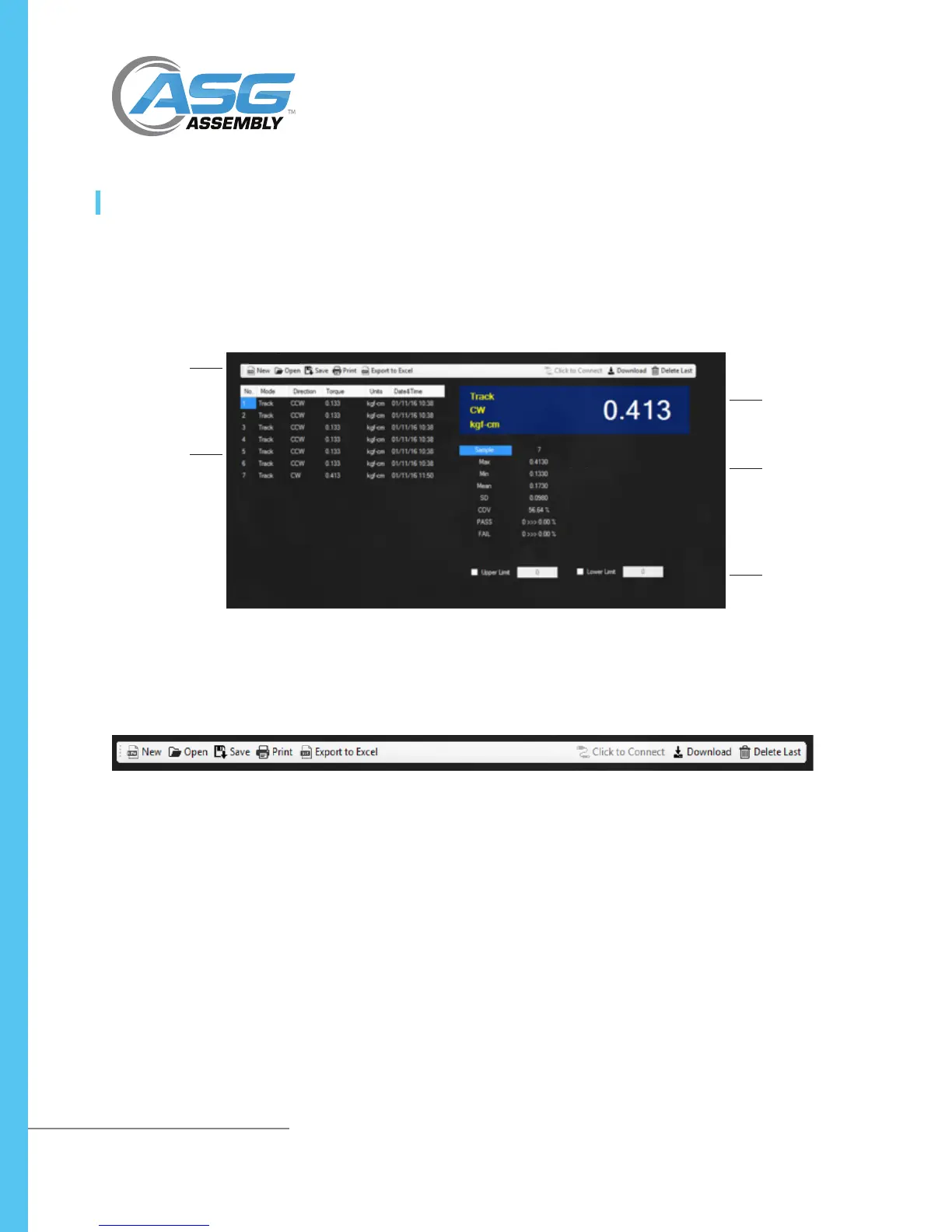
Menu Bar:
Displays all the
program’s menu
Table: Shows
the information
retrieved from
DTT memory
and reading
taken in real
time
Real Time: The area
that shows the data
retrieval in real time
Result: Shows the
analyzed result
Pass/Fail: The area
that shows the result
of the set conditions
of the test tools where
the upper and lower
limits are entered and
enabled



 To Next Page