ASG, Division of Jergens, Inc.
15700 S. Waterloo Road | Cleveland, OH 44110-3898 | Phone: (888) 486-6163 | Fax: (216) 481-4519 | Email: asginfo@asg-jergens.com | www.asg-jergens.com
Page 23 of 23
Software (Continued)
Capturing Data in Real Time
Error
DTT Series Digital Torque Testers
User Manual
1. Plug the USB cable into the DTT meter and the PC
2. Turn on the DTT meter
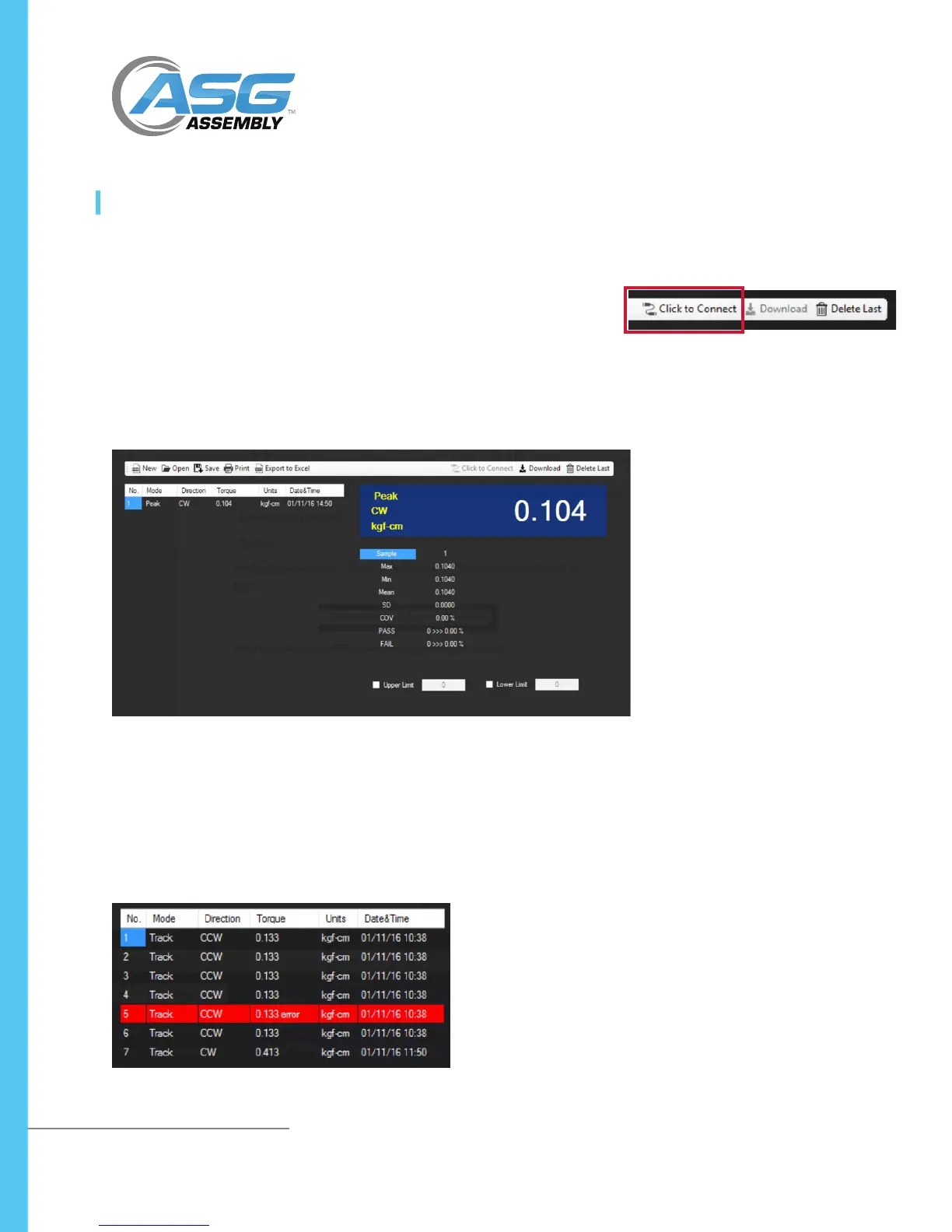
3. On the menu bar in Torque Link 2.4, select the “Click to Connect”. TorqueLink
will automatically nd and connect with the DTT meter.
4. When DTT is in Peak or F-Peak mode, peak data will be sent automatically and
show in the program
• When information retrieved from the DTT recognizes an error, program will notify
by highlighting in red color, and this data will not be analyzed
• Data that has errors can be corrected manually by double-clicking to edit them
directly



 To Previous Page