Audio controls
Your ASTAK is capable of two-way audio functionality. Connecting a
speaker to your camera, allows you to speak from wherever you are,
provided you have a microphone on the computer that you are watching from. To
turn
this feature on, simply select the microphone (left above).
The camera features both an on-board microphone as well as a jack for an external
microphone. When you view your camera, you are able to listen to these microphones.
Click on the speaker icon (right above) to turn the audio on.
Media
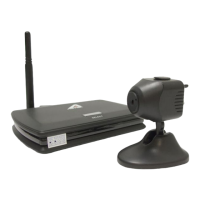
Selecting the Media tab provides access to the image and video settings.


 To Next Page