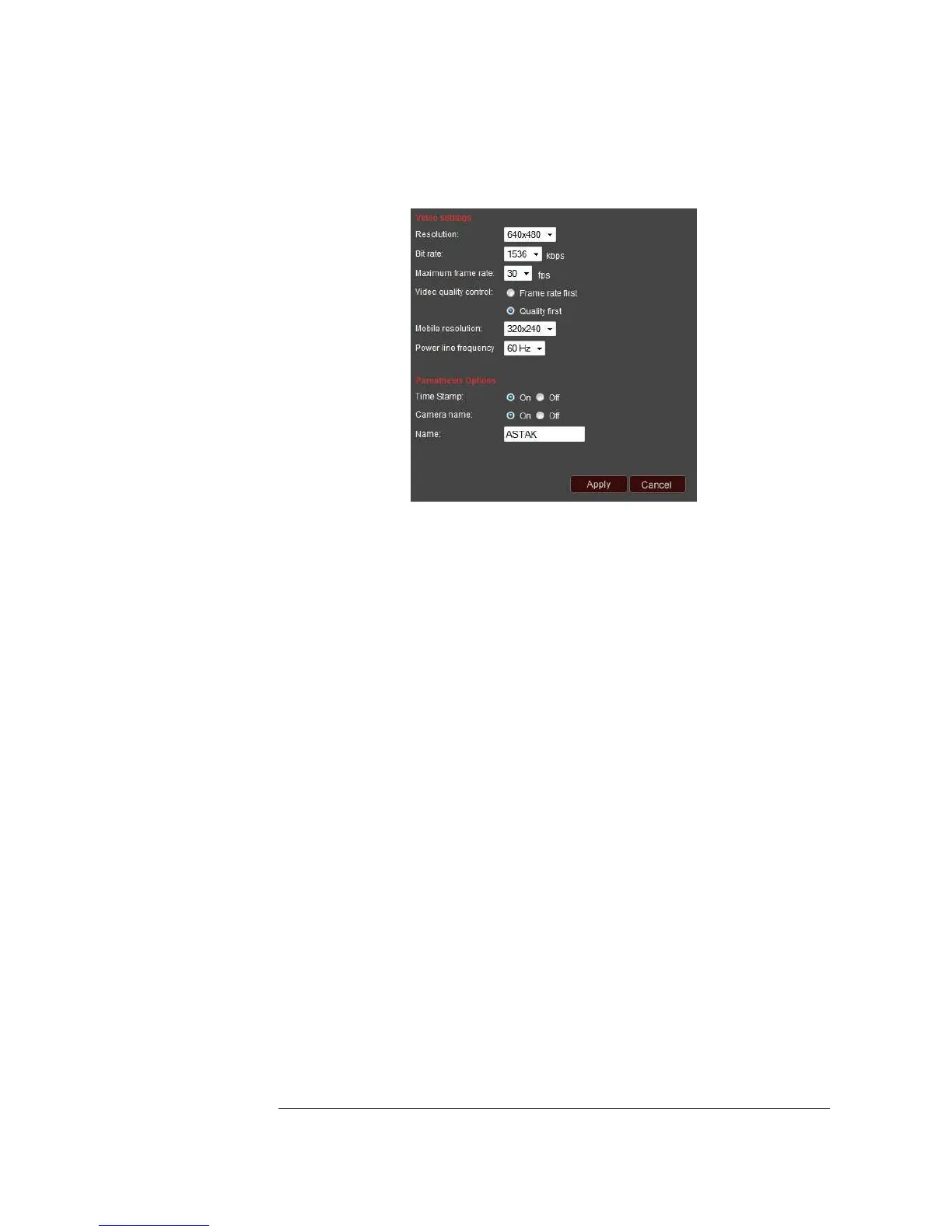
Video settings
Resolution: There are three different resolution options you can choose from:
640x480, 320x240, or 160x120.
Bit Rate: This specifies the number of kilobytes per second of the video stream.
Increased bit-rate equates to improved quality and increased size.
Note: to get good video and audio quality, the bit-rate should be set lower than the
speed of your internet connection’s upload speed.
Maximum Frame Rate: This controls how many frames per second the video is
displayed with. Choosing a higher number will result in a smoother video stream.
Video Quality Control: For a real-time, fast response, choose the “Frame rate first”
option. Choosing the “Quality first” option uses a buffer so that the video stream is
delayed a few seconds, but with improved overall smoothness and quality of the video.
Power Line Frequency: Different countries use different standard electric currents. If
you use your camera in the USA, please choose the 60Hz option. If you intend to use
your camera in certain other countries, such as Europe and China, please choose the
50Hz option.
Time Stamp and Camera Name (Parenthesis options): Selecting or turning on the
Time Stamp option will place a small time indicator at the top right corner of your
video. This will help you keep track of when your videos were taken.
Name: Selecting this option will place the name of your camera (which you can select)
at the top left corner of your video.
*Please click Apply to save your changes.*


 To Next Page