Advanced
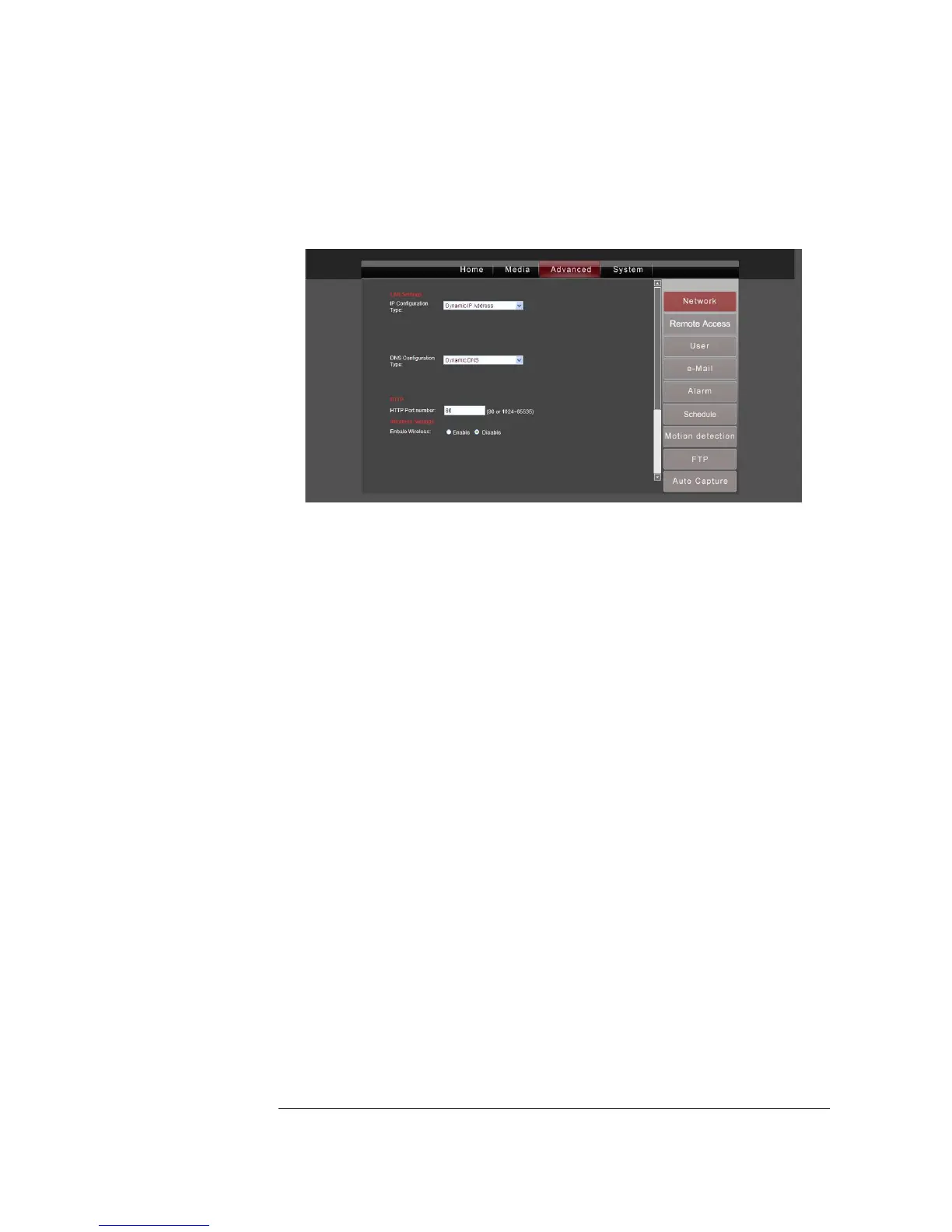
Click on the Advanced tab to access advanced user settings.
Network
Warning: Only advanced users should configure network settings.
IP Configuration Type: You can choose from a Dynamic or Fixed IP address. If you
choose a Dynamic IP address (default), your IP address will be assigned automatically
by your router. If you choose Fixed IP address, you will need to enter all your
information manually.
DNS Configuration: You can choose from a Automatic or Fixed DNS (Domain Name
System). As implied by the name, automatic DNS is assigned during the connection
stage, and Fixed DNS is a value that you enter manually.
HTTP Port Number: The default is 80. Changing this value with restart the camera.
Enable Wireless: If you want to enable wireless mode, click on Enable, and then click
on the Search button next to the SSID row. A popup window will appear that lists
available wireless networks in your location. Choose a wireless network and click OK.
For more information, see Configuring for wireless networks in Chapter 2.
Mode: Select either Infrastructure or Point to Point. Select the Infrastructure mode if
you are using a wireless router. Select Point to Point mode if you are connecting
directly to another wireless PC.
Security mode: Choose a security mode that matches your router’s security mode.
(You can refer to your router manual for this information.)
*Please click Apply to save your changes.*


 To Next Page