PLG12863E AFI4700 Pilot’s Guide 22
aircraft’s pitch along the pitch ladder and roll along the roll angle scale
within the ADI.
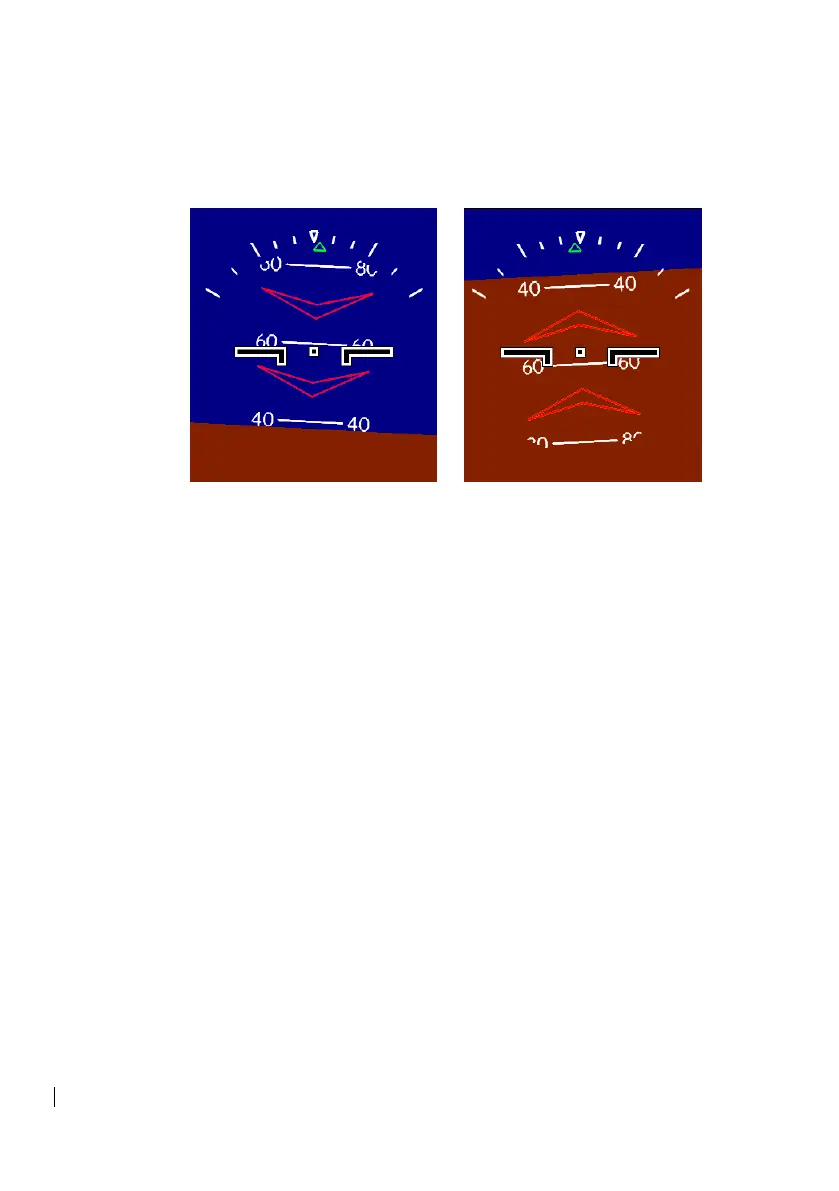
2.2.1 Extreme Attitude
Figure 2-3 Extreme Attitude
Extreme attitude is defined as a roll greater than 65°, 30° pitch up, or
20° pitch down. Red chevrons are displayed at +/- 50° and +/- 70°
pitch up and pitch down respectively. At pitch angles above 80° the
brown color is removed, likewise at pitch angles less than -80° the
blue color is removed with a white dot appearing at +/- 90° pitch.
At extreme pitch attitudes, the ADI will never be fully blue or fully
brown. The horizon line will always remain visible.
2.3 Radar Altimeter & Decision Height
The radar altimeter displays the aircraft height above the ground via
radar sensing in the upper right corner of the ADI display.
The decision height (DH) is provided as a visual cue as the aircraft
crosses a selected altitude. DH is indicated just below the radar
altitude in the upper right corner of the ADI. When in the DH menu,
DH can be adjusted on the front bezel from 9’ to 1000’ with a
progressive resolution using the Left and Center Push Keys. The left
push button decreases the DH, and the center push button increases
the DH Height. When DH is configured for rotary on the configuration
page, the right rotary knob can also be used to adjust the DH. When
in the DH menu, the right rotary knob adjusts only the DH, and not the
HDG. When not in the DH menu, the right rotary knob adjusts the


 To Next Page