PLG12863E AFI4700 Pilot’s Guide 53
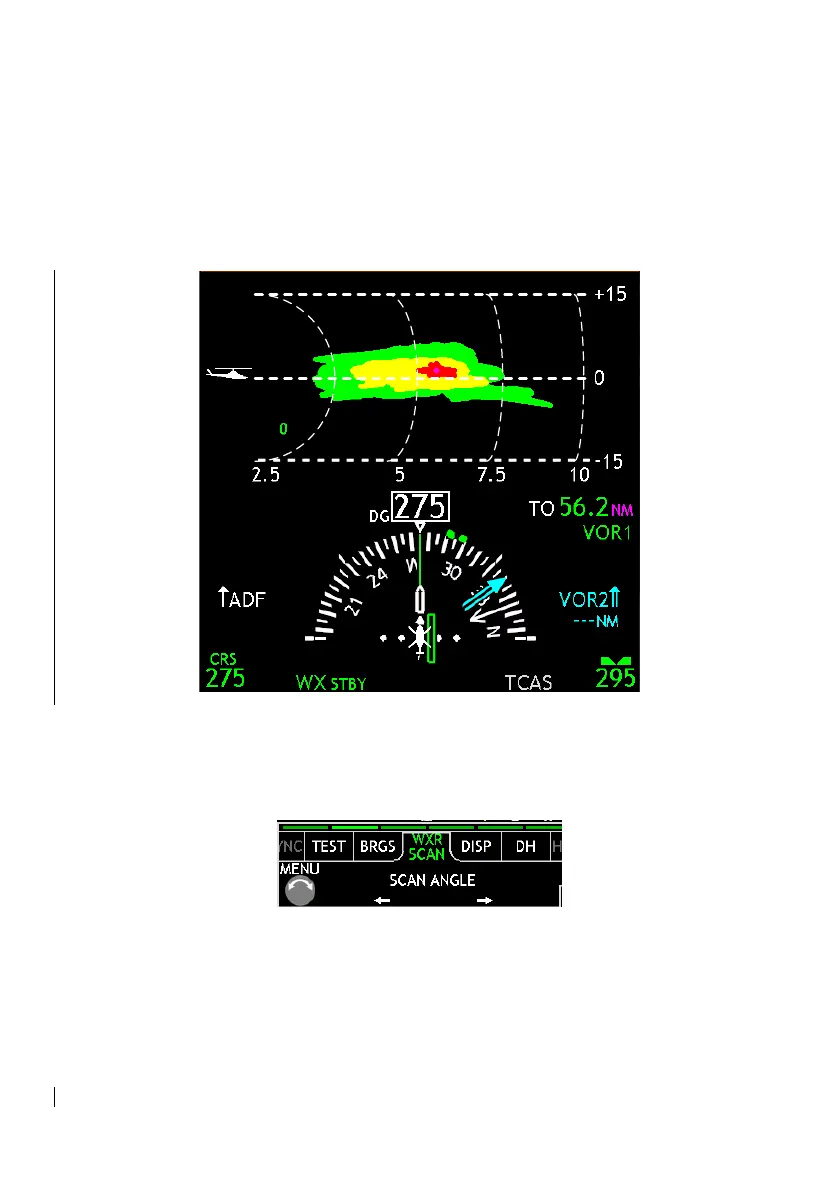
The HSI changes formats to display the top half of the compass and a
side view of the Weather Radar output. The range of this profile view
is selectable using the bottom center bezel buttons, giving the full
ranges of [2, 5, 10, 20, 40, 80, 16, 240, or 320 NM]. The inner three
rings are ¼, ½, and ¾ of the full range scale.
Figure 3-12: Weather Radar Vertical Profile
WXR SCAN is a menu tab that appears only when in Vertical Profile
mode. It allows the pilot to control the left-right angle in which the
weather radar unit is pointed.
Figure 3-13: WX VP Menu
To exit Vertical Profile mode, either press the left bezel button to cycle
out of WX display, or navigate to the DISP menu tab and select VP.


 To Next Page