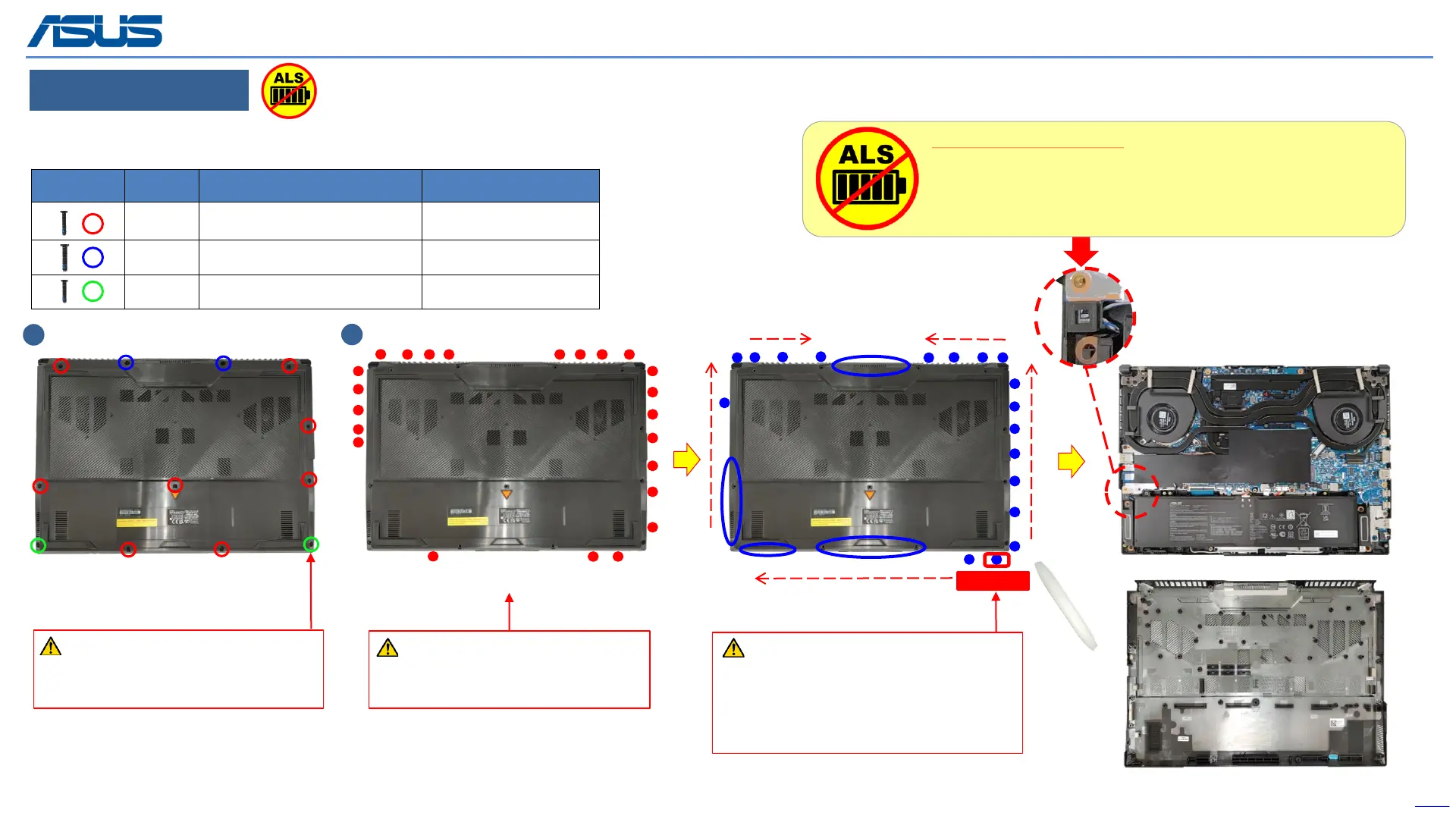
BOTTOM CASE
Step 1 : Remove screws*11pcs.
Step 2 : Use the non-conductive pry tool to pry the bottom case.
Disassembly Notice
The screw is unable to remove
from bottom case, so please always
loosen it last, and lock it at first.
Back
11
To avoid the bottom case hooks,
don't insert plastic blade in each red
circle.
Please follow above arrow direction
with using plastic blade to pry bottom
case in each blue circle location.
(To avoid the bottom case hook, please
prying at each blue circle location.)
1
2
Screws QTY Spec Torque (kgf-cm)
8 M2.5*9.5L(4.6,0.85)(K)#1 2.5±0.2
2 M2.5*12L(4.5,0.8) (K) #1 2.5±0.2
2 M2.5*8.0L(4.5,0.8) (K)#1 2.5±0.2
Start
The device has an Ambient Light Sensor (ALS) for power-off protection Function.
Ambient Light Sensor (ALS):
1. After removing the BOTTOM CASE, the ambient light sensor
detects light, system will automatically power off for protection.
2. Make sure assemble bottom case back and plug in AC adapter,
then you can power on normally.



 To Next Page