SSD
Screws QTY Spec Torque (kgf-cm)
2 M2*3L (5.6,0.8)(K)#1 2.0
±
0.2
Back
13
Disassembly Notice
2
1
Tear off
The device has an Ambient Light Sensor (ALS) for power-off protection Function.
Unscrew
Tear off
Be careful with top Mylar. The Wrong
direction of tearing maybe cause damage.
3
Remove
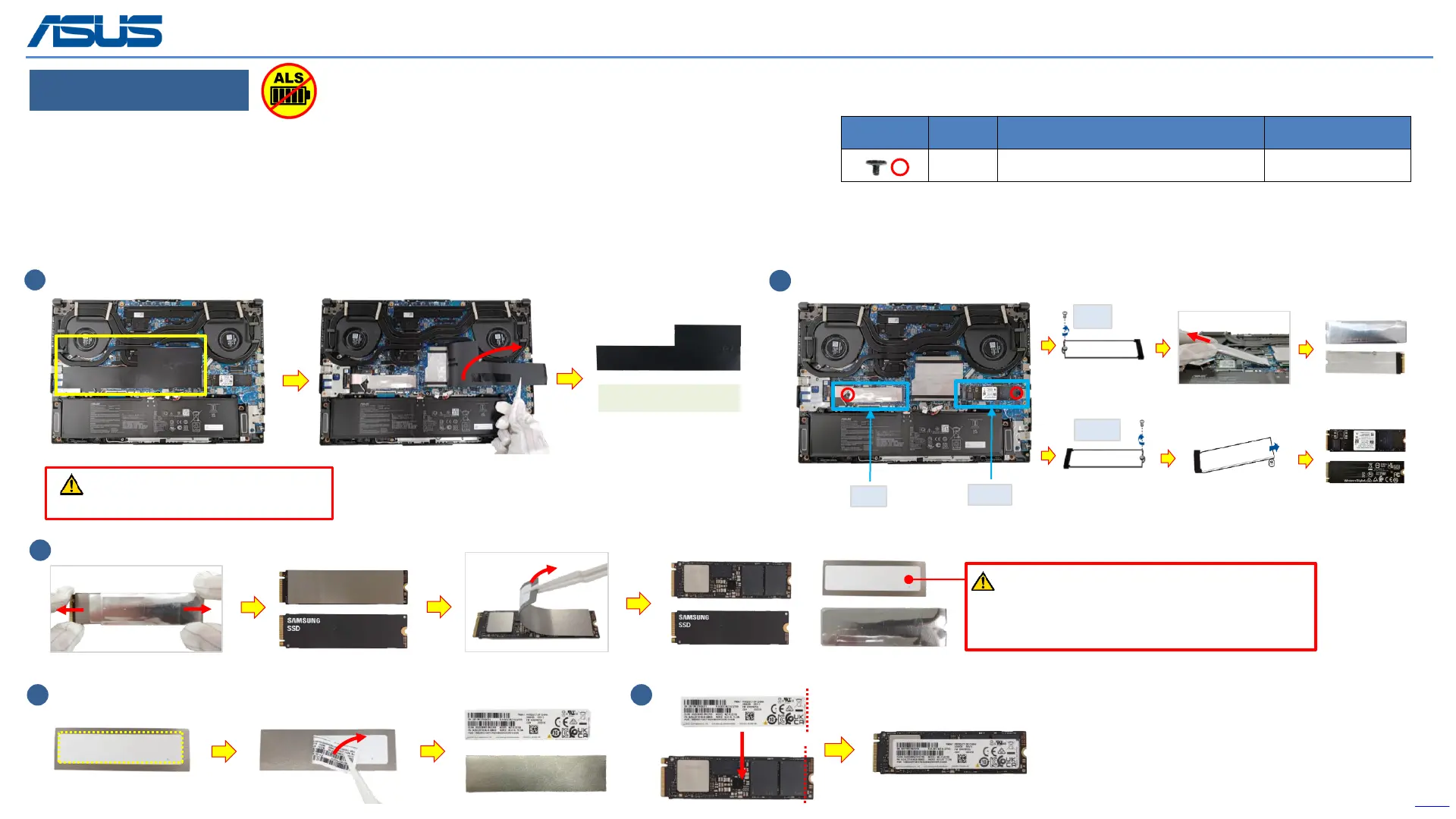
Step 1 : Tear off the (yellow mark) DIMM COVER MYLAR.
Step 2 : Remove the (red mark) screw and M.2 card (SSD).
Step 3 : Remove the AL FOIL and ABSORBER of the left-M.2 card (SSD).
Step 4 : Peel back the SSD LABEL from the ABSORBER carefully.
Step 5 : Paste the SSD LABEL on M.2 card (SSD).
*Please keep these parts, they will be reused for new SSD installation.
4 5
If the SSD label is torn off during disassembly,
please see step 4-5 to paste it back on the SSD card
to avoid the situation that it cannot be returned to
the warehouse.
(Rear)
(Front)
(Rear)
(Front)
left
right
left
right
(Rear)
(Front)
(Rear)
(Front)
DIMM COVER MYLAR



 To Next Page