2-25
ASUS RS700-E9 Series
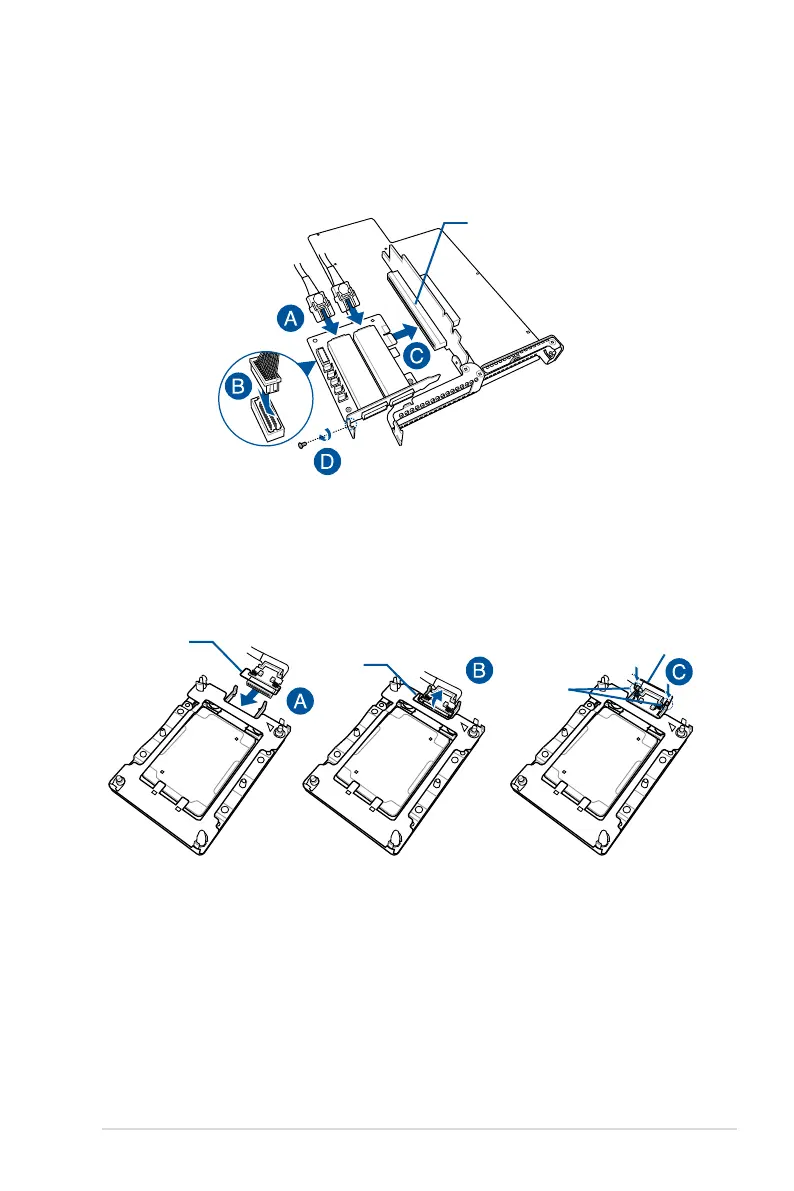
8. ConnecttheinternalOMNI-PATHcables(A)andtheOMNIPcabletotheASUSHFI-
OMNIcard(B),installtheASUSHFI-OMNIcardintothex16slotonthebutteryriser
cardbracket(C),thensecureitwiththescrew(D).
9. Connect the other end of the internal OMNI-PATH cable into the Intel
®
Xeon
®
Scalable
ProcessorsFamilySerieswithOMNI-PATHFABRIC(A),liftthemetalcliponthe
internal OMNI-PATH cable (B) and secure it down to the metal socket hooks on the
CPU socket (C).
PCIE x16 slot
Metal clip
Metal clip
Metal clip
Socket hooks




 To Next Page