2-19
ASUS RS720-E9 Series
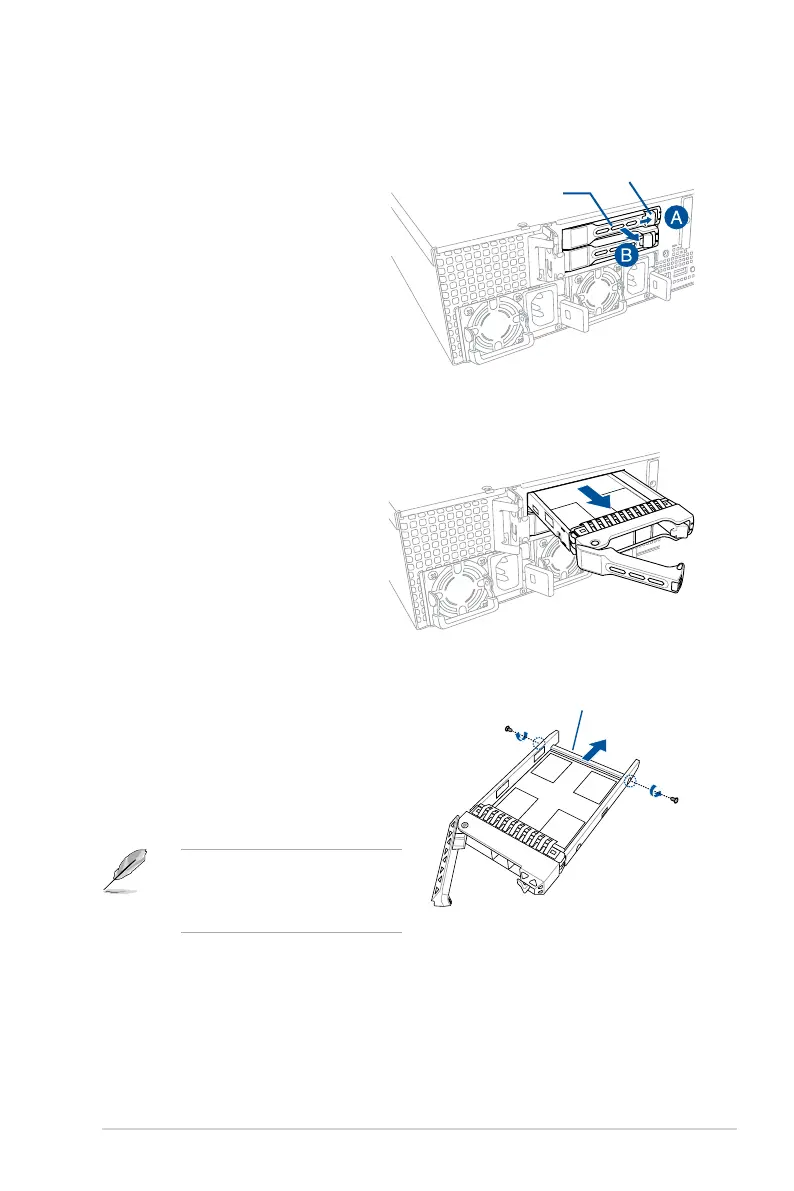
To install a 2.5” hot-swap storage device to the rear bay (optional):
1. Push the spring lock to the right (A)
then pull the tray lever outward (B)
to release the tray. The tray ejects
slightly after you pull out the lever.
Spring lock
Tray lever
2. Firmly hold the tray lever and pull the
tray out of the bay.
3. Placethestoragedevicetrayonaat
and stable surface.
4. Release the screws on each side of the
storage device tray to release the metal
beam.
The metal beam supports the storage
device tray horizontally to prevent the
storage device tray from bending or
deforming.
Metal beam














 To Next Page