2-15
ASUS RS720-E12 Series
2.4.2 Memory Configurations
You may install 32GB, 64GB, and 128GB RDIMMs or 3DS RDIMMs into the DIMM sockets. If
you are not sure on which slots to install the DIMMS, you can use the recommended memory
configuration in this section for reference.
• Refer to ASUS Server AVL for the updated list of compatible DIMMs.
• Always install DIMMs with the same CAS latency. For optimum compatibility, it is
recommended that you obtain memory modules from the same vendor.
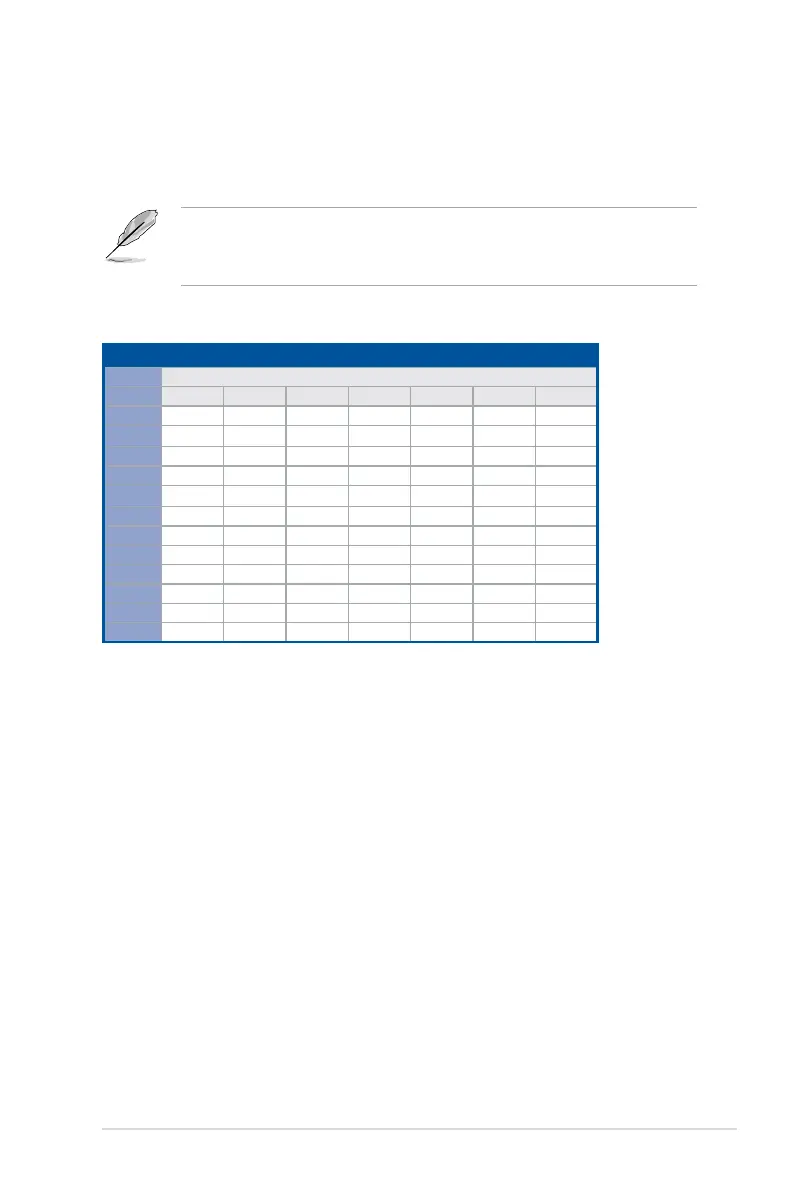
Recommended memory configuration for 1 CPU Configuration
1 CPU Configuration (must be on CPU1)
DIMMs
CPU1
1 2 4 6 8 10 12
A1
• • • • • • •
B1
• • • • •
C1
• • • •
D1
• • •
E1
• •
F1
•
G1
• • • • • •
H1
• • • • •
I1
• • • •
J1
• • •
K1
• •
L1
•



 To Next Page