Chapter 2: Hardware Information
2-42
2.7.6 Installing an ethernet expansion card to riser
bracket 4
The pre-installed riser card bracket 4 can support a 4-port Intel
®
I350-AM4 1G LAN controller
expansion card or 2-port Intel
®
X710-AT2 Gigabit 10G LAN controller expansion card.
Do not install a 4-port Intel
®
I350-AM4 1G LAN controller expansion card if you plan to
install an external rear fan.
To install a 4-port or 2-port ethernet expansion card on the riser card bracket:
1. Follow steps 1-3 of
Installing an expansion card to riser bracket 4
to remove riser
card bracket 4 from the chassis.
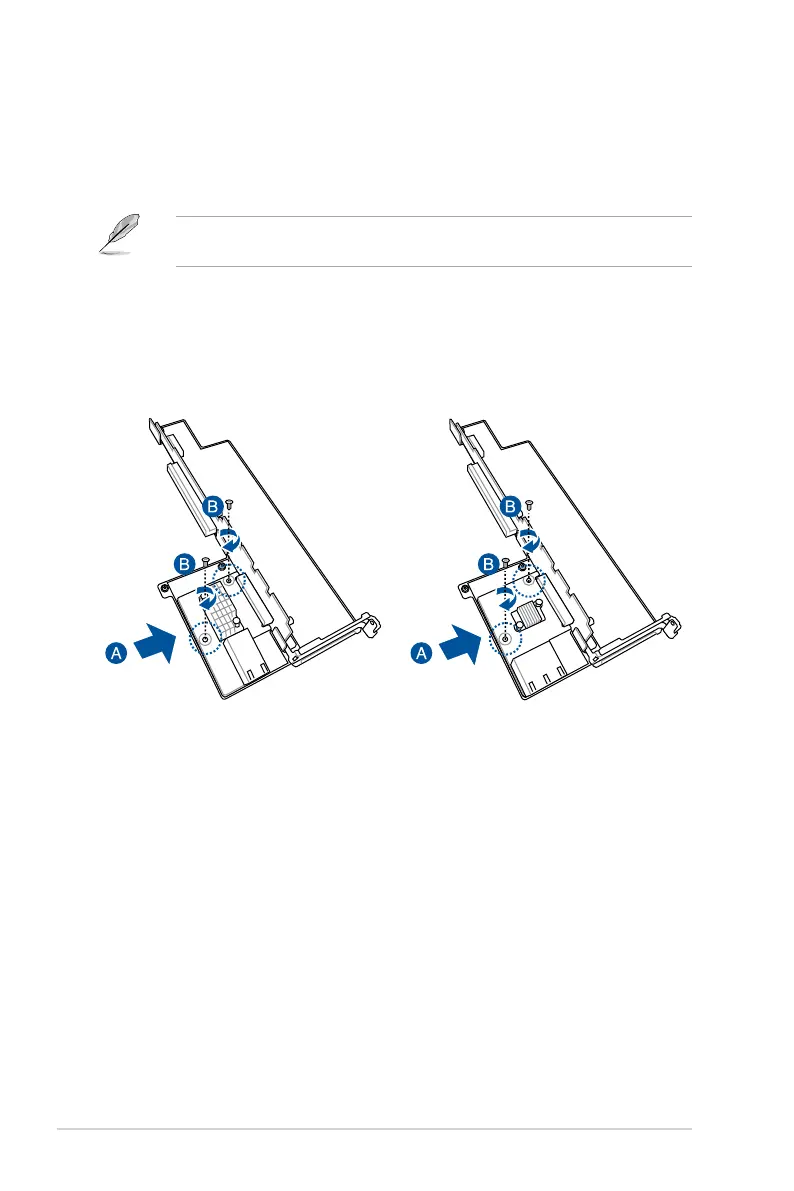
2. Insert the 4-port or 2-port ethernet expansion card to the
RS2_LAN_PCIE1
slot (A) on
the riser card bracket, then secure it using two (2) screws (B).
2-port Ethernet expansion card 4-port Ethernet expansion card
3. Follow step 6 of
Installing an expansion card to riser bracket 4
to install riser card
bracket 4 into the chassis.



 To Next Page