2-41
ASUS RS720-E12 Series
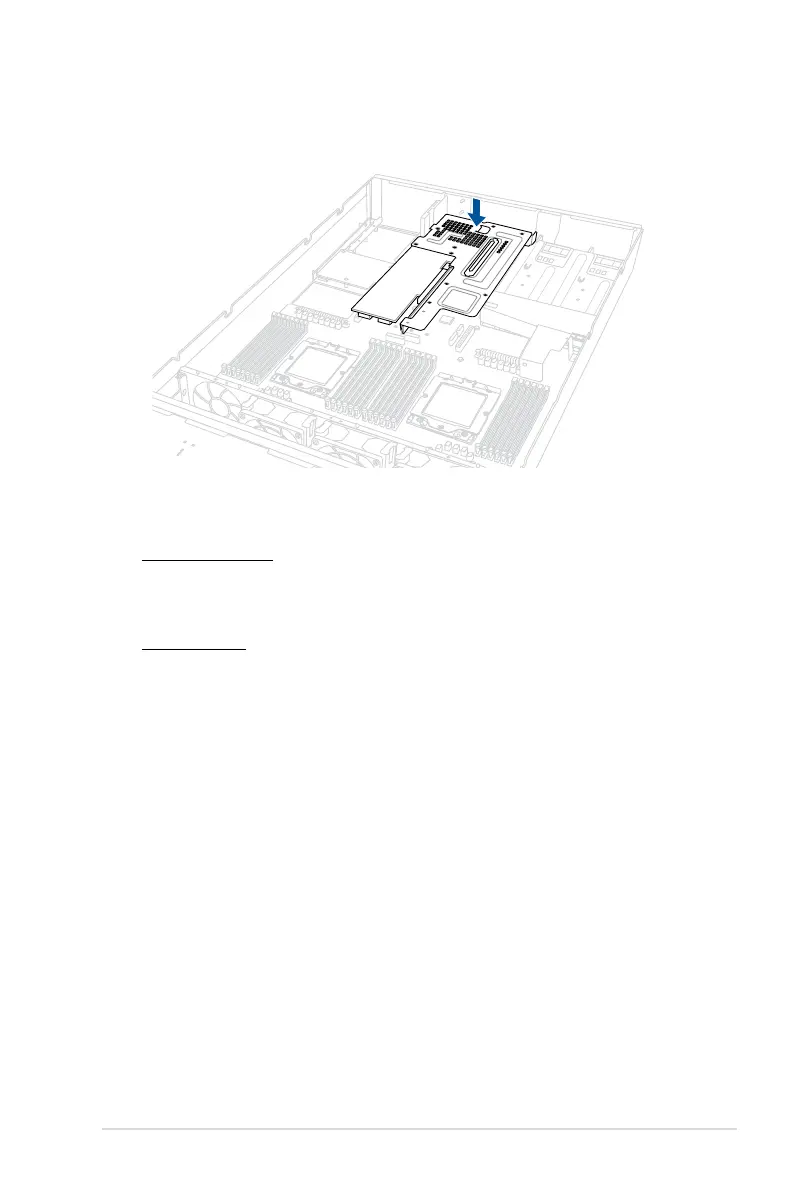
6. Install the riser card bracket and the expansion cards assembly into the PCIe slot on
the motherboard. Ensure that the golden connectors of the riser card bracket is firmly
seated in place.
7. Install the riser card brackets on the top section. You may refer to the following sections
depending on the system model:
For Standard model:
Please refer to steps 8 and 9 of
Installing an expansion card to riser card bracket 1
(for standard model)
, and
Installing an expansion card to riser card bracket 2 and
3 (for standard model)
sections.
For GPU model:
Please refer to steps 15 and 16 of
Installing an expansion card to riser card bracket
1 (for GPU model)
, and steps 10 and 11 of
Installing an expansion card to riser
card bracket 2 and 3 (for GPU model)
sections.



 To Next Page