33
SETTINGS
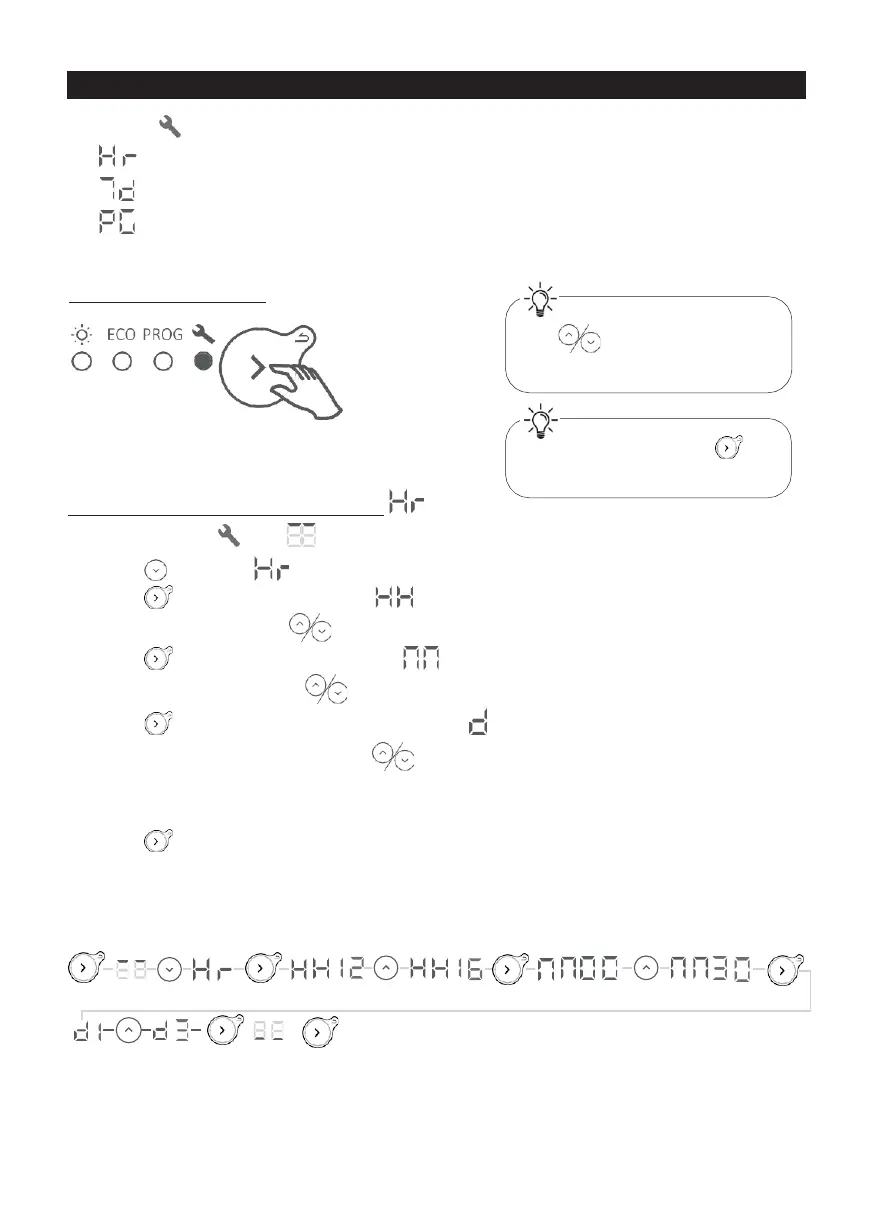
In Settings , you can:
• : Set the time and day;
• : Select the program (P1 to P7) for each day of the week (d1 to d7);
• : Personalise each of the programs (P1 to P7), choosing the operating
program (Co, Ec, oF) for each hour of the day (from 00:00 to 23:00).
Selecting settings
Setting the time and current date
1 - Select Settings . The symbol will be displayed
2 - Press to display .
3 - Press to display the time. The symbol will flash alternately with the hours.
4 - Set the hours using the buttons.
5 - Press to display the minutes. The symbol will flash alternately with the minutes.
6 - Set the minutes using the buttons.
7 - Press to display the day of the week. The symbol will flash alternately with the day.
8 - Set the day of the week using the buttons.
9 - Press to confirm.
10- Press again (press and hold) to exit the menu.
Example: to set 16:30 on a Wednesday:
X2
Press and hold the buttons
to scroll through the
numbers quickly.
Press and hold the
button to go back.












 To Next Page