34
EN
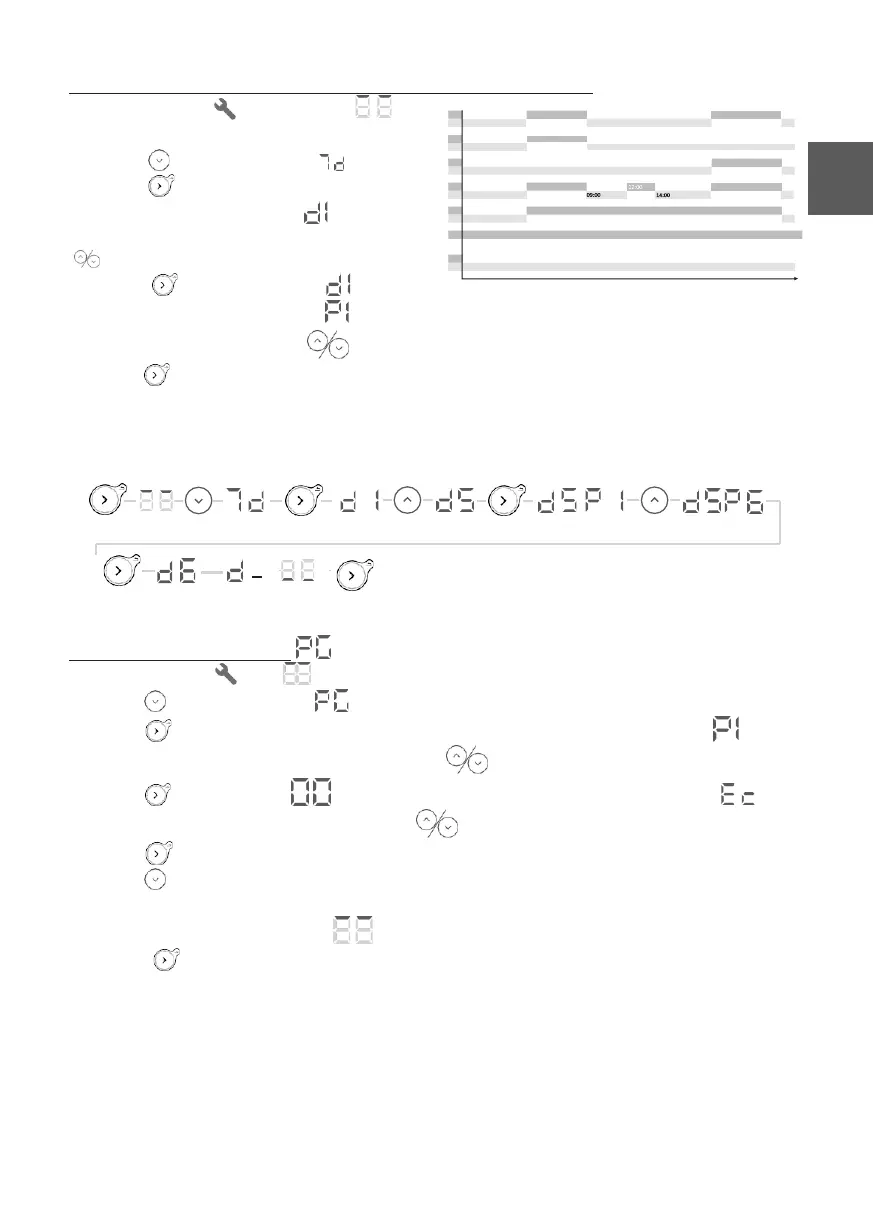
Selecting a pre-defined program for each day of the week
1 - Select Settings . The symbol
will be displayed.
2 - Press 3 times to display .
3 -Press to display the first day. The
day number will be displayed .
4 - Select the day to set using the
buttons.
5 - Press . The day number will flash
alternately with the program .
6 - Set the program using the buttons.
7 - Press to confirm. The next day will be displayed.
8 - Go back to step 4 for each of the other days.
9 - Press again (press and hold) to exit the menu.
Example: I am not working on Friday, so I want to allocate program P6 to Friday (d5).
Personalising a program
1 - Select Settings . The symbol will be displayed.
2 - Press 4 times to display .
3 - Press to display the first program. The program number will be displayed .
4 - Select the program to be changed using the buttons.
5 - Press , the first hour will flash alternately with the operating program .
6 - Select the hour to be changed using the buttons.
7 - Press several times to select the operating program (Comfort, Eco, Off).
8 - Press to display the next hour.
9 - Go back to point 6 for each of the other time slots
10 - After the last hour (23), the symbol will be displayed.
11 - Press to go back to the programs list.
12 - Go back to point 4 for each program to be changed.
13 - Press again (press and hold) to exit the menu.













 To Next Page