35
There is an automatic one-minute timeout from Settings.
After a power outage, you may need to reset the day and time.
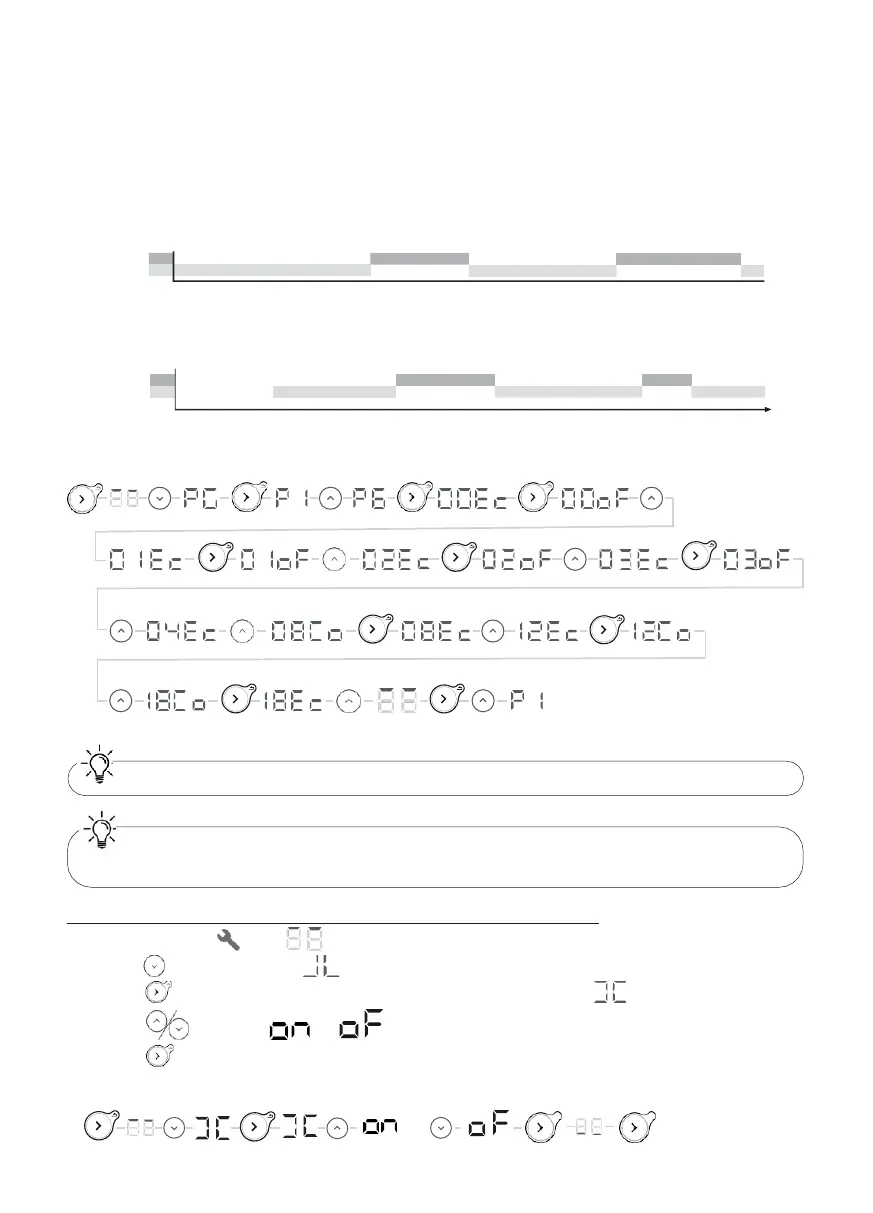
Example: I want to modify program P6. I want the appliance to switch off between 00:00
and 04:00, and have Comfort temperature between 09:00 and 13:00, and then between 19:00
and 21:00.
So you need to change the time slots between 00:00 and 04:00 from Eco to Off, and change the
slot between 08:00 and 09:00 from Comfort to Eco, change the slot between 12:00 and 13:00
from Eco to Comfort, and then change the slot between 18:00 and 19:00 from Comfort to Eco.
Pre-defined P6
Co 08:00
P6 Ec 00:00
00:00 06:00
12:00
18:00
Modified P6
Co
P6 Ec
Of 00:00
00:00 06:00
12:00
X6 X2 X6
A
ctivating or deactivating the window open detection function
1 - Select Settings . The symbol will be displayed.
2 - Press twice to display .
3 – Press to display Activate or Deactivate the function. The symbol will flash.
4 – Press to select or .
5 – Press to confirm.
6- Press again (press and hold) to exit the menu.
OR
23:00
24:00
04:00











 To Next Page