ALL
38
1)The console display overview is not ON:
• Make sure the outlet has power, the power cord is connected to the outlet and the treadmill is turned on.
• Make sure the connect line in the
display console
is correctly connected and there is no potenal damage caused by the pressure to
display console
during
assembly.
2)Current breaker acvates when the machine is operang:
Make sure the power cord is connected to the designated treadmill outlet with power.
3)The power goes out when the treadmill is inclined or lied:
Make sure the power cord is not pulled to loose when the treadmill is inclined or lied.
4)The belt cannot stay at the center when operang:
Make sure the belt is not loose. Please adjust the belt to the appropriate ghtness if it’s loose (refer to Adjust/maintenance belt on P.17).
• The treadmill is not placed on a level locaon and loses its balance.
5)Noise occurs at the front side when the treadmill is operang:
Please check if the machine is level.
6)Sound occurs when the treadmill is operang:
• It is common that the sound will occur when the machine is operang; with the extension of operang me and belt, these sounds will lower but not disappear
completely.
• It is normal if the sound of the machine is no louder than a general conversaon.
7)During operaon, the treadmill makes no noise, but the sound is very loud:
• Generally, the treadmill produces echo; if the machine is placed next to the wall, the echo will be louder. A thick rubber mat under the treadmill can effecvely
decrease echos from the ground.
Treadmill is designed with high security and easy to use. Please refer to following informaon and soluons for any operaonal problem:
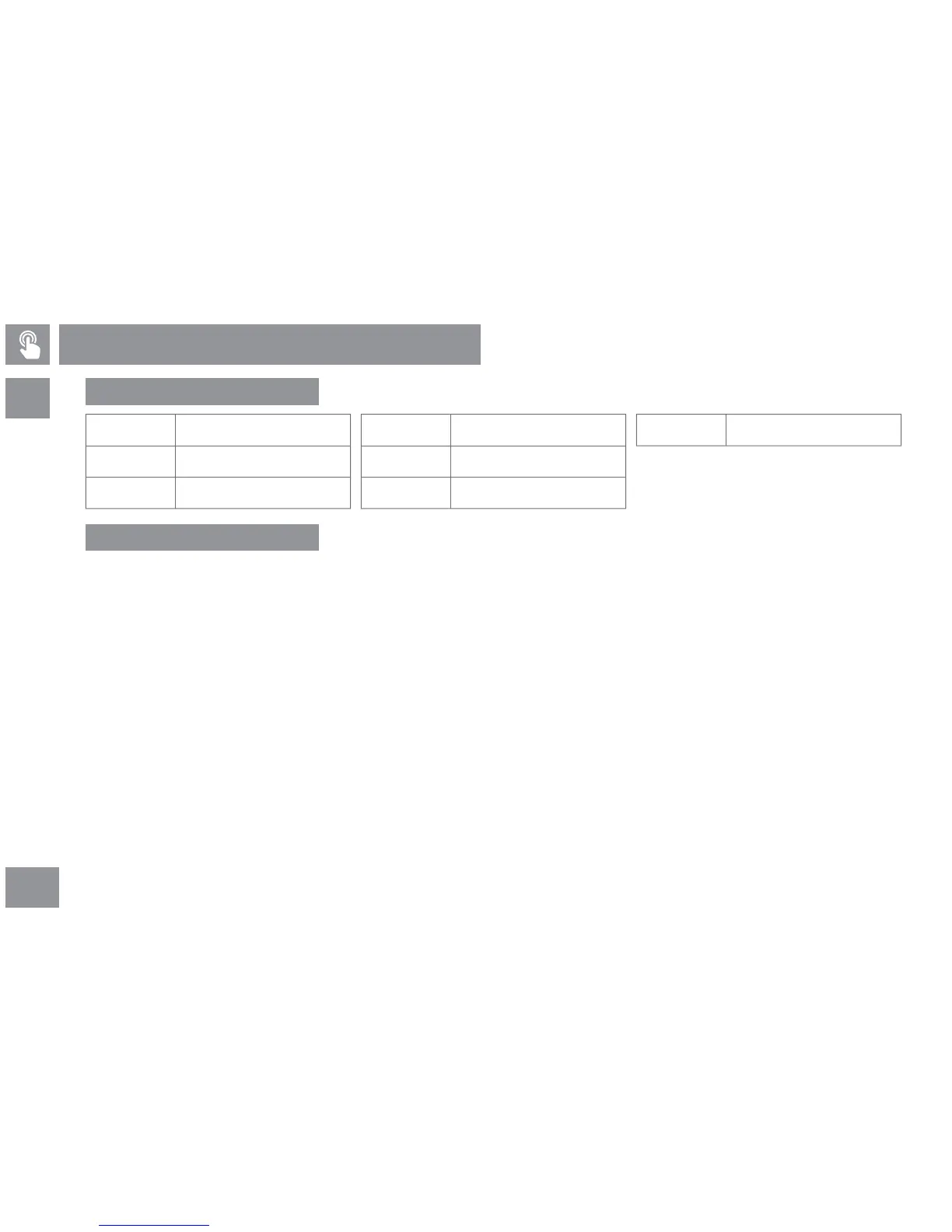
E00
E01
E02
No signal in motor controller
Speed signal error
Motor voltage error
E03
E04
E05
Motor current error
Motor power cord falling out
Motor acceleraon error
E09 Motor controller error
Troubleshoong
Error detecon code
Troubleshoong



 To Next Page