8
Multiformat switcher MS-8 Reference Manual
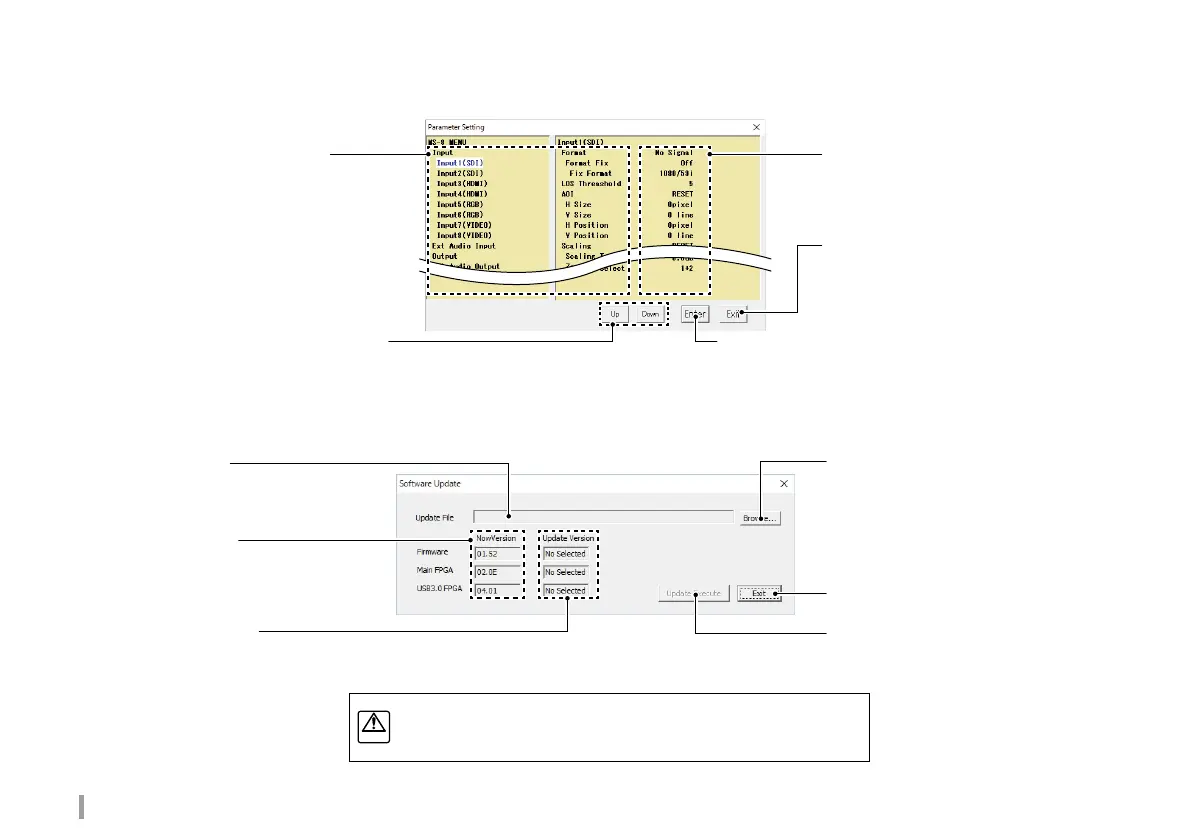
Browse...button
Select the desired update file.
Update File
Displays the selected update file.
Now Version
Displays the versions of installed
programs.
Update Version
Displays the versions of the selected update files.
Exit button
Exist the Software Update screen.
UPdate Execute button
Update the software.
Parameter name
Display parameter groups and
parameter names.
The selected item is highlighted.
Parameter value
Display the parameter value.
Exit button
When top level is selected:
Exits the Parameter Setting screen.
When parameter name or value selected:
Move up one level.
Up button, Down button
When a parameter name is selected: Select an item.
When a parameter value is selected: Select the value.
Enter button
When a parameter group is selected: Move down one level.
When a parameter name is selected:
Edit the parameter value.
When a parameter value is selected: Move up one level.
Software Update screen
Parameter Setting screen
Download the needed update le from our website.
http://www.atvcorporation.com/en/products/videos/MS-8/support.html



 To Next Page