7
Multiformat switcher MS-8 Reference Manual
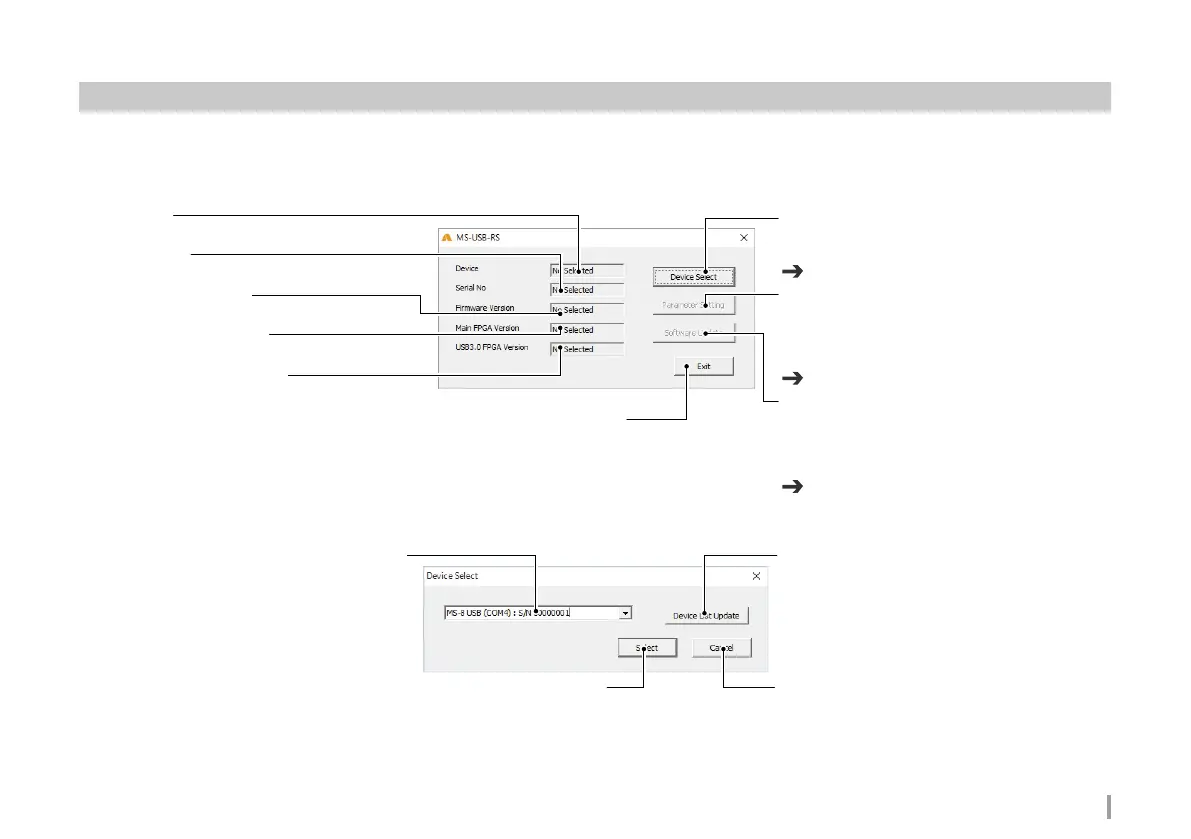
Device
Displays the device name.
Serial No
Displays the serial number.
Firmware Version
Displays the firmware version.
Main FPGA Version
Displays the Main FPGA version.
USB3.0 FPGA Version
Displays the USB 3.0 FPGA version.
Device Select button
Displays the Device Select screen.
Selects the device.
Parameter Setting button
Displays the Parameter Setting screen.
Sets parameters.
The device must be selected before parameters can
be set.
Software Update button
Displays the Software update screen.
Used to update software.
The device must be selected before software can be
updated
Exit button
Exit USB Remote software.
Select button
Select the device.
Selects the device.
Device List Update button
Refreshes the list of A-PRO-4 and MS-8 devices
connected to the PC.
Cancel button
Exit the Device Select screen.
Screen names and operation
All screens shown are for Windows.
Menu screen
Device Select screen
Refer to P.8 Parameter Setting screen
Refer to P.7 Device Select screen
Refer to P.8 Software Update screen



 To Next Page