A ss is tance s y s tem s
Switching adaptive cruise control off
.,. Push the lever away from you into position @
until it clicks into place . The message ACC: off
appears.
@ Indicator lights
It -adaptive cruise cont rol is switched on . No
objects a re detected ahead . The stored speed is
main t ained.
• - an object ahead was detected. The adaptive
cru ise control system regulates the speed and
distance to the object ahead a nd accelerates/
brakes a utomatically .
(ii -adaptive cruise control is switched on . An
object ahead was detec ted . Your vehicle rema ins
stopped and will not start dr iving a utomat ically .
• - The automatic braking is not enough to
maintain a sufficient distance to an object ahead .
You must inte rvene ~
page 100, Driver interven-
tion request.
© Instrument cluster display
If adaptive cruise control is not shown in the in-
strument cluster display, you can call it up usi ng
the multifunction stee ring wheel buttons
~ page 12.
Based on the graphics in the d isplay, you can de -
termine if the system is ma inta ining a distance to
the object ahead and what that distance is.
No vehicle - no object was detected ahead.
White vehicle - an object was detected ahead.
Red vehicle - request for driver intervention
~ page 100 .
Both arrows on the scale © indicate the distance
to the object ahead. No arrow appea rs when t he
ve hicle is o n a n open road and there is no obje ct
ahead. If an object is de t ected ahead, the arrow
moves on the scale.
The green zo ne on the scale indicates the sto re
distance. For information on chang ing the d is-
tance, refer to
Q page 99 . If t he distan ce se-
lected is exceeded or not reached, the a rrow
moves into the red zone on the sca le.
98
A WARNING
If you press the !SET! button when driving at
speeds below 20 mph (30 km/h), the veh icle
accelerates automatically up to 20 mph (30
km/h), wh ich is the minim um speed that can
be set .
(D Tips
- If you switch the ign it ion or the adaptive
cruise control syst em off, the set speed is
erased fo r safety reasons .
- The electronic stabilization control (ESC)
and the an t i-slip-regulat ion (ASR) are auto-
matically switc hed on when the adaptive
cruise cont rol is swit ched on.
Changing the speed
Applies to: vehicles with Audi adaptive cruise control
0
f
•
0
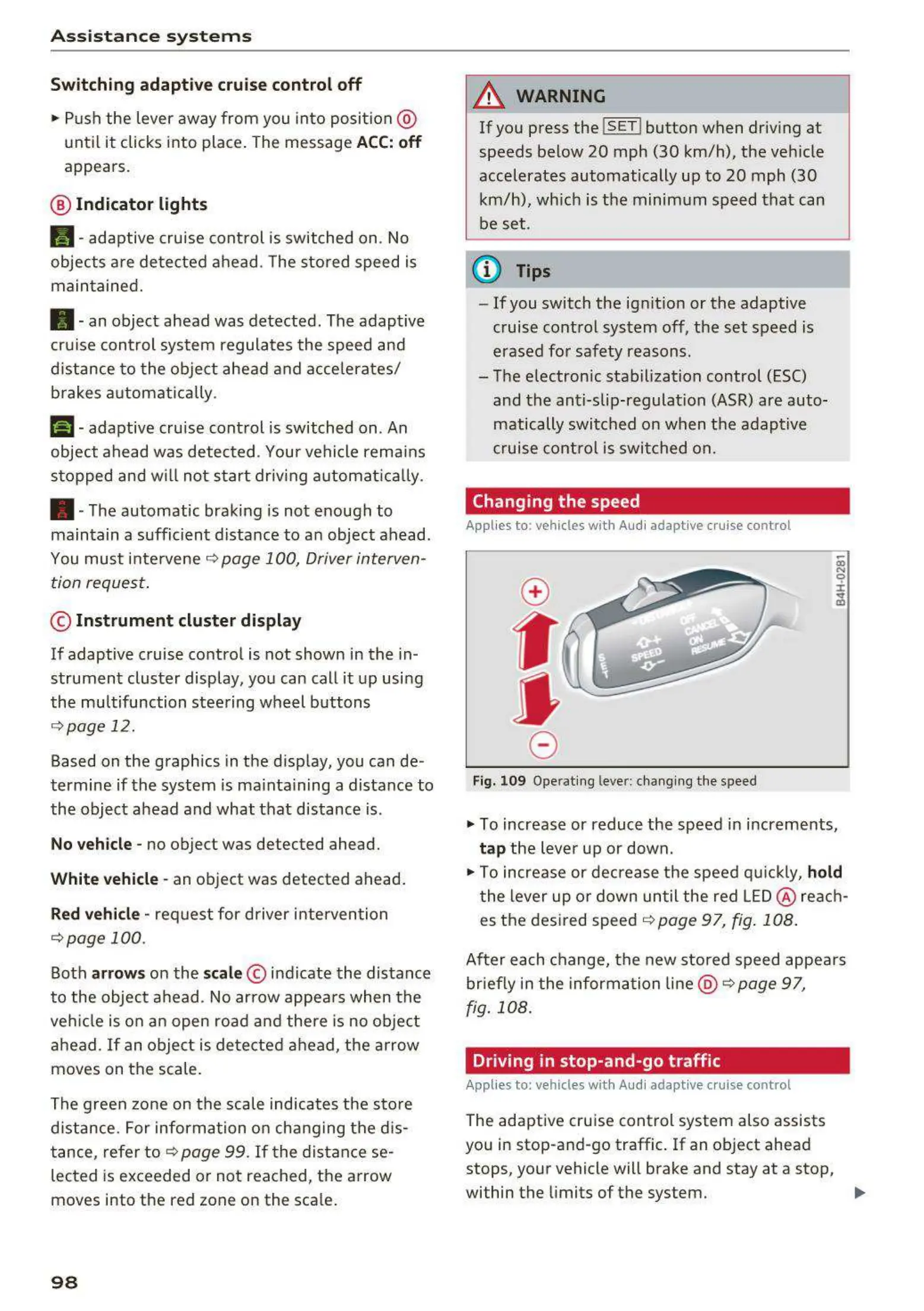
Fig. 10 9 Operat ing lever: changing the speed
.,. To increase or reduce the speed in increments,
t ap the lever up or down .
.,. To increase or decrease t he speed quickly,
hold
t he lever up or down unt il the red LED@ reac h-
es the desired speed ~
page 97, fig. 108 .
After each change, t he new stored speed appea rs
briefly in t he information line @ ~ page 97,
fig . 108 .
Driving in stop-and-go traffic
Applies to: vehicles with Audi adaptive cruise control
The adapt ive cru ise control system also assists
you in stop-and-go traffic . If an object ahead
stops, your vehicle will brake and stay at a stop,
within the limits of the system.
..



 To Next Page