28
OWNER’S MANUAL / TH quattro
Classic domain
mono mono
A Channels B Channels
POWER
12 V
LEFT RIGHT
+
-
+
CAP
+
+
-
-
LEFT RIGHT
+
+
-
-
0
5
8
7
64
3
2
19
IN A
OUT A
IN A
IN B
IN B OUT A
DIGITAL AUDIODC OUT CONTROL BUS
REM
OUTINADRS
IN
OPTICAL
GND
+15
-15
OUT - AD Link - IN
LR LR
LR
LR
LRLR
1 - AC Link - 2
Source
Front Panel Rear Panel
REM Out
DRC (Optional use)
Pre Out
USB / AC Link Converter
ACNet (Optional use)
RIGHT
CHANNEL
Tweeter
Woofer
WM2 or WT1 WT2 or MT1 WT2 or MT1
Rear (Optional)
Front
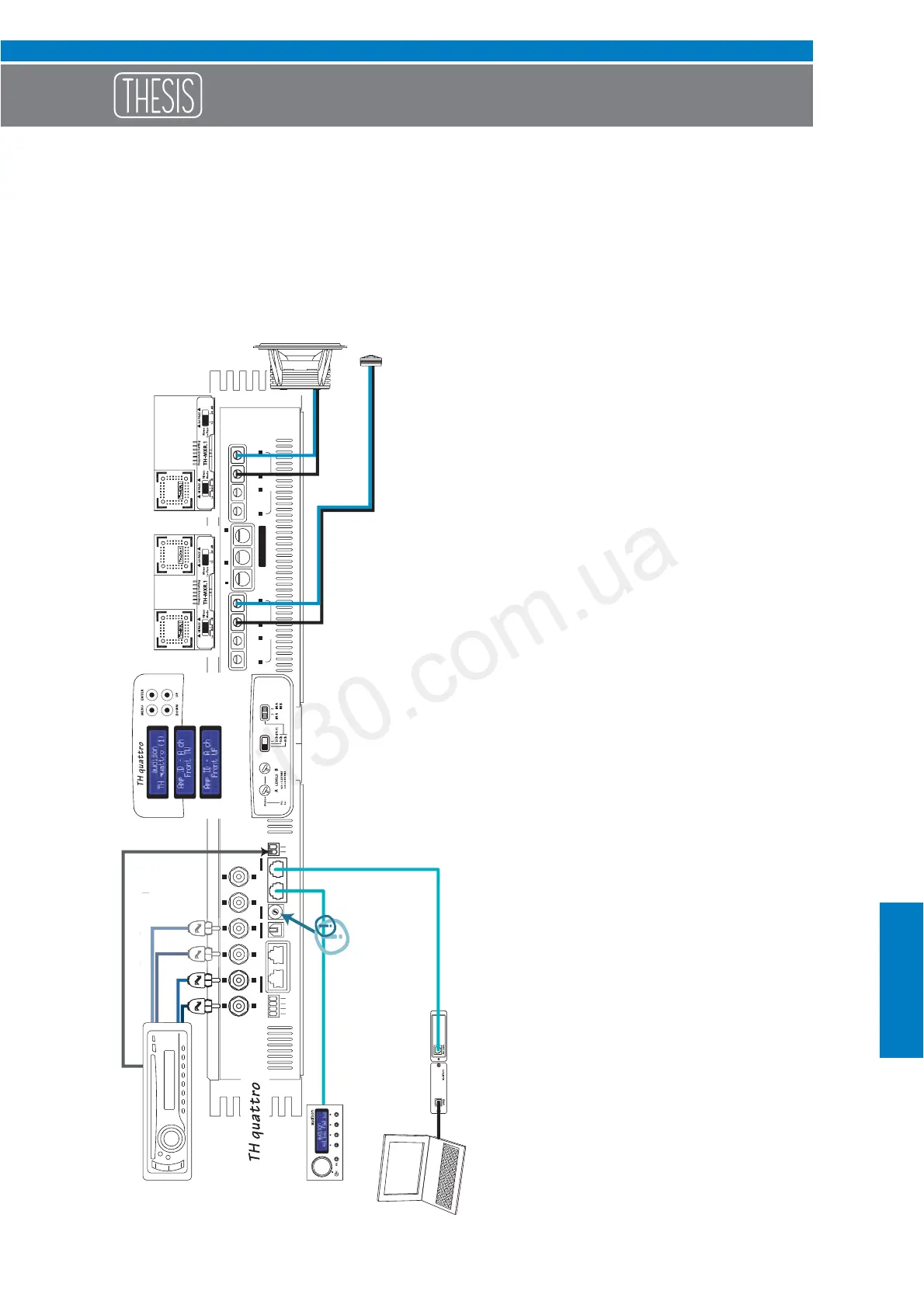
Example: Two Way, multi-amplified, TH amplifier
Analog Input
In order to build a Standard System
you have to:
1- Insert the TH-MXR.1 boards with its
relative filter modules (if required);
2- Connect power supply;
3- Connect the speaker system;
4- Connect signal inputs (IN A or IN A / IN B)
and remote turn on;
5- Select 4 Ch mode on the Input Controls
Panel (select IN A or IN A / IN B);
6- Adjust sensitivity on the Input Controls
Panel “A LEVEL” or “A/B LEVEL” ;
In order to add DRC to the System
you also need to:
7- Set ADRS on the Front Panel (in position 1
for instance);
8- Set Amp ID for A channels (on FRONT TW
for instance) and B channels (on FRONT
WF for instance) in the ASC Setup
Amplifier; this way DRC will be enabled to
adjust general Volume, Balance and Fader.
In order to adjust the system
through the ACNet:
On this system the steps 1, 2, 3, 4, 5 and 7
need to be performed.
The Software will temporarily bypass the
DRC functionality in oder to manage in a
more direct and easier way all of the
amplifier functions during the adjustment
and modifying phases, including input
sensitivity adjustment along with peak
detector.
REMARK:
On ASC Dual Power and Runtime Monitor
will anyway stay active (by default) and
ready for changes (see page 47 and
following pages).
Autogood products internet store http://130.com.ua




 To Next Page