45
OWNER’S MANUAL / TH quattro
Digital domain
PRESS PRESS UP TO PRESS
PRESSUP TO
0
5
8
7
64
3
2
19
IN A
OUT A
IN A
IN B
IN B
OUT A
DIGITAL AUDIODC OUT CONTROL BUS
REM
OUTINADRS
IN
OPTICAL
GND
+15
-15
OUT - AD Link - IN
LR LR
LR
LR
LRLR
1 - AC Link - 2
MIN
Front Panel
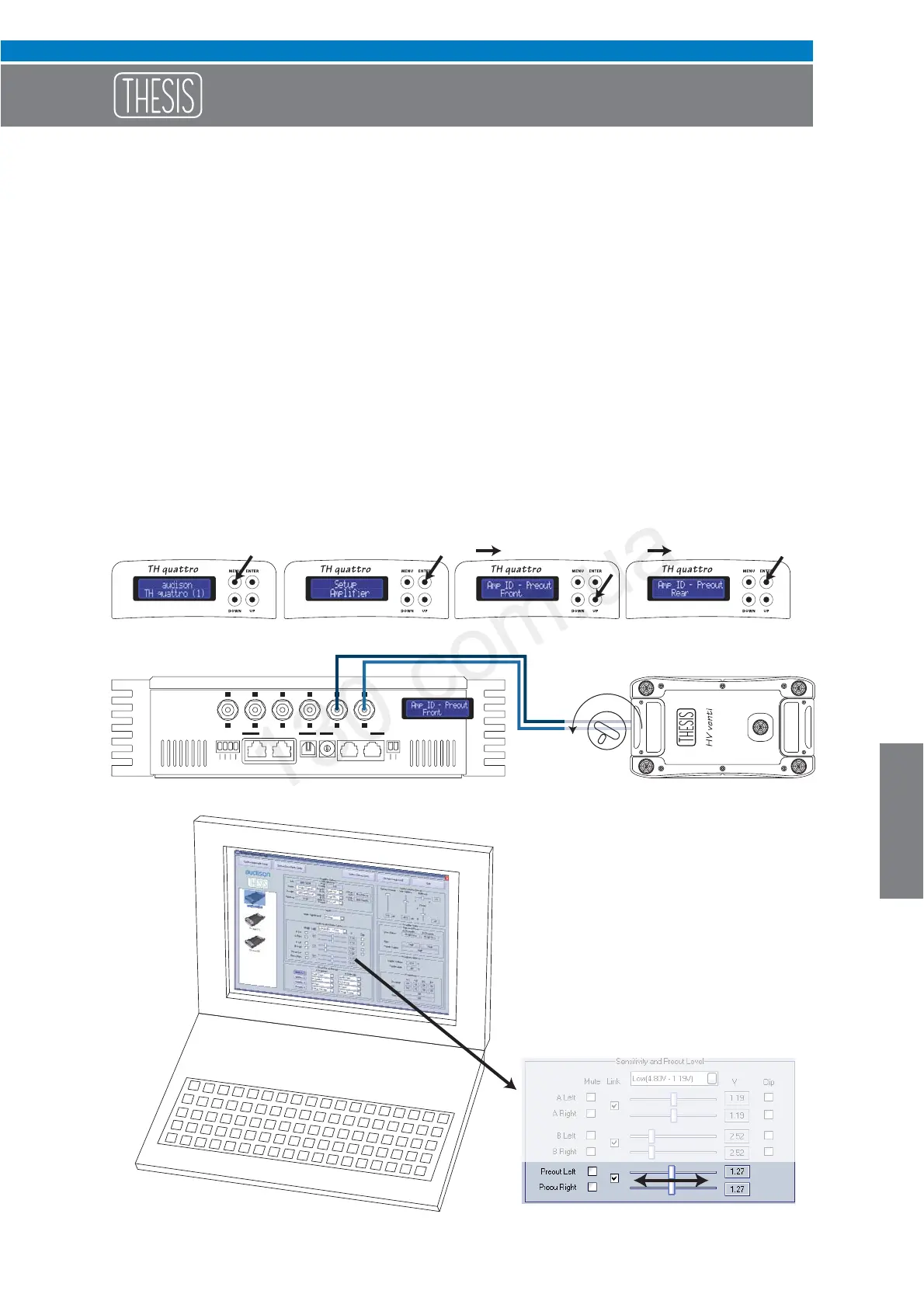
How to adjust the PRE OUT analog output
As already said, the AMP ID can also be assigned to the PRE OUT output, but not only to it. Through the AC
Net software also the PRE OUT sensitivity can be adjusted to align the gain of the amplifier connected to that
output, thus adapting sensitivity according to the system general volume increase and decrease.
The procedure to perform this operation is the following:
1- Connect the (non-TH) amplifier to the PRE output.
2- Assign the ID - Preout.
3- Set the non-TH amplifier sensitivity to the minimum.
4- Through the ACNet slider, increase the output sensitivity until you get the desired volume.
5- Should it not be enough, increase the non-TH amplifier input sensitivity
Autogood products internet store http://130.com.ua



 To Next Page